
Antoine HLMN
Known Participant
February 14, 2020
Open for Voting

P: (iPad only) Store locally fails with video

  • February 14, 2020
  • 13 replies
  • 640 views

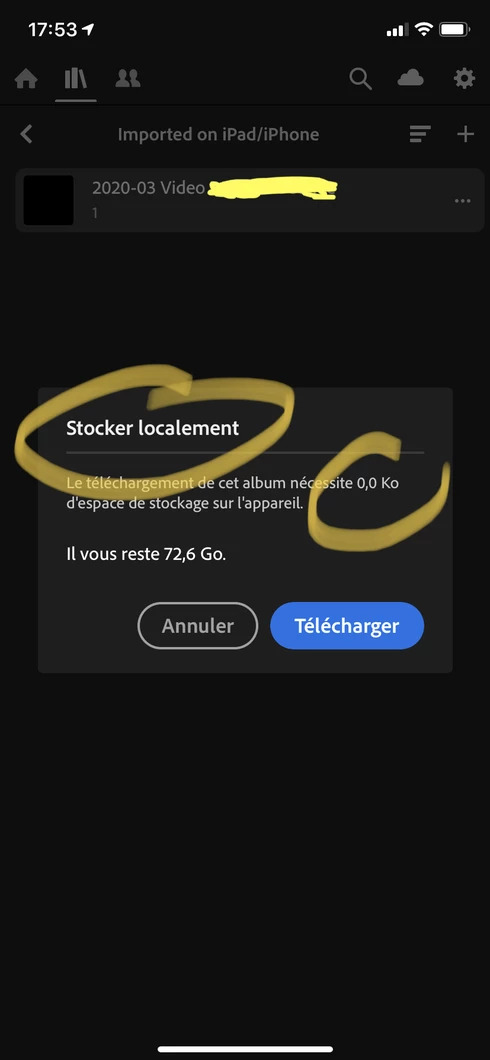
Storing an album locally fails for video file:

13 replies

Antoine HLMN
Known Participant
August 4, 2020
The bug is “as designed”, or “you don’t understand how the software is supposed to be used”. Adobe is basically thanking you for your money and politely showing what’s in between the index and ring finger. No lube, extra grit and a thank you card.
Inspiring
August 3, 2020
Is there any progress on this? I too am struggling with videos not syncing on iPad Pro. I have a $1,000 device with an HDR screen, and an expensive subscription with Adobe. Is it too much to ask to have videos sync as well as photos? 
Antoine HLMN
Known Participant
February 19, 2020
I have been advised by the team that this behavior is as-designed. I am converting your thread into a feature request.

I'm speechless. I facepalmed my self so hard my hand still hurts. How can this seriously be Adobe's official answer. How can Adobe claim this openly. Note I'm not blaming you for being Adobe's voice, by the way, but Adobe for being this way (just to be clear)...

In what way can a function designed to "store an album locally" be DESIGNED not to include video (or any other, supported type) files ? Who would be so incompetent to include this specifically in the specs ? I don't believe this for a second. Albums are supposed to SYNC (isn't that the purpose of LR mobile?) and a feature linked an album not... work on an album. A function linked to an object (here album) should apply tot that object, regardless of it's inheritances. That's good practices 1.0.1. Object.metdod(); function(parameter)... basics! Common sense!

It's not the first time Adobe flips a bug in "as designed", blame it's users for "using it wrong" and is one more proof Adobe treating it's customers like excrements ! I'm honestly -once more- very disappointed, not to say disgusted by the lack of seriousness Adobe is showing ! This is NOT a feature request but a bug !


Rikk Flohr_Photography
Community Manager
February 18, 2020
Antoine,

I have been advised by the team that this behavior is as-designed. I am converting your thread into a feature request. 

I have also asked that we warn on Store Locally selection that videos will not be available for this option and that we update our help documentation.  I am sorry for the confusion this has caused. 
Rikk Flohr: Adobe Photography Org
Antoine HLMN
Known Participant
February 16, 2020
Rikk, I just tested on iOS and it fails too, so it’s not pasOS specific.
Antoine HLMN
Known Participant
February 16, 2020
Thanks Rikk!

My original post was on iOS, so I’m not sure its a padOS specific issue. I’ll try again syncing from iPad and testing on iPhone later today.

Cheers!
Rikk Flohr_Photography
Community Manager
February 16, 2020
I am sorry you are experiencing this Antoine. It looks like this may be iPad specific but is working on iPhone. At least I cannot replicate on iPhone. Since they are two separate versions of the app, it is possible.

After reading your latest information I:
  1. Recorded a 4:09 video with my iPhone 11 Pro Max. 
  2. Imported to Lightroom mobile
  3. Synced to cloud
  4. Added to Album "Store Video Locally"
  5. Unchecked Store Album Locally.
  6. Rechecked Store Album Locally.
  7. Disconnected WIFI
  8. Put Phone in Airplane mode to disable Cellular.
  9. Go to Album: "Store Video Locally"
  10. Tap on 4:09 Video 
  11. Play
  12. Wait 4:09 for video to finish. 
  13. Pass
Next: 
  1. Allow Album to sync to iPad 
  2. Mark Album to store locally
  3. Allow to download locally
  4. Disconnect WIFI
  5. Tap on Album "Store Video Locally"
  6. Tap on 4:09 Video
  7. Tap Play
  8. Video yields message  "Cannot Load Video" 
  9. Fail
I am logging a bug with the iOS team for iPad only. 
Rikk Flohr: Adobe Photography Org
Antoine HLMN
Known Participant
February 15, 2020
suspicious of a video downloaded from the web

That’s condescendent, coming from a company developing a full cloud LR and an struggling with so many bugs.

No, it’s not file related. I shot a 4 minutes movie with my phone and it’s bugging the same way on my iPad:


The last screenshot is over 2MB so cannot be loaded here. Same as above.
Rikk Flohr_Photography
Community Manager
February 15, 2020
I would be very suspicious of a video downloaded from the web and not directly produced by a camera.  Without a sample it is difficult to say.
Rikk Flohr: Adobe Photography Org
Antoine HLMN
Known Participant
February 15, 2020
An 25 minutes .mp4 video, 1080p, about 900 Mo. Downloaded from the web. According to specs, .mp4 should be supported, right?