
Antoine HLMN
Known Participant
February 14, 2020
Open for Voting

P: (iPad only) Store locally fails with video

  • February 14, 2020
  • 13 replies
  • 640 views

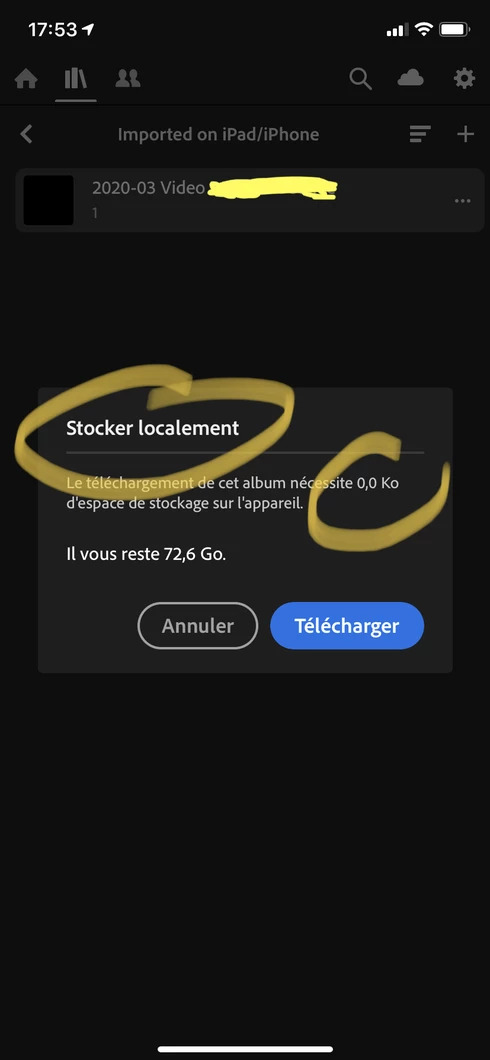
Storing an album locally fails for video file:

13 replies

Rikk Flohr_Photography
Community Manager
February 14, 2020
What was the source of the video from LrWeb? Format, Device? I want to try to duplicate as closely as possible.
Rikk Flohr: Adobe Photography Org
Antoine HLMN
Known Participant
February 14, 2020
Thanks for replying, Rikk!

Just trying to store locally on my phone a video uploaded through LR Web:


https://youtu.be/uf1E7WvDIEE


Despite the video being played without any issue, the album is of 0,0 kB and is not downloaded correctly.
Rikk Flohr_Photography
Community Manager
February 14, 2020
I cannot replicate this Antoine.
iPhone 11 Pro Max - iOS 13.3
Lightroom 5.2
  1. Select video (.mov file 1080P captured by iPhone 7)
  2. Add to album - "Store Video Locally"
  3. Go to album - "Store Video Locally"
  4. Set to store locally. 
  5. Allow to sync.
  6. Close Lightroom
  7. Turn off WIfi and put in Airplane Mode. 
  8. Open browser to verify offline status
  9. Open Lightroom
  10. Go To Album "Store Video Locally"
  11. Tap on thumbnail
  12. Video appears with Play button
  13. Press Play
Video Plays. 

Did I miss any steps?
Rikk Flohr: Adobe Photography Org