



Frank_B
Inspiring
March 11, 2024
Open for Voting

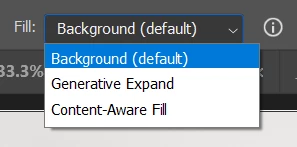
Add option to set different type of Fill as a default (Content Aware, Generative).
  • March 11, 2024
  • 15 replies
  • 3859 views

Right now the default is Background and when working with batch of photos and we need to crop-extend the image edges it requires repetetive task of changing fill type. Not only that. After chenging the fill type, arrow keystrokes don't move the crop grid/frame anymore but they navigate between the fill type.

Please add option to set default Fill as:
- Background
- Content Aware
- Generative (additionally with no pop-up text field when we don't want to add anything extra).

Thanks.

15 replies

Participant
May 12, 2025

I really need generative expand to stay set as my default after I select it once while using the crop tool. It currently reverts back to "background default" anytime time I click anyting else. We just want to be able to control what option is considered default. Please work your magic for the next update. 

Participant
May 11, 2025

currently this is working as designed


@CShubert  can you please give us users the option to set content-aware fill as default? 

I agree with the many others in here that it's awfully annoying to have to set this over and over and over again.

Inspiring
April 28, 2025

Facing this issue now. it really slows things down. 

Participant
April 27, 2025

This is really slowing me down. Please fix asap!

Participant
January 22, 2025

Please correct this. I am facing the exact same problem, and it is impeding on my workflow. Seems like basic commen sense to allow somehwere in the settings or even right on the top bar to allow one to choose their default option. It worked seemlessly before having generative fill as the default option to allow me to make crop adjustments rapidly. now i haver to either catch it and manualy change it everytime, or if i forget i have to manually go and highlight the selected background areas and use generative fill on them.

Participant
November 12, 2024

I agree, this is very inconvenient. It really frustrates me that I have to manually switch from background to generative expand every time. It is especially annoying when working with a batch of photos. I keep pressing Generate and then seeing that it just added white background around the picture instead of expanding. than I have to go back and redo it. This was never the issue before the last update so now when I'm focused on work I keep forgetting to switch options and have to go through this process multiple times which is just time consuming and extremely annoying, especially if i'm in a rush. 

Participant
November 7, 2024

Currently working as designed...? So it has literally been changed to have background color as default on purpose? With NO OPTION for the user to select their own preferences?


That's some awful design.

Participant
November 7, 2024

Agreed. or just add an option to let US choose what should be the default based on what we use most. A photographer is almost always going to use the generative expand the most.  C'mon now...  ughh 

0pal4tress
Participant
November 6, 2024

I AM BEGGING YOU, please add the option to change the default fill. everytime i open up new images i have to go into the pulldown menu to select generative expand, and when i am editing thousands of photographs it becomes extremely frustrating and time consuming. generative expand was the default option in older versions. you say it's currently working as designed, but the design used to be much better.

CShubert
Community Manager
Community Manager
November 4, 2024

Hi all, currently this is working as designed. We will monitor this thread and the more upvotes it gets might allow the team to change the settings. 


Thanks,

Cory - Photoshop Product Manager