



Ivan Zajats
Inspiring
March 17, 2023
Open for Voting

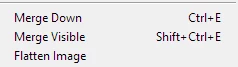
Add creating a Stamp Visible Layer as a menu command

  • March 17, 2023
  • 5 replies
  • 1304 views

Surprisingly, this command is still not in the menu.

Luckily, I know the shortcut (Shift+Ctrl+Alt+E), but do all newbies know it?

Those who like to learn software on their own, by trial and error, will never guess...


I've noticed it while recording an action; as you know, it's better to use the menu commands for it. But... you won't find it there.


5 replies

Stephen Marsh
Community Expert
Community Expert
April 27, 2025

Another option is to script the process, then a custom keyboard shortcut can be applied to the script.

Participant
April 26, 2025

If anyone is going down the rabbit hole of setting tons of custom keys, I discovered an issue with Stamp Visible vs Merge Visible.


As we know, the default hotkey for Stamp Visible is Alt Shft Ctrl E. That's not fully true.

What it actually is, is just the hotkey for Merge Visible + Alt.


So if you want to change the Stamp Visible hotkey, you have to change the Merge Visible hotkey to something (like Ctrl P or whatever you want), and hold Alt whenever pressing your new key.


How it works

New Merge Visible hotkey: Ctrl P

Means the new Stamp Visible hotkey would be: Ctrl Alt P


This is clunky, and Stamp Visible should be separated out of the Merge Visible hotkey setup, but this is how you change the Stamp Visible Hotkey.

Chuck Uebele
Community Expert
Community Expert
March 17, 2023

Nothing wrong with wanting to add it to the menu. 

Ivan Zajats
Inspiring
March 17, 2023

yep, but what's the problem to add it to the menu...

by force of habit I wanted to use the menu for recording an action

Chuck Uebele
Community Expert
Community Expert
March 17, 2023

It is amazing that it is not in the menu, yet, but I think that those that use that command prefer KBSC over menu items.