



DavidB
Known Participant
February 22, 2023
Open for Voting

Add HEX field to Color RGB sliders

  • February 22, 2023
  • 8 replies
  • 2354 views

Hi all

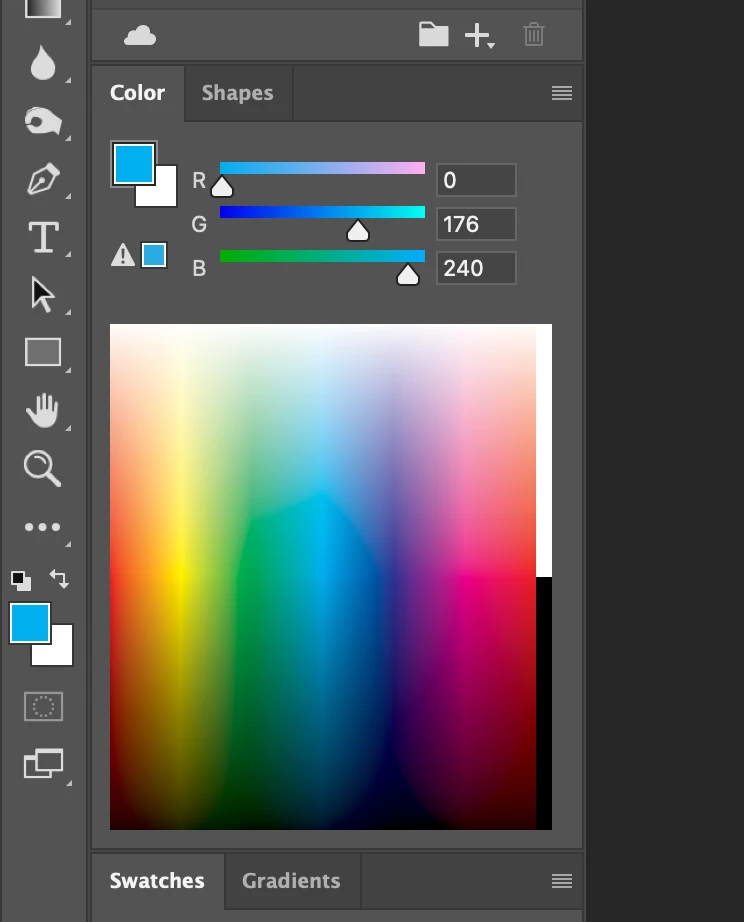
I'd love to see a HEx field box in the floating colour RGB slider pallet

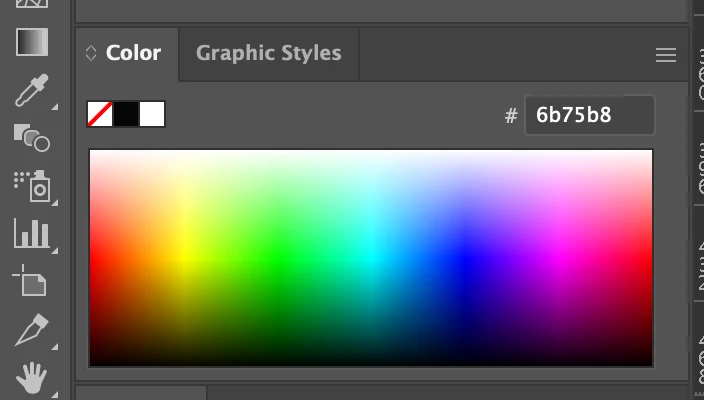
They have added it to the RGB pallet in Illustrator and I'd lov eto see it in Photoshop


Thanks!

DavidB


photoshop doesnt have one
 

Illustrator has one
 

8 replies

Michael Bullo
Community Expert
Community Expert
February 23, 2023

@DavidB  That's great to hear the keyboard shortcuts are helping you out. Cheers.

Michael Bullo
Community Expert
Community Expert
February 23, 2023

@DavidB  Thank you. Not "super picky" at all as I agree it would be a nice addition to the panel.

jane-e
Community Expert
Community Expert
February 23, 2023


@DavidB wrote:

Now I want those customizable Panel Menu shortcuts added to Illustrator


If you want to enter hex numbers in Illustrator, you can change the Color Mode to Web Safe RGB — as long as your Document Color Mode is RGB, not CMYK (File menu).


In Photoshop, if you have your color panel set to CMYK and choose Web Color Sliders, PS will properly change the panel to RGB.


Remember that Hex numbers are just another way of referring to RGB, and the colors shift depending on your color space. They were put into Photoshop when folks needed them for the html code they were manually typing into Notepad for web pages.


Jane


DavidB
DavidBAuthor
Known Participant
February 23, 2023

Now I want those customizable Panel Menu shortcuts added to Illustrator 👍

DavidB
DavidBAuthor
Known Participant
February 23, 2023

OMG @Michael Bullo I just added the shortcut and it will def speed up my webdesign workflow so much - thanks!

DavidB
DavidBAuthor
Known Participant
February 23, 2023

Thanks @Michael Bullo 


I use the hex field once you're in the pop up menu itself - I was hoping they could add the Hex box on the root level screen without having to click into it every time (super picky, I know, but I thought I'd ask)


BUT I did not know you could assign a shortcut to those sub popup commands
Thanks so much - that is awesome!


Keeping my fingers crossed they add my lazy request some day 😜

Thanks

DavidB

Michael Bullo
Community Expert
Community Expert
February 23, 2023

If capturing the Hex code of a color is a frequent action you could create a keyboard shortcut...


Edit > Keyboard Shortcuts


Michael Bullo
Community Expert
Community Expert
February 23, 2023

A few things that might help...


Within the menu for the Color panel are the options...

  • Web Color Sliders
  • Copy Color's Hex Code


Double clicking on a color chip within the Tools panel will open up the Color Picker which contains the Hex field.