



Known Participant
February 3, 2026
Open for Voting

Add Overprint Option for Stroke Fill

  • February 3, 2026
  • 1 reply
  • 0 views

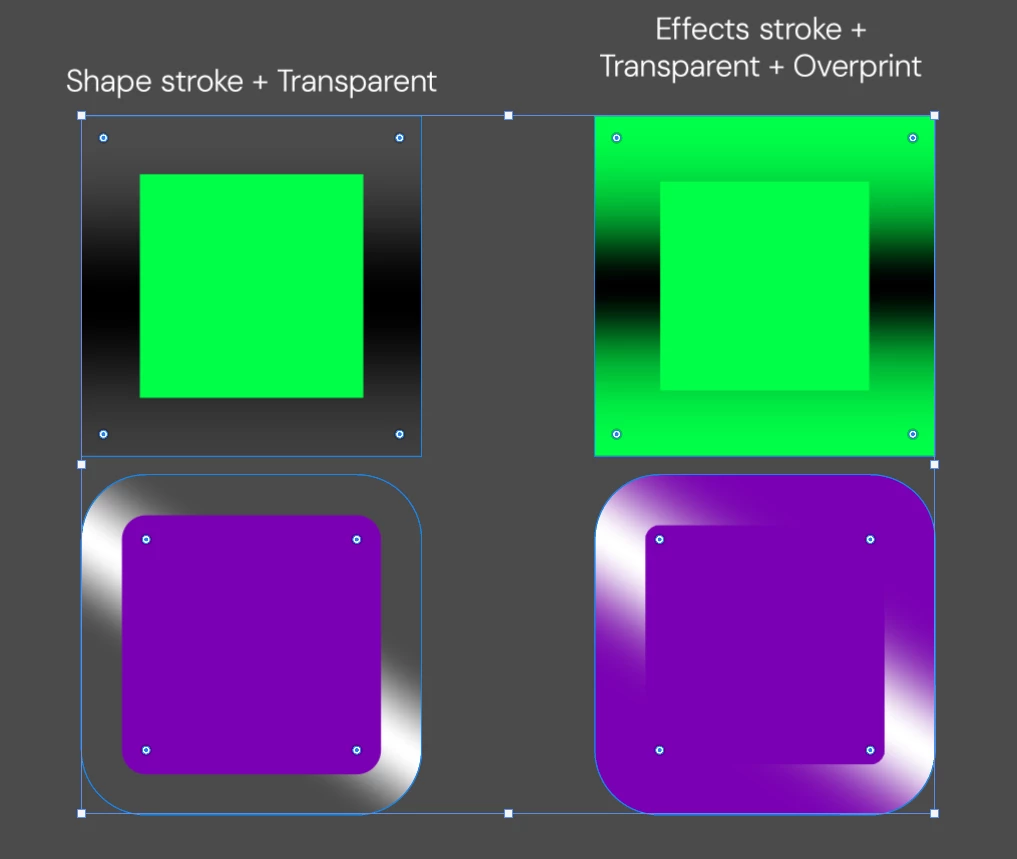
Please add an option to enable overprint for the stroke fill of a shape. This is useful when you need the shape’s color to remain visible beneath a transparent stroke. It would also help simulate a contour highlight or gloss effect similar to the new iOS style.

👉VIDEO


1 reply

Stephen Marsh
Community Expert
Community Expert
February 4, 2026

A layer blend mode of Multiply or Darken is often used in Photoshop to produce a similar effect to object level overprint as found in illustration or page layout apps.

Known Participant
February 4, 2026

No, that’s not it. What you’re suggesting is a workaround. I need real transparency in the shape’s stroke.

Stephen Marsh
Community Expert
Community Expert
February 4, 2026

@Stephen Marsh Overprint is an object level property that doesn’t exist in Photoshop. Multiply blend mode generally has the same end result. Blend modes and opacity create transparency.


This is a feature request, I’m just covering what is currently possible in a raster editing environment compared to illustration or page layout.


Can you clarify what you’re looking for in a new feature?


Do you mean for compositing in Photoshop, or when the file is placed in other software and it then interacts with elements in the other application.