


Inspiring
February 9, 2022
Open for Voting

Add the the ability to control the postition of Tab Stops

  • February 9, 2022
  • 3 replies
  • 401 views

Right now, if you have Tabs in your type, you can't control where it is or how it's aligned.

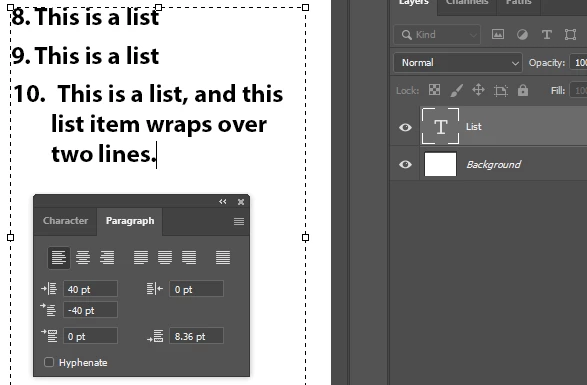
This makes it impossible to e.g. make good lists.


Looks bad, and hard to control. Have to fake it with spaces and manual letter spacing:
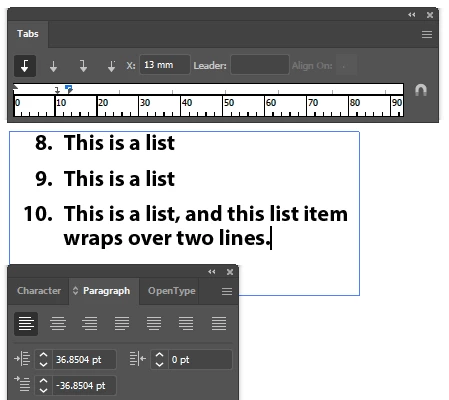
I suggest adding the ability to control the position/alignement of tabs, similar to Illustrator and InDesign. 

Better:
 

3 replies

jane-e
Community Expert
Community Expert
August 28, 2022


@Serene_observer5E99  Wrote:

If you can't support even the most basic sort of text features (the ability to set tabs is not that big of an ask), then why provide the ability to add text in PS at all?


Adobe Photoshop does support the most basic sort of text features, plus a bit more, but not at the level of InDesign or even Illustrator. If you want the Adobe engineers to know this is important to you, click the Upvote button in the upper right corner. Right now there are zero votes.


Jane

Forum volunteer


Serene_observer5E99
Inspiring
August 28, 2022

Sometimes it is more efficient and easier to set the text in PS, rather than jumping between applications.


If you can't support even the most basic sort of text features (the ability to set tabs is not that big of an ask), then why provide the ability to add text in PS at all? You allow the use of text, but only if you don't care if it is precise or not?

jane-e
Community Expert
Community Expert
May 18, 2022

@Chain83 wrote on February 9

Right now, if you have Tabs in your type, you can't control where it is or how it's aligned.

I suggest adding the ability to control the position/alignement of tabs, similar to Illustrator and InDesign. 


Photoshop has barely any of the Type features that you will find in InDesign. At its core, it is an image editor and is not intended for page layout. Maybe one day we'll get the ability to set tab stops in Photoshop, but in the meanwhile, use Illustrator or InDesign for this kind of layout. Use File > Place to bring your images into either application.


Apologies for the three month delay in seeing your post.


Jane