

Allow multiple Quick Export formats in File > Export menu
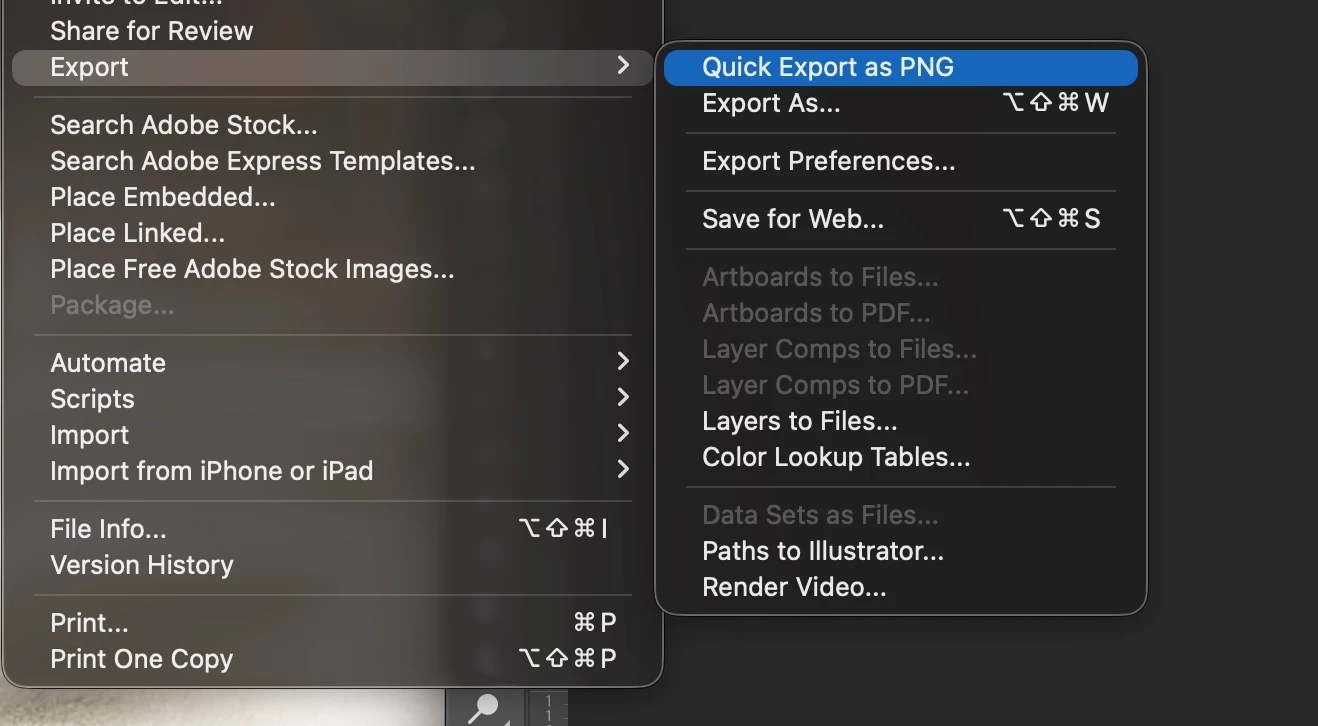
I’m requesting the ability to have multiple Quick Export commands in Photoshop’s File > Export menu, rather than a single, global Quick Export format controlled in Export Preferences.
Right now, Quick Export only allows one format at a time (for example PNG or JPG), so users must open Preferences and change the Quick Export format every time their output needs change. This is especially painful in workflows where exports regularly alternate between PNG and JPG (or other formats), such as preparing assets for different platforms, clients, or usage contexts.
In my day‑to‑day work, I often need:
-
PNG files with transparency for UI elements, icons, and overlays.
-
JPG files optimized for smaller file sizes for mockups, presentations, and quick client reviews.
Switching the Quick Export format each time adds unnecessary friction and breaks the “quick” part of Quick Export. It also increases the chance of mistakes—for example, exporting to JPG when I meant PNG because I forgot to switch the preference back.
The feature I’m requesting is:
-
Allow multiple Quick Export entries in File > Export, such as:
-
“Quick Export as PNG”
-
“Quick Export as JPG”
-
(Optionally) other formats as users configure them.
-
-
Let each Quick Export entry have its own settings (quality, metadata, color space, etc.) and its own keyboard shortcut.
-
These could be configured in the Export Preferences panel, where users define which formats they want and how each one behaves.
Benefits:
-
Faster, more efficient export workflow with fewer clicks and no need to constantly open Preferences.
-
Reduced risk of exporting to the wrong format.
-
More aligned with real‑world workflows where designers must deliver multiple formats of the same or similar content (e.g., one-click PNG for production assets, one-click JPG for previews or comps).
I’ve attached a screenshot of the current File > Export menu, which only shows a single “Quick Export as [format]” option, to illustrate the current limitation.
 AdChoices