
Participant
December 29, 2022
Open for Voting

Can Photoshop adopt UI Scaling system same as Illustator or Indesign?

  • December 29, 2022
  • 5 replies
  • 858 views

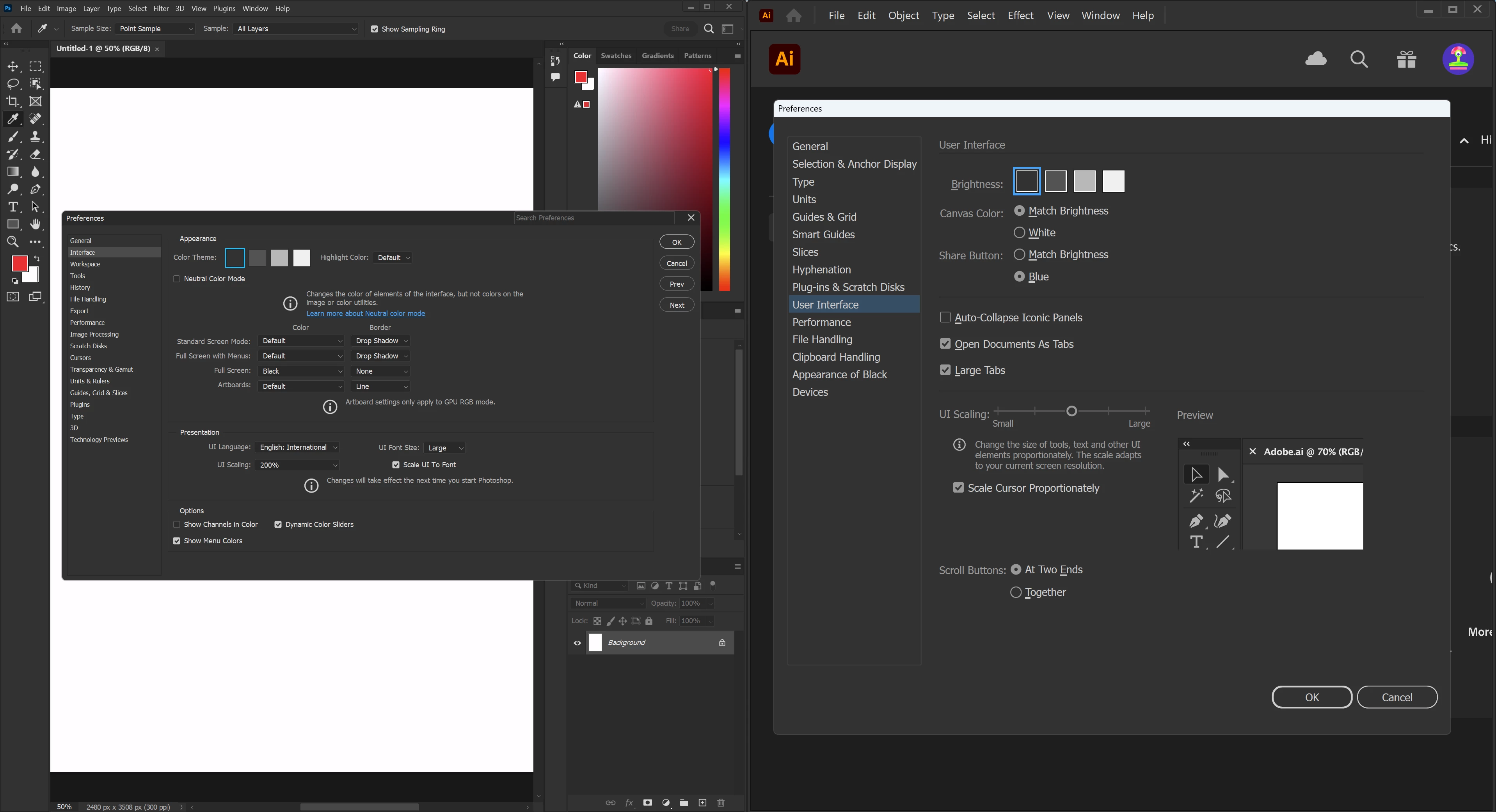
I found Photoshop's UI scaling doesn't work in Windows 11, but Illustator and Indesign work very well. Comparing the setting interface below, I really think the Illustator one is much more straightforward and easier.
5 replies

D Fosse
Community Expert
Community Expert
March 20, 2025

@DoubleSupercool 

No, that's not what I'm saying. The interface isn't the problem.


The problem is the image window. A vector image can be scaled indefinitely and still always be rendered at full screen resolution. So it can just scale with the UI.


A raster image is different. It still needs one image pixel to be represented by exactly one physical screen pixel. So it cannot scale when the UI scales. It has to stay unscaled. If the image scales with the UI, a 4K screen is wasted in Photoshop, you're not getting the high resolution you paid for.

Genius
March 20, 2025

The UI of any application can be drawn with the system frameworks provided by Microsoft and Apple. Those frameworks are designed to work with high-resolution displays. Applications can also use custom windows that must be drawn and scaled by the developer. For example, Adobe Bridge has custom UI elements. Finally, there are other windowing systems like those used in Linux which, again, have functionality defined by the developer.

Participating Frequently
March 20, 2025

Are you saying the INTERFACE in Illustrator is a vector interface and the INTERFACE in Photoshop is a raster interface?

Is there any information anywhere from Adobe to confirm that?

RoylllAuthor
Participant
December 29, 2022

Gotcha! I don't know programming, and I thought interface and function were different things that could be treated separately. Thank you for your reply.

D Fosse
Community Expert
Community Expert
December 29, 2022

There is a fundamental difference between Photoshop and Illustrator/InDesign that few people understand the implications of:


Ai/Id are vector applications that will always, under all circumstances, render content at full screen resolution. So when they scale up for a high resolution screen, they can just scale everything, interface, image, the whole thing.


Photoshop, as a pixel-based raster editor, is a special case. It needs to scale up the interface, but cannot scale up the image. The two must be treated separately. That's a very different proposition that requires special coding, special support from the operating system etc. If that wasn't so, the high resolution display would be wasted. You could just as well use an old standard HD screen.


The way this works is that Photoshop atomatically picks up the scaling factor you set in Windows, and uses this for the interface (but not the image). This only works for Windows past a certain version (can't recall which, somewhere around 2019/2020)


Leave Preferences > UI scaling on Auto, don't touch it. Just set it in Windows.


That's a lot of bold italic, sorry about that, but these are crucial things to be aware of.