


James Brown Photo
Participating Frequently
December 3, 2025
Open for Voting

Curves Adjustment Line and Point Size

  • December 3, 2025
  • 2 replies
  • 396 views

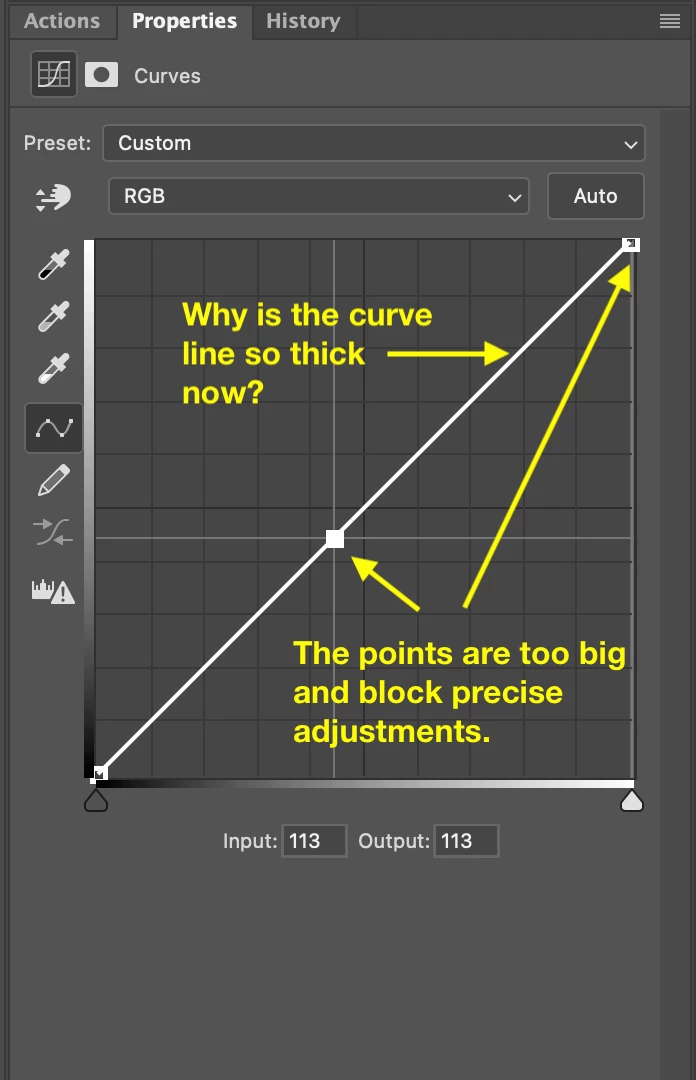
Anyone else find the new curves adjustment line and points to be overly thick and huge? Not sure why as the previous width and size of the line and curve points were just fine and easier to make small adjustments.

Here's a screen capture of them now in PS 27.1.0.
ps_27-1_curves_adj.png

2 replies

davescm
Community Expert
Community Expert
December 3, 2025

'Anyone else find the new curves adjustment line and points to be overly thick and huge?'
Yes, I see that here on Windows.

'...previous width and size of the line and curve points were just fine and easier to make small adjustments.'
Whilst I prefer the previous thin line curve display, I don't find any difference in the ability to make small adjustments. Both input and output step in increments of 1 whether using the mouse or the keyboard arrow keys.

Dave

barbara_a7746676
Community Expert
Community Expert
December 3, 2025

There is no built-in Photoshop option to change the thickness of the curves line or points.

You could try resetting preferences or updating your graphics card. You could also try Preferences > Performance and take the check on or off of Graphics Card.