


Customize File Extension Types
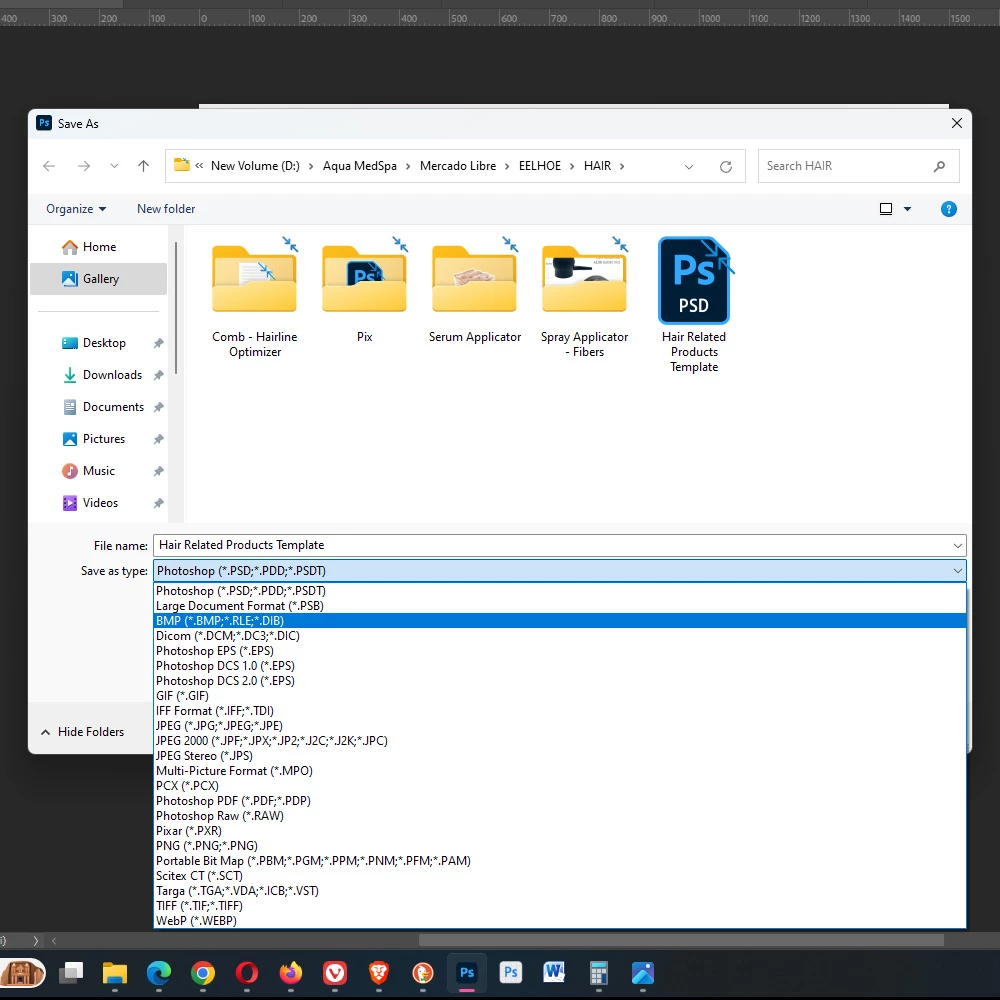
We need the ability to edit (enable/disable) the 23 different file type extensions in the save menu of Photoshop. To any professional that saves 50-100+ photos a day, it is an excessive waste of our time to have a drop-down menu loaded with 19 options we don't need, where we have to search for the proper file type every time we want to save. While it only wastes 3-5 seconds on average for every photo, after 50-100 photos this time adds up and there is no legitimate excuse for it.
Adobe needs to add an option under Edit > Preferences > File Handling, Under the "Enable Legacy Save As" option, where the 23 file extensions appear and we can check the box or uncheck the box for each file exentsion type. This menu should be customizable. There is no need to display 23 file types when the average user occupies less than 5.
 AdChoices