


Direct Export to Google Drive from Photoshop on the Web
Problem Statement
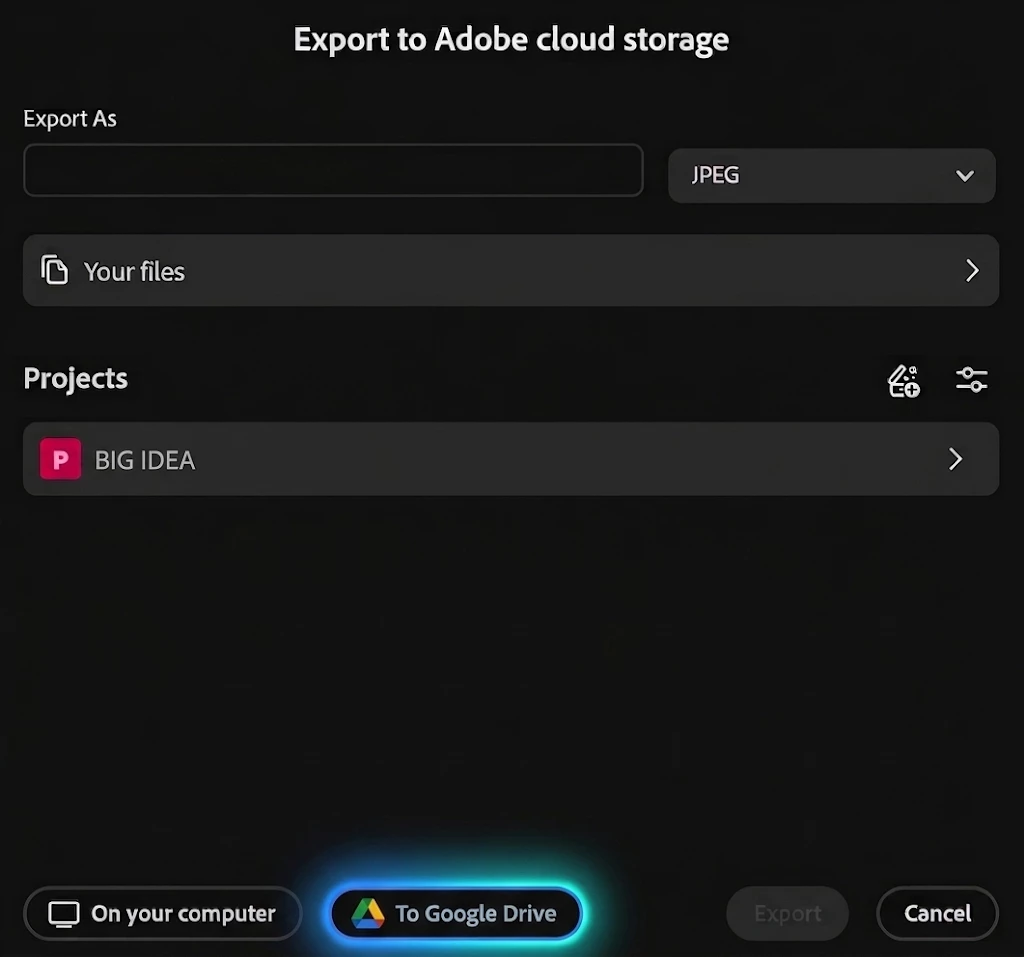
Currently, Adobe Photoshop on the web requires users to download exported files directly to local storage. For workflows centered entirely around cloud storage, users must download the image to their local hard drive and then manually upload it to Google Drive. This multi-step process introduces unnecessary friction, clutters local downloads folders, and slows down content delivery.
Proposed Solution
Integrate native Google Drive export functionality into Photoshop on the web. Alongside the standard local download option, users should have the ability to authenticate their Google account and send exported assets directly to their cloud storage.
Recommended Capabilities
-
Direct Export Destination: Include a "Save to Google Drive" option within the export menu.
-
Folder Navigation: Provide a lightweight directory picker allowing users to select specific folders or Shared Drives.
-
Standard Format Support: Support direct export for common file formats, including PNG, JPEG, TIFF, PSD, WEBP, and JXL.
-
OAuth Integration: Utilize standard Google authentication to connect and disconnect storage securely.
Workflow Benefits
This enhancement would significantly streamline productivity for individuals and organizations utilizing Google Workspace for digital asset management. It would eliminate redundant file transfers and provide a seamless browser-based experience for cloud-first environments.
 AdChoices