



Display the live resulting font size (e.g., 48 pt → 72 pt) alongside the scale percentage when resizing text with Free Transform, enabling precise typography adjustments without manual calculations.
Feature Request: Display Resulting Font Size During Free Transform of Text Layers
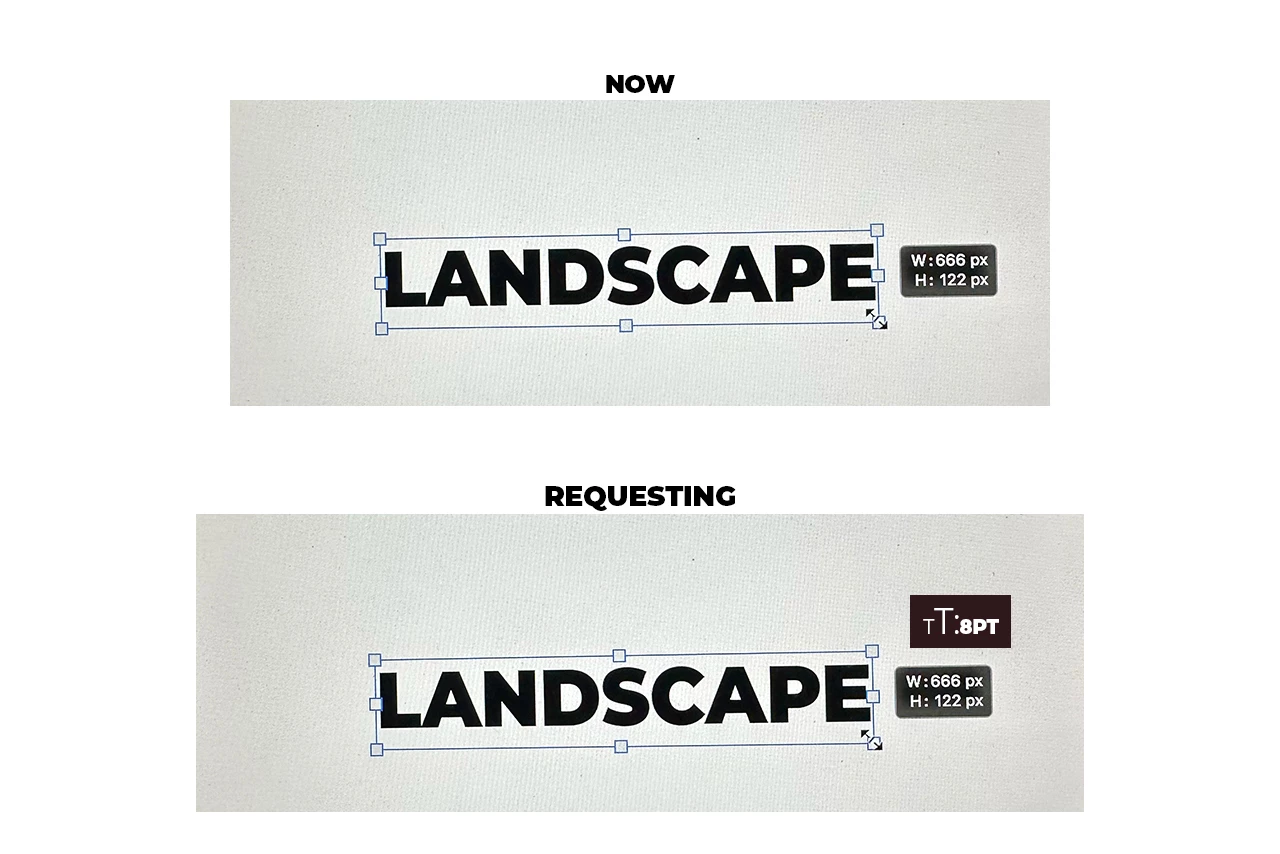
When scaling a text layer using Free Transform (Ctrl/Cmd + T), Photoshop currently displays the scaling percentage but does not clearly indicate the resulting font size after the transformation.
I would like Photoshop to display the live calculated font size while scaling text. For example:
- Original font size: 48 pt
- Scale: 150%
- Resulting font size: 72 pt
Possible implementations:
- Show the resulting font size next to the scale percentage in the Transform controls.
- Display a tooltip during scaling (e.g., "48 pt → 72 pt").
- Add an optional preference to show live font-size calculations while transforming text layers.
Benefits:
- Faster and more precise typography workflows.
- Easier adherence to brand guidelines and design systems.
- Eliminates the need for manual calculations when visually resizing text.
- Helps designers maintain consistency across documents, artboards, thumbnails, presentations, and marketing assets.
For text layers containing multiple font sizes, Photoshop could display the resulting size of the selected text or provide a size range where applicable.
 AdChoices