piotrg10000892
Participant
August 14, 2025
Open for Voting

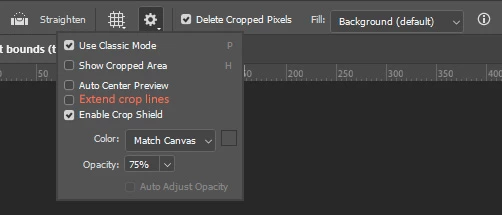
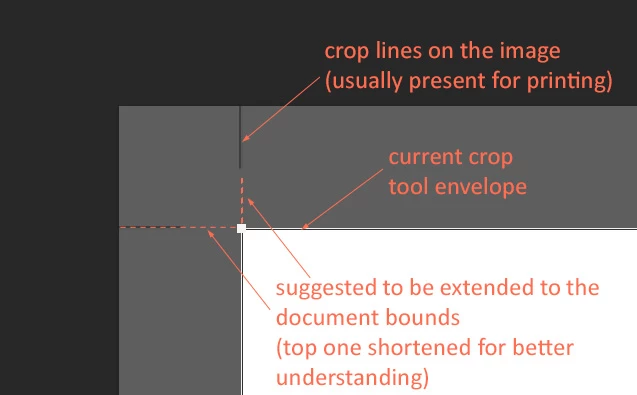
Extended crop line

  • August 14, 2025
  • 4 replies
  • 120 views

It would be very useful while croping print files for screen use, now you have to guess.

It could be and option in tool settings.

(Yes, I'm aware it could be done with gudlines)
4 replies

piotrg10000892
Participant
August 14, 2025

Yes, as always, something is useful for one person, while another person does not use it at all.


I have been dealing with this minor inconvenience for a long time, and perhaps others also find it annoying, although not that troublesome.


I think it would be a small improvement that would not spoil anything and, as an option, could make things much easier, especially for people who also use files prepared for printing in digital presentations.


D Fosse
Community Expert
Community Expert
August 14, 2025

OK, got it.


As with most feature requests, useful in some workflows and not in others. Let's see how many upvotes it gets. 

piotrg10000892
Participant
August 14, 2025

I know what crops marks are, I've been using Photoshop for 20 years and I've prepared a lot of documents for printing.

It is not about crop marks used for printing.

It is about CROP TOOL ENVELOPE, and extending its lines while cropping procedure.


D Fosse
Community Expert
Community Expert
August 14, 2025

Photoshop can't make crop marks (except manually). They're not in Photoshop code, but are added when exporting print ready PDFs from page layout software (ID).


I understand that this could be useful in your case, but it could create problems elsewhere. The whole point of crop marks is to accomodate bleed and misalignment, so extending them defeats the purpose. I'd suggest you use guides.