



Open for Voting
Extra zoom in and out options on right-click menu when holding space?
Does that make sense?
Like when you hold down the space bar and right click the image you get a little menu where you can zoom in to 100%, 200%, print size, or fit to screen. But to be able to zoom in or out in smaller increments, you have to use the magnifying glass.
When you use the magnifying glass and then right click, you get a meny that is like the one I described above, only it has two aditional options:
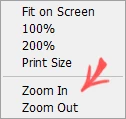
It would be REALLY convenient if the "right click while holding space" menu had those two extra options too!
Can we have that please?
 AdChoices