



Burbank-611
Participant
December 22, 2025
Open for Voting

Feature Request: Adding Transform Controls to Shape Properties Panel

  • December 22, 2025
  • 2 replies
  • 86 views

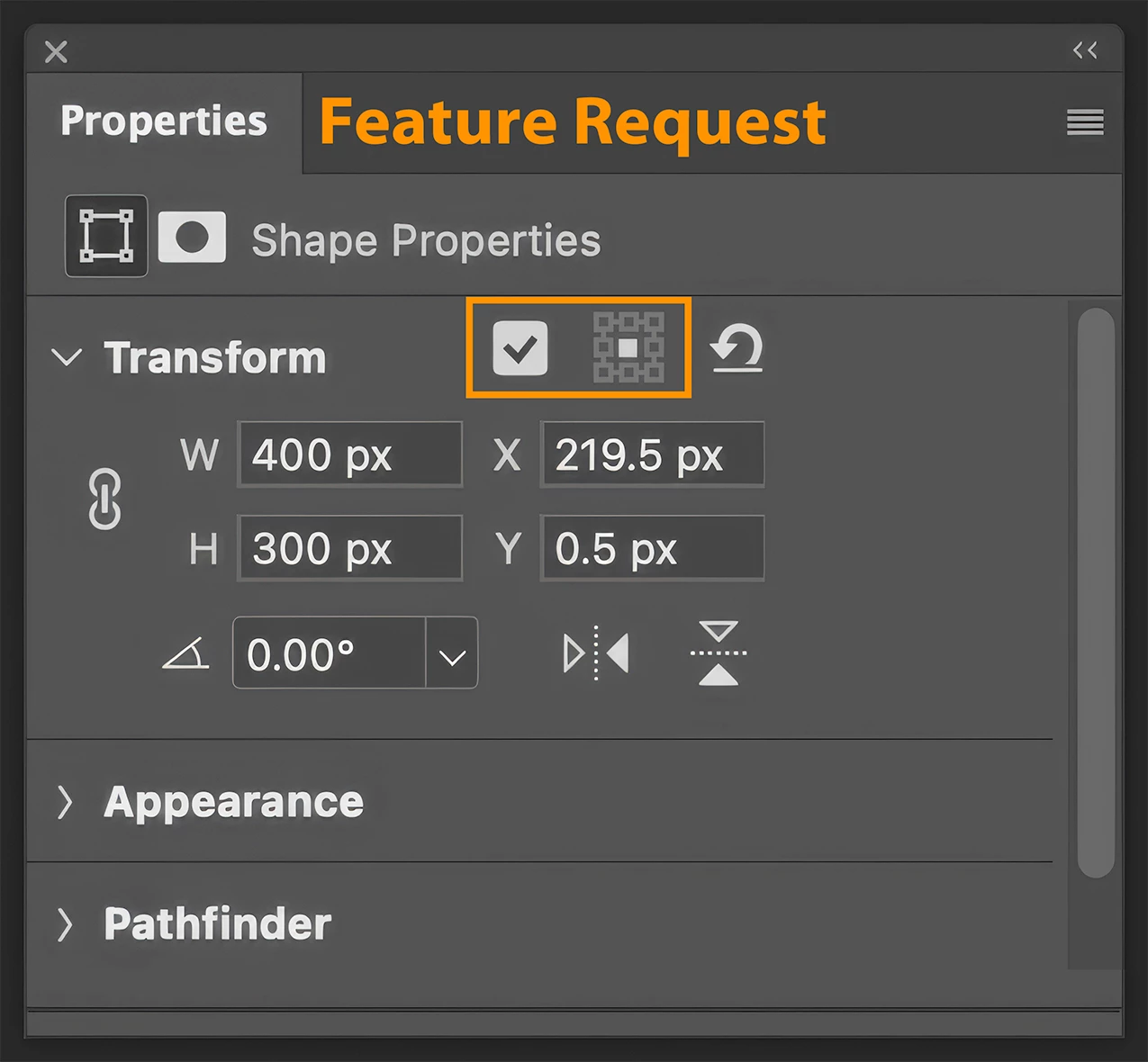
I could very well be mistaken (and if I am someone please let me know), but I'm reasonably sure that these Transform Controls/abilities are only available when transforming (Cmd T/Ctrl T). It would be helpful to also have them in the Properties Panel when shapes are "Live" (see attached pic). It would speed-up workflow.FR for Ps.png
2 replies

Burbank-611
Participant
January 5, 2026

Hi Pete!
I appreciate your reply. 

You're correct, the two items I think would be helpful additions to the Shape Properties panel are:
1. Reference Point Visible/Hidden Checkbox
2. Reference Point Location Control

You asked:
"...would you be looking for that reference point location to be added to all layer transforms within Properties panel."

I didn't think of that at the time of my post, but I would agree with you that additing that to all other appropriate panels is likely to be just as useful/helpful. It would keep the adjustment process centered within the panel — otherwise there can be some jumping back and forth between Transforming (Cmd-T) and the Panel. It's not an earth shattering suggestion, I know, but anything that simplifies and/or speeds-up any process is a welcome addition.

Thanks again for reply — it encourages me to make future suggestions for Feature Requests and Bug Fixes.

Cheers,
-B

Pete.Green
Adobe Employee
January 5, 2026

Hi @Burbank-611 ,


Thanks for the request!

In your mockup you've added the Reference Point location control to the properties panel, is that mostly what you're looking for to be added here?


Would that only be for Shapes? or would you be looking for that reference point location to be added to all layer transforms within Properties panel?


Regards,

Pete