


Free transform's bounding box needs a relative orientation / rotation tool
When using free transform, scale, skew, distort, warp, ect. we are stuck with only being able to use the bounding box's square 90 degree default orientation. I think we need to be able to rotate the orientation of the bounding box without rotating the object so that we can perform transforms at angles other than true vertical and horizontal.
Like for example if I want to make box man longer when he's square with the canvas, easy peasy.
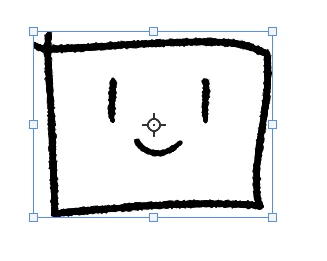
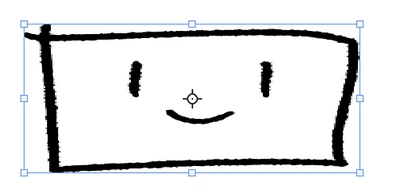
But if I want to do the same transform when hes at an angle, it wont work the same and ends up skewing him instead of just streatching him longer.
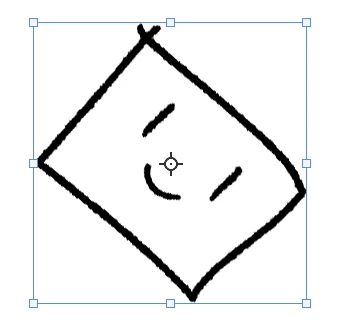
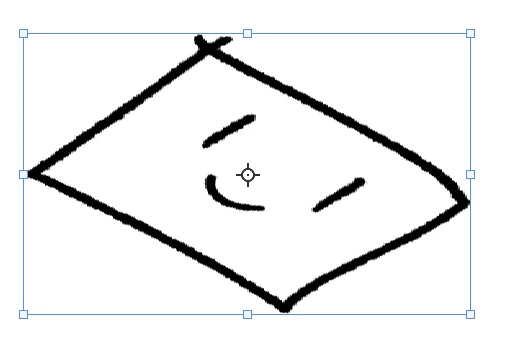
If we could rotate the transform box to match the objects orientation then we could easily do transforms at any angle, but currently the only way seems to be to rotate, apply transform, scale, and then rotate to its original position. This makes it currently a destructive guess and check process, and for smart objects requires rasterizing before the first rotation since the bounding box doesn't reset once rotations are applied.
I find myself needing this feature a lot, and I feel like it could be tied in with the transform box's refrence point some how, like rotating the refrence point would rotate the box without rotating the objects inside.
 AdChoices