

how to make open tabs resize to fit on screen
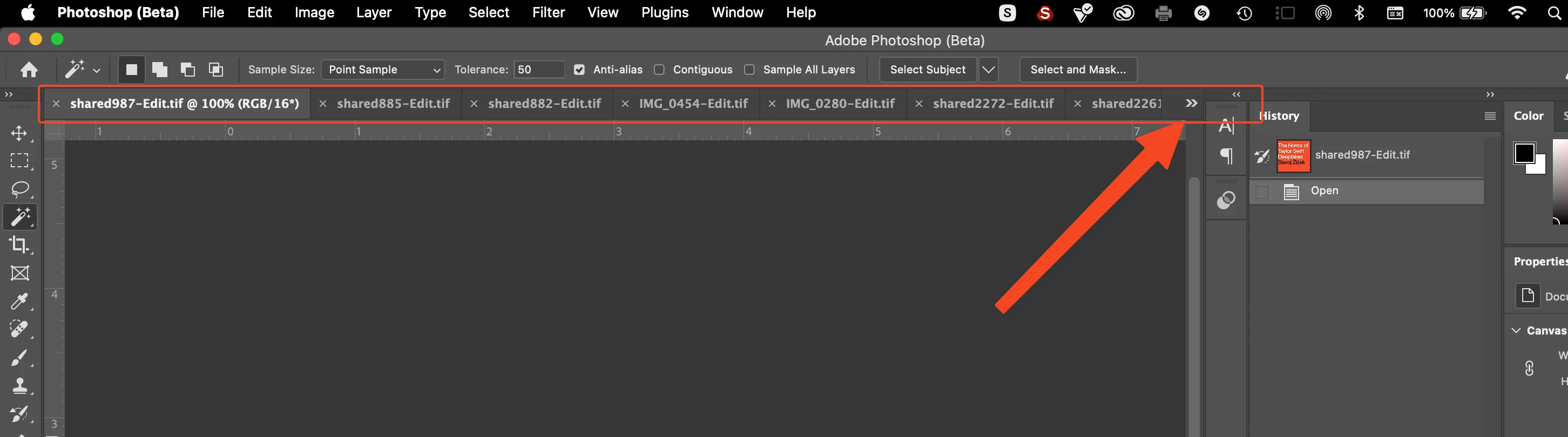
can anyone tell me if there is a way to get open tabs in photoshop to simply resisze themselves (the same way that open tabs in a browser do) so that they all fit visibly on the screen?
or at least you should be able to just swipe easily left and right on the track pad to move them over to see what is off the screen instead of messing with that tiny little arrow thing to pull up the little dropdown list.
this screenshot below shows what i'm talking about, the tabs indicating each open image don't resize when others are opened so they are never all visible at once, which would make them so much easier to manage. it would necesarrily append the text/title of each tab, but browsers have already normalized this, you can just hover the cursor over the tab and it will tell you what is beneath, but you can't do that when the tab is no longer even physically on the screen as is the case currently.
maybe there is already a way to turn on this behavior, but if not it would be a very simple and hugely beneficial quality of life fix.


 AdChoices