


Participant
September 6, 2021
Open for Voting

How to measure and divide a line or plane in PS?

  • September 6, 2021
  • 2 replies
  • 584 views

Hello,


I am trying to learn perspective by doing exercises in PS to save paper and take advantage of the quicker workflow, but I am hitting a solid wall when it comes to figuring out how to measure and divide in PS. For example, if I was to draw a cube using pen and paper, and then subdivide the cube so that it had 9 faces on every plane, like a Rubiks cube, I could simply take out my ruler and divide my first line into 3 equal sections and have them converge towards the VP. From there I would just use basic techniques, like those in How to Draw from Scott Robertson, to multiply and divide until I got my desired result.


Essentially I am just looking for a ruler tool to measure my lines so I can divide them evenly and construct the underlay for my drawings and paintings. Is there any such feature in PS? To better illustrate my problem I made a simple image, please see below. Thanks for your time, and please excuse my sloppy writing in the image.
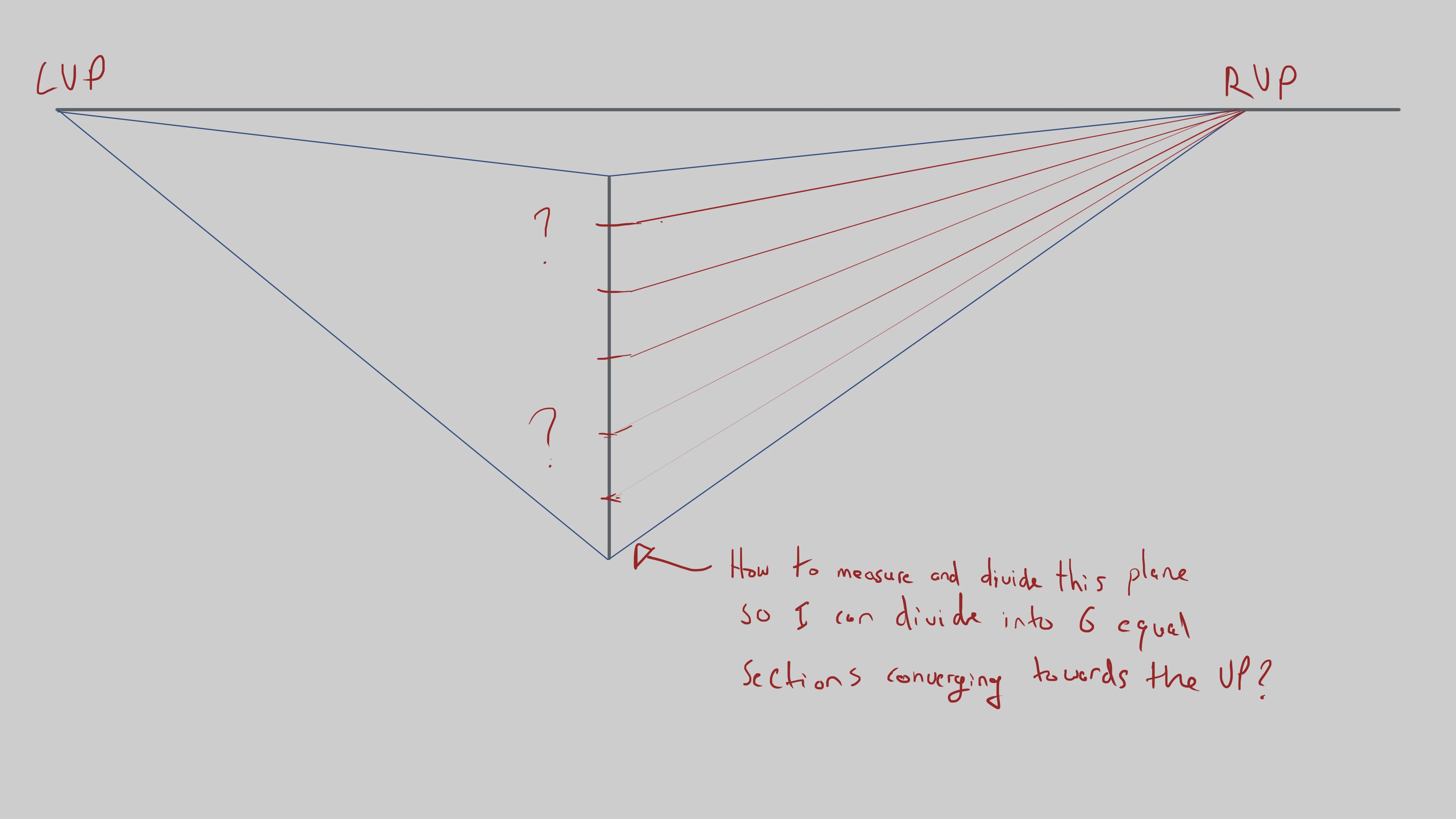
2 replies

Azat1Author
Participant
September 6, 2021

Interesting, I may have to give Lazy Nezumi a go. I'm a bit surprised that PS doesn't have something similar built in with respect to measurement and guides. I know PS is used primarily for photo manipulation, but with so many professional digital artists using it as their primary software, I had hoped that Adobe would have expanded on their capabilities. Guess you can't have it all. Thanks for the heads up though!

davescm
Community Expert
Community Expert
September 6, 2021

You could run the vanishing point filter which can then render its grids onto a Photoshop layer.


Dave

jane-e
Community Expert
Community Expert
September 6, 2021

That's a great idea if it has to be done in Photoshop, Dave!


Another reason I like the Illustrator method is that you can use the Scale tool and drag along those guides to scale in perspective.


@Azat1 

As you said, PS at its core is an image editor with some other capabilities. Illustrator is a drawing application. In recent years, though, Photoshop has been "borowing" more and more of Illustrator's features. You can make a feature request to the product developers by starting a post and clicking "Ideas" instead of "Discussion". Or any moderator can move this to the Ideas section for you if you ask us to.


~ Jane


jane-e
Community Expert
Community Expert
September 6, 2021

Hi


Personally, I would do it in Illustrator by creating a blend and then expanding it to make paths, followed by converting the paths to ruling guides with Cmd+5 and finally locking them.


Several folks here use Lazy Nezumi, which is Windows only and you can get a trial for 15 days. I'll tag @Trevor.Dennis who can tell you if it will do what you are trying to do.

https://lazynezumi.com/


~ Jane