
Participating Frequently
January 13, 2022
Open for Voting

Is there an option that shows me a list with all smart objects paths?

  • January 13, 2022
  • 24 replies
  • 5733 views

I have several projects that needs to be reskinned (same distribution of assets but different artwork). I normally duplicate an initial project to work on it and change the arwork, but sometimes, duplicated files are linked to the inistial project instead of the duplicated one. (Photoshop takes this linking as correct and doesnt show me a warning, so I need to check all linked layers individually. I would like to know if there is a list of all linked smart objects with its path (just like the initial window that usually warns you when a linked smart object is missing.), but this time I need to see a window like the one I attach but with all linked smart objects.
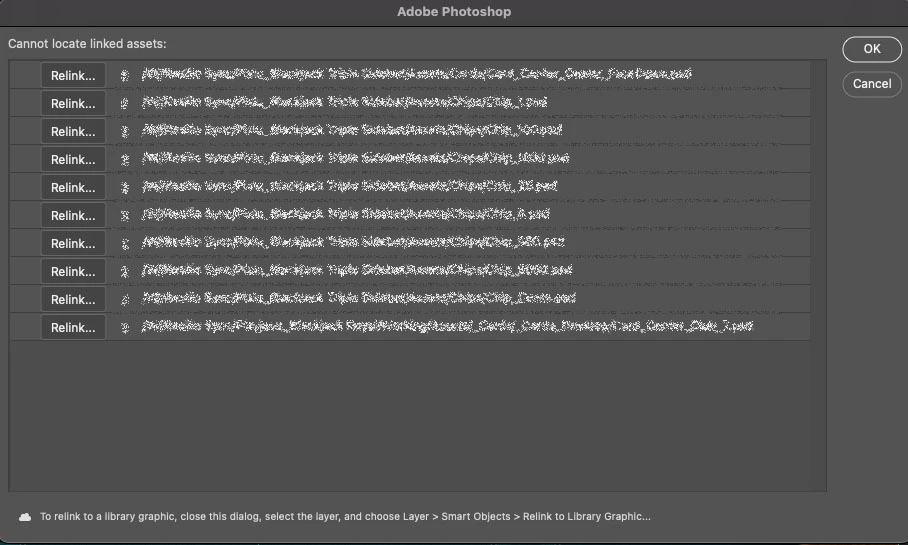
Any help? thank you!

24 replies

Stephen Marsh
Community Expert
Community Expert
January 16, 2022

Here is the script to relink to selected folder, it has only had limited testing. I have also added the list from @c.pfaffenbichler so it's a bit of a mashup!


// https://community.adobe.com/t5/photoshop-ecosystem-ideas/is-there-an-option-that-shows-me-a-list-with-all-smart-objects-paths/idi-p/12657491
// Relink (linked) smart object layers to new asset folder
// 

#target photoshop

var newPath = Folder.selectDialog('Relink to Folder');
var newPath = newPath.fsName + "/";
$.writeln("New path: " + newPath);

// Loop forward over top level layers
// for (var i = 0; i < app.activeDocument.layers.length; i++) {
// Loop backward over top level layers
for (var i = app.activeDocument.layers.length - 1; i >= 0; i--) {
        app.activeDocument.activeLayer = app.activeDocument.layers[i];
        var activeSO = getSmartObjectReference();
        relinkSmartObject();
}


// Functions

function relinkSmartObject() {
    try {
        if (activeSO.found) {
            var oldPath = activeSO.filePath.fsName;
            var oldPathOnly = oldPath.replace(/(^.+\/)(?:.+$)/, '$1');
            $.writeln("Old path: " + oldPathOnly);
            var fileName = oldPath.replace(/(?:^.+\/)(.+$)/, '$1');
            $.writeln("Filename: " + fileName);
            var relinkToFile = stringIDToTypeID("placedLayerRelinkToFile");
            var AD = new ActionDescriptor();
            var idNull = stringIDToTypeID("null");
            AD.putPath(idNull, new File(newPath + fileName));
            executeAction(relinkToFile, AD, DialogModes.NO);
        }
    } catch (e) {}
}

function getSmartObjectReference()
/* https://stackoverflow.com/questions/63010107/get-a-smart-objects-layers-files-directory-source-in-jsx */
{
    try {
        var smartObject = {
            found: false,
            fileRef: '',
            filePath: '',
            linked: false,
        };
        var ref, so;
        ref = new ActionReference();
        ref.putProperty(charIDToTypeID("Prpr"), stringIDToTypeID("smartObject"));
        ref.putEnumerated(charIDToTypeID("Lyr "), charIDToTypeID("Ordn"), charIDToTypeID("Trgt"));
        so = executeActionGet(ref).getObjectValue(stringIDToTypeID("smartObject"));
        smartObject.found = true;
        smartObject.linked = so.getBoolean(stringIDToTypeID("linked"));
        smartObject.fileRef = so.getString(stringIDToTypeID("fileReference"));
        if (smartObject.linked) {
            smartObject.filePath = so.getPath(stringIDToTypeID("link"));
        }
        return smartObject;
    } catch (e) {
        return smartObject;
    }
}

///////////////////////////

// https://community.adobe.com/t5/photoshop-ecosystem-ideas/is-there-an-option-that-shows-me-a-list-with-all-smart-objects-paths/idi-p/12657491
// get list of linked smart objects’ paths;
// 2022, use it at your own risk;
var aaa = collectSmartObjectsLinks();
alert("\n" + aaa.join("\n\n") + "\n\n" + "(copied to clipboard)");

// SO linked paths to list
var list = aaa.join("\n");

// Copy SO linked paths list to clipboard
var d = new ActionDescriptor();
d.putString(stringIDToTypeID('textData'), list);
executeAction(stringIDToTypeID('textToClipboard'), d, DialogModes.NO);

// Text file platform specific LF options
var os = $.os.toLowerCase().indexOf("mac") >= 0 ? "mac" : "windows";
if (os === "mac") {
    textFileLF = "Unix"; // Legacy = "Macintosh"
} else {
    textFileLF = "Windows";
}
// Create a desktop text file of the SO linked paths
var textFile = new File('~/Desktop' + '/' + 'Linked SO Paths.txt');
if (textFile.exists)
    textFile.remove();
    textFile.open('w');
    textFile.encoding = 'UTF-8';
    textFile.lineFeed = textFileLF;
    textFile.write(list);
    textFile.close();
    
    // Open the text file
    textFile.execute();

////// collect layers //////
function collectSmartObjectsLinks() {
    // get number of layers;
    var ref = new ActionReference();
    ref.putProperty(stringIDToTypeID('property'), stringIDToTypeID('numberOfLayers'));
    ref.putEnumerated(charIDToTypeID("Dcmn"), charIDToTypeID("Ordn"), charIDToTypeID("Trgt"));
    var applicationDesc = executeActionGet(ref);
    var theNumber = applicationDesc.getInteger(stringIDToTypeID("numberOfLayers"));
    // process the layers;
    var theLayers = new Array();
    for (var m = 0; m <= theNumber; m++) {
        try {
            var ref = new ActionReference();
            ref.putIndex(charIDToTypeID("Lyr "), m);
            var layerDesc = executeActionGet(ref);
            var layerSet = typeIDToStringID(layerDesc.getEnumerationValue(stringIDToTypeID("layerSection")));
            var isBackground = layerDesc.getBoolean(stringIDToTypeID("background"));
            var isSmartObject = layerDesc.hasKey(stringIDToTypeID("smartObject"));
            // collect smart object links;
            if (isSmartObject === true) {
                var theSO = layerDesc.getObjectValue(stringIDToTypeID("smartObject"));
                if (theSO.getBoolean(stringIDToTypeID("linked")) === true) {
                    var theLink = theSO.getPath(stringIDToTypeID("link"));
                    var theCheck = true;
                    for (var n = 0; n < theLayers.length; n++) {
                        if (theLayers[n] == String(theLink)) {
                            theCheck = false;
                        }
                    }
                    if (theCheck === true) {
                        theLayers.push(theLink.fsName);
                    }
                }
            }
        } catch (e) {}
    }
    return theLayers;
}
Stephen Marsh
Community Expert
Community Expert
January 15, 2022

A scriptUI dialog, legacy floating CEP panel extension - or even a new style UXP panel would be nice, but perhaps overkill at the simplest level...


All one would need for a basic improvement is a script to update all links relative to a new directory path. Just like InDesign's relink to folder option. Same image name, same extension - just a different new path.


From a scripting perspective this should be relatively simple to script in a basic form (famous last words).


A simple brute force approach would update all files with a new path, blindly assuming that the file exists with the same name at the new directory location* (which is how you have described your project directory structure, same name/format links, same quantity, just with updated content).


A more sophisticated script would only update images that had a different path than the new project and warn if missing links were found that didn't exist in the new directory.


*Example:


c.pfaffenbichler
Community Expert
Community Expert
January 15, 2022

How important is this for you right now (as opposed to a possible future implementation)? 


Creating a dialog or, better yet, a Panel for such operations would seem a somewhat involved task but I suspect that there are people (not me, though) who could handle it. 

Would you be willing to hire someone to write this? 

Participating Frequently
January 14, 2022

"So, from your diagram, the linked PSD files in the assets folder always have the same name, same dimensions etc? It is just the top level project folder which has a different name and path?"   For this, my answer is yes.  This use to be a problem specially cause different people has the whole project downloaded in different Drives across the globe, and we sync it via Resilio sync. So, the top level project folder usually is their own hard Drive.   I cannot share screenshots of my files due to confidentialty company rules :(. And to replicate this It would take a lot of time that I dont have right now. 

I was looking for something exactly like you showed me on indesign, but in photoshop.  It's what I meant with my image example with the list of linked files where we can relink them manually. 

Stephen Marsh
Community Expert
Community Expert
January 14, 2022

Photoshop already has a magic wand tool, but I think you wish to wave a different magic wand. 😐


So, from your diagram, the linked PSD files in the assets folder always have the same name, same dimensions etc(just different content)?


It is just the top level project folder which has a different name and path?


As I originally requested:

Please post an example of the full path and filename in your template. Also do the same for the replacement image and path.

Please provide at least three example of old and new pairs.


It may make sense to look at Adobe InDesign for inspiration as it has more mature link handling. Some of the features don't make sense in Photoshop, but mass relinking to a new folder or extension does:


Participating Frequently
January 14, 2022

Hi, sorry I'm not so good at engineering, I'm an artist haha, but let me know if this explains better the situation:


When I duplicate a project for an art reskin, sometimes Photoshop do the job and links the files inside that new project, but sometimes it doesnt; when that happens Photoshop does not warn you, cause all smart objects are linked, but what it doesnt know is that some linked smart objectas are linked to the previous assets form the previous project.   I'll try to explain it with the next images:


Stephen Marsh
Community Expert
Community Expert
January 14, 2022

What is correct vs incorrect link? You know and can do this manually, but how can you instruct a computer to automate? What are the rules, criteria etc?


Please post an example of the full path and filename in your template. Also do the same for the replacement image and path.


Please provide at least three example of old and new pairs.


How would you propose that an automated relinking be performed? Different source folder, but same linked SO image name?

Participating Frequently
January 14, 2022
Thank you Dave! I had to do it one by one as you mention with the
properties, but I have hundreds haha. Same with File Info. :/. Adobe
definitely needs that window to be added.

--
Julio Fernández
-Concept artist and illustrator-
Participating Frequently
January 14, 2022
Exactly, a list where I can relink anything that is not correctly linked
would be expected.

--
Julio Fernández
-Concept artist and illustrator-
Stephen Marsh
Community Expert
Community Expert
January 14, 2022

@c.pfaffenbichler – excellent stuff, not hard for you! :]


I added a couple of extra bits:

1) Copy result to clipboard

2) Write result to text file on desktop


// https://community.adobe.com/t5/photoshop-ecosystem-ideas/is-there-an-option-that-shows-me-a-list-with-all-smart-objects-paths/idi-p/12657491
// get list of linked smart objects’ paths;
// 2022, use it at your own risk;
var aaa = collectSmartObjectsLinks();
alert("\n" + aaa.join("\n") + "\n\n" + "(copied to clipboard)");

// SO linked paths to list
var list = aaa.join("\n");

// Copy SO linked paths list to clipboard
var d = new ActionDescriptor();
d.putString(stringIDToTypeID('textData'), list);
executeAction(stringIDToTypeID('textToClipboard'), d, DialogModes.NO);

// Text file platform specific LF options
var os = $.os.toLowerCase().indexOf("mac") >= 0 ? "mac" : "windows";
if (os === "mac") {
    textFileLF = "Unix"; // Legacy = "Macintosh"
} else {
    textFileLF = "Windows";
}
// Create a desktop text file of the SO linked paths
var textFile = new File('~/Desktop' + '/' + 'Linked SO Paths.txt');
if (textFile.exists)
    textFile.remove();
    textFile.open('w');
    textFile.encoding = 'UTF-8';
    textFile.lineFeed = textFileLF;
    textFile.write(list);
    textFile.close();
    
    // Open the text file
    textFile.execute();

////// collect layers //////
function collectSmartObjectsLinks() {
    // get number of layers;
    var ref = new ActionReference();
    ref.putProperty(stringIDToTypeID('property'), stringIDToTypeID('numberOfLayers'));
    ref.putEnumerated(charIDToTypeID("Dcmn"), charIDToTypeID("Ordn"), charIDToTypeID("Trgt"));
    var applicationDesc = executeActionGet(ref);
    var theNumber = applicationDesc.getInteger(stringIDToTypeID("numberOfLayers"));
    // process the layers;
    var theLayers = new Array();
    for (var m = 0; m <= theNumber; m++) {
        try {
            var ref = new ActionReference();
            ref.putIndex(charIDToTypeID("Lyr "), m);
            var layerDesc = executeActionGet(ref);
            //var layerSet = typeIDToStringID(layerDesc.getEnumerationValue(stringIDToTypeID("layerSection")));
            //var isBackground = layerDesc.getBoolean(stringIDToTypeID("background"));
            var isSmartObject = layerDesc.hasKey(stringIDToTypeID("smartObject"));
            // collect smart object links;
            if (isSmartObject === true) {
                var theSO = layerDesc.getObjectValue(stringIDToTypeID("smartObject"));
                if (theSO.getBoolean(stringIDToTypeID("linked")) === true) {
                    var theLink = theSO.getPath(stringIDToTypeID("link"));
                    var theCheck = true;
                    for (var n = 0; n < theLayers.length; n++) {
                        if (theLayers[n] == String(theLink)) {
                            theCheck = false;
                        }
                    }
                    if (theCheck === true) {
                        theLayers.push(theLink);
                    }
                }
            }
        } catch (e) {}
    }
    return theLayers;
}


https://prepression.blogspot.com/2017/11/downloading-and-installing-adobe-scripts.html