
Participating Frequently
January 13, 2022
Open for Voting

Is there an option that shows me a list with all smart objects paths?

  • January 13, 2022
  • 24 replies
  • 5734 views

I have several projects that needs to be reskinned (same distribution of assets but different artwork). I normally duplicate an initial project to work on it and change the arwork, but sometimes, duplicated files are linked to the inistial project instead of the duplicated one. (Photoshop takes this linking as correct and doesnt show me a warning, so I need to check all linked layers individually. I would like to know if there is a list of all linked smart objects with its path (just like the initial window that usually warns you when a linked smart object is missing.), but this time I need to see a window like the one I attach but with all linked smart objects.
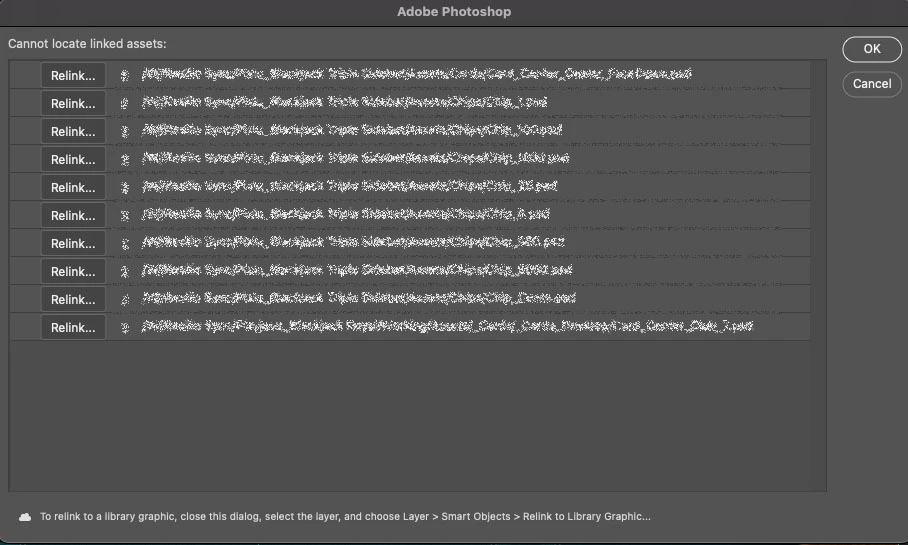
Any help? thank you!

24 replies

c.pfaffenbichler
Community Expert
Community Expert
January 14, 2022

Well, a list of the linked files’ paths is not hard to get. 

// get list of linked smart objects’ paths;
// 2022, use it at your own risk;
var aaa = collectSmartObjectsLinks ();
alert ("\n"+aaa.join("\n\n"));
////// collect layers //////
function collectSmartObjectsLinks () {
// get number of layers;
var ref = new ActionReference();
ref.putProperty(stringIDToTypeID('property'), stringIDToTypeID('numberOfLayers'));
ref.putEnumerated( charIDToTypeID("Dcmn"), charIDToTypeID("Ordn"), charIDToTypeID("Trgt") ); 
var applicationDesc = executeActionGet(ref);
var theNumber = applicationDesc.getInteger(stringIDToTypeID("numberOfLayers"));
// process the layers;
var theLayers = new Array;
for (var m = 0; m <= theNumber; m++) {
try {
var ref = new ActionReference();
ref.putIndex( charIDToTypeID( "Lyr " ), m);
var layerDesc = executeActionGet(ref);
var layerSet = typeIDToStringID(layerDesc.getEnumerationValue(stringIDToTypeID("layerSection")));
var isBackground = layerDesc.getBoolean(stringIDToTypeID("background"));
var isSmartObject = layerDesc.hasKey(stringIDToTypeID("smartObject"));
// collect smart object links;
if (isSmartObject == true) {
var theSO = layerDesc.getObjectValue(stringIDToTypeID("smartObject"));
if (theSO.getBoolean(stringIDToTypeID("linked")) == true) {
var theLink = theSO.getPath(stringIDToTypeID("link"));
var theCheck = true;
for (var n = 0; n < theLayers.length; n++) {
if (theLayers[n] == String(theLink)) {theCheck = false}
};
if (theCheck == true) {theLayers.push(theLink)};
};
};
}
catch (e) {};
};
return theLayers
};
davescm
Community Expert
Community Expert
January 14, 2022

I've moved this thread to "ideas" so that anyone can add their vote at the top of the thread. I've added mine 🙂


A panel similar to the re-linking dialogue box but with all links listed would work for me. It would help provide a quick check that SOs are linked to the correct documents.


Dave


c.pfaffenbichler
Community Expert
Community Expert
January 14, 2022

A list of the linked Smart Objects’ paths should not be too hard to get with a Script, but I suspect you do not just want a list, right? 

Stephen Marsh
Community Expert
Community Expert
January 14, 2022

The closest that I could find was the following, which is only for the active layer:


https://stackoverflow.com/questions/63010107/get-a-smart-objects-layers-files-directory-source-in-jsx


davescm
Community Expert
Community Expert
January 13, 2022

It would be nice if there was a links panel (there currently is not so it may be worth a feature request).


In the meantime, there are two places you can see the links.

1. By clicking in the layers panel on each linked smart object in turn, the path for the linked content is shown in the properties panel.


2. File Info - Raw data contains the paths but they are not all together so can be hard to spot.


Dave

Stephen Marsh
Community Expert
Community Expert
January 14, 2022
Ged_Traynor
Community Expert
Community Expert
January 14, 2022

Feature request comes under Idea's