


It would be great if shapes maintained crisp edges when offset from whole numbers, or using stroke
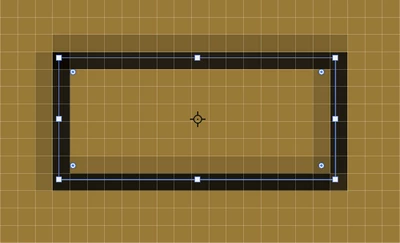
Problem: Currently, if you have a shape positioned at X: 100px, and apply 1px center stroke, since photoshop can't actually create half pixels on either side, so it ends up creating a mathematical hack job by creating a 2px wide stroke and compensating for this by giving it a transparent fill, so that "mathematically" you end up with a "1px stroke" in terms of fill values or weight, but a visually blurred shape edge.
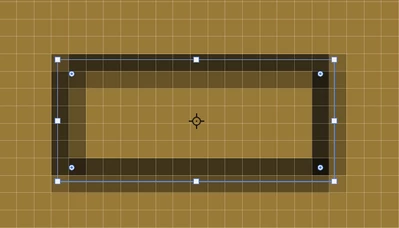
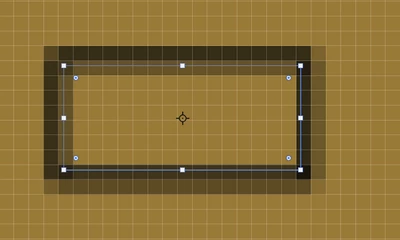
The same thing happens to edges of shapes if you position them off whole-numbers
Solution/idea: Short answer, allow photoshop to create half pixels. Long answer, can't photoshop use some math to properly address this and apply an actual 1px stroke? I think technically this would mean photoshop has to introduce the ability to split pixels from whole numbers into decimal points 0.1 to 0.9. But just to be clear, I'm not saying we need the ability of a 1.5px stroke, whole number strokes are fine, the problem is how strokes are rendered and shape edges are rendered depending on their posititons away from whole numbers.
The ideal final product: Say I have a shape positioned at X: 100, and I apply 1px stroke > Photoshop applies an actual 1px stroke and positions the stroke properly so it only takes up half a pixel on either side of the shape edge.
This seems like such a simple mathematical formula:
"Apply 1px center stroke, but shift it by 0.5px"
INSTEAD OF the visual nightmare of:
"Apply 1px center stroke, but actually apply 2px stroke and make each side semi-transparent to compensate for position away from whole number"
Attaching images so you can see what im referring to (different scenartios thhat look visually awful)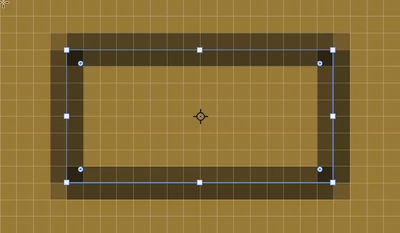
 AdChoices