





Layer Thumbnail to Indicate Whether Smart Object is Synced or Not
Consider the following layer stack image:
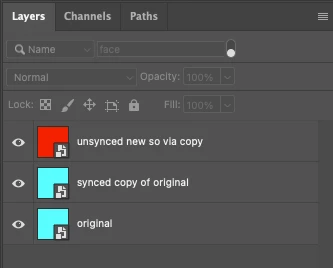
The bottom "original" layer and the middle layer "synced copy of original" are both embedded smart objects. Changing one changes the other as they are synchronised. Here I inverted the colour of one layer, therefore both synced layers are updated and inverted.
The upper "unsynced new so via copy" layer is unsynchronised, therefore it didn't update when the original layer was updated. This is all good and by design.
What I am suggesting is that there be some sort of visual representation to easily visually differentiate that one of these embedded smart objects isn't synchronised.
Or conversely- only show the synchronised files with an icon or other visual attribute.
Having to edit a smart object in order to see which layers are synchronised isn't ideal.
Whatever the best method is, I'll leave for group discussion. :]
So please upvote this original post if you agree that it would be useful to know what is what.
Please upvote a comment that proposes a way to visually identify such a layer (presuming that anybody replies with one).
 AdChoices