


michaljanata
Inspiring
February 2, 2026
Open for Voting

Orange color for Color editing tools

  • February 2, 2026
  • 2 replies
  • 95 views

In Photoshop I would like to have colors in all color editing tools (Saturation, Selective color atc.) similar as it is in Lightroom.
Especialy orange is very usuful when editing skin tones.
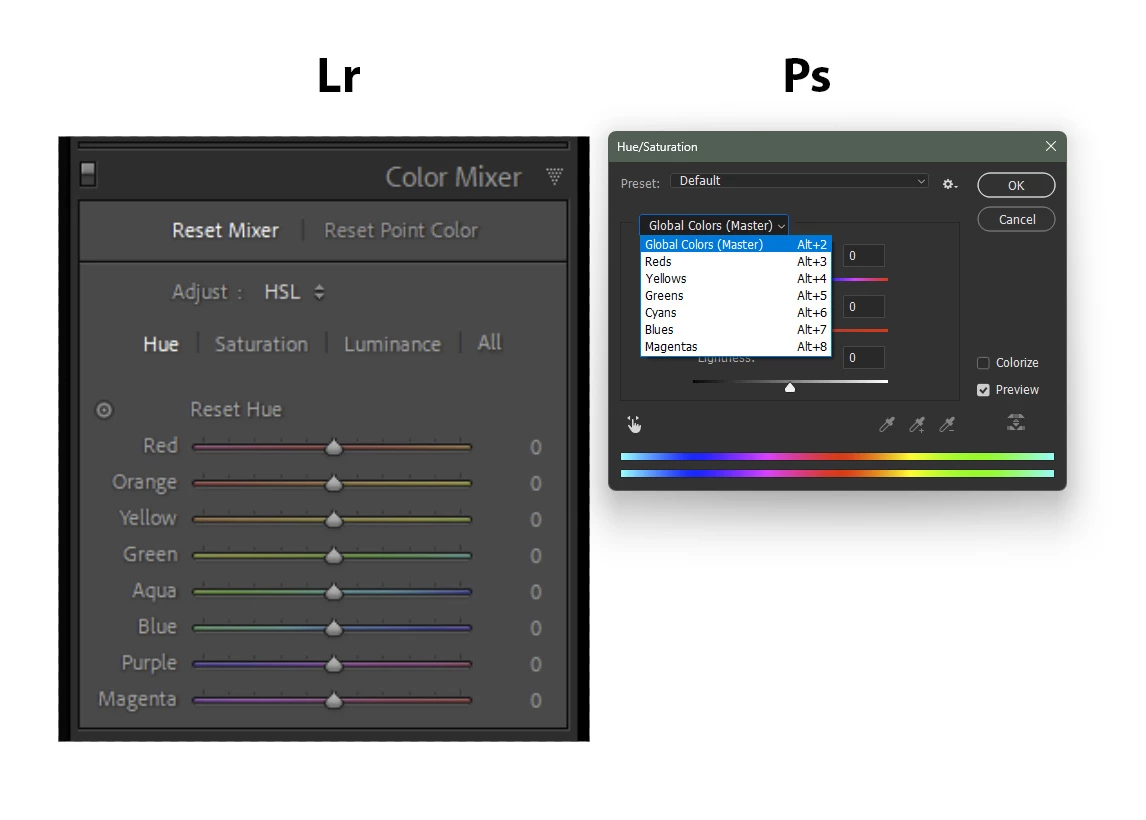


    2 replies

    Earth Oliver
    Legend
    February 2, 2026

    Looks like you’re using an older version of Ps. Try updating the app to see the new Hue/Sat panel...

    michaljanata
    Inspiring
    March 3, 2026

    not true, I’m using always latest updates, 27.4 now


    Rob_Cullen
    Community Expert
    Community Expert
    February 2, 2026

    You could use the Camera Raw Filter  [Shift+Ctrl/Cmd + A]  in Photoshop.

    Or better - open your image in Camera Raw before it opens in Photoshop.

    This is Camera Raw FILTER-


    Regards. My System: Windows-11, Lightroom-Classic 15.1.1, Photoshop 27.3.1, ACR 18.1.1, Lightroom 9.0, Lr-iOS 10.4.0, Bridge 16.0.2 .
    michaljanata
    Inspiring
    March 3, 2026

    yes, i know, but it is not always best/fast for my workflow with actions… i cant see any reason not to have orange in Hue/Saturation tool

    jane-e
    Community Expert
    Community Expert
    March 3, 2026

    @michaljanata 

    You posted in Feature Requests, so the Photoshop team will see and track it.


    You might try some of the workarounds that have been suggested until (or if) the PS team implements your idea to include orange.


    Jane
