


Inspiring
July 29, 2013
Open for Voting

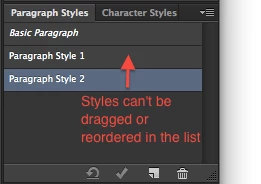
P: Ability to organize and reorder Paragraph / Character Styles in the Styles panel via drag & drop

  • July 29, 2013
  • 50 replies
  • 1439 views

There is currently no way to drag and drop styles to move them around in the Character / Paragraph Styles pallette in Photoshop CC. It makes the management of styles difficult once you have more than a dozen or so in that pallette. Please correct this!
50 replies

Participating Frequently
March 10, 2014
This is so frustrating! I use Photoshop for web design so keeping my styles organized is essential to reducing bloat and clutter in my CSS files. I need a way to see which styles are almost similar so I can reconsolidate them and streamline my use of fonts, weights, sizes and colors. This should not have been implemented before it was at least mature enough to use correctly. So far I at least name my styles with a system, but since the palette doesn't even force alphabetical ordering of styles it gets really hard to get an overview.
Inspiring
February 19, 2014
This seems like a no brainer. From a users perspective, it's totally intuitive that you would be able to drag and arrange. It's completely frustrating that you cannot, or that there seems to be no workaround. Please push a fix soon, this thread is 7 months old.
Inspiring
February 19, 2014
It is about time this is included in the next update. It works in other Adobe software, but why does this not work in Photoshop? This is really bogging down my workflow.

As a temporary fix to this problem, it would be good to know if there is a specific location where the style palettes are saved so I can at least edit/reorganize them manually.
Inspiring
January 22, 2014
That's fine. I would figure it would be an easy fix to do this though, given that every other style palette in the CC range allows you to do this. I've pretty much had to do my mockups in Illustrator and leave Photoshop behind so I could just keep my styles organised, so it would be nice to come back.
David Mohr
Participating Frequently
January 22, 2014
Sorry, I have no update at this time.

David
Inspiring
January 22, 2014
Hi Dave, I noticed this hasn't been added as of the January 2014 update. Any word on when we might see this issue resolved?
Participant
December 18, 2013
I'm a UI designer, and I like the Paragraph Styles feature, but the inability to reorder my styles is a major drawback. I have dozens of styles in our UI Kit that are all out of order.

Reordering the styles from the panel itself would be ideal, but at the very least it would be helpful if they could be reordered in the preset manager, similar to color swatches.

Anything at this point would be great. Please try to work this into the next update.
Inspiring
September 9, 2013


Please include the ability to re-arrange styles in the Styles / Character Styles / Paragraph Styles panels, via drag and drop just as it works in Illustrator / Indesign.
Inspiring
September 9, 2013
Just noticed this wasn't implemented in Photoshop 14.1 update - is this something that can be done? Can you also add folders / groups to further organise things as seen in ID / AI?
David Mohr
Participating Frequently
August 5, 2013
Thanks for the suggestion!