


Participant
June 6, 2019
Open for Voting

P: Ability to reassign Timeline Playback Shortcut

  • June 6, 2019
  • 30 replies
  • 4450 views

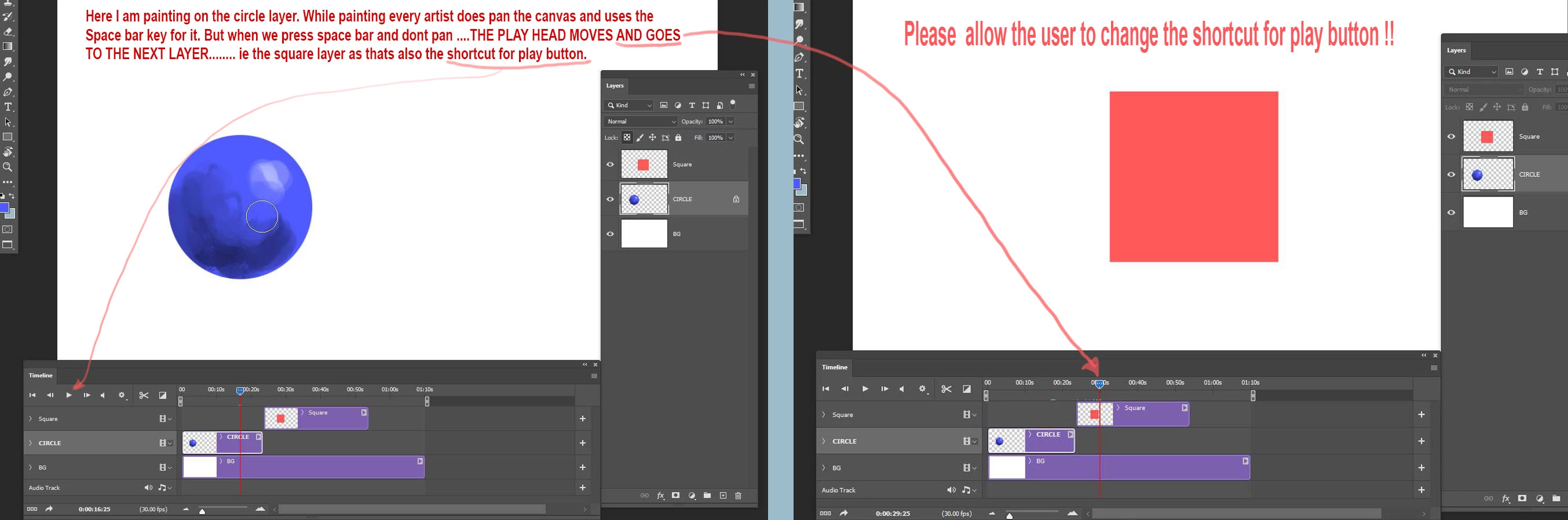
When working with video timeline  I am painting and panning the canvas with the space bar key. But when I press spacebar and not pan it starts to play the timeline and the play head moves to the next layer which is very annoying. This problem was reported a long time ago but the problem is not fixed yet. There whould be a way to disable the shortcut key for the play button in the video timeline. Else the video time line is a feature of no use for animation artists trying to create animations in Photoshop. Just cant work with this. Please fix the problem. Its been really long since this bug got fixed.
30 replies

CaptnCapsLock
Known Participant
May 29, 2025

Found an alternate solution to the Sisyphean task of asking Adobe to make a quality-of-life-change to a program.

I use a Wacom stylus for bumping the frame around with the Hand tool while painting/drawing in PS - more specifically I hit the lower button on my stylus to scroll, which selects the Hand tool in Photoshop anyways. BUT when using the Timeline panel (say for 2D animating and storyboarding)  THIS ^^ is a constant issue (especially when I'm trying to be frame-specific).

The "Fix"...

In your Wacom Tablet settings panel, change the button you would otherwise use for scrolling or moving your canvas around, to a Keyboard Shortcut instead, and designate that keystroke "Shift+Space". This will apparently confuse the Timeline panel enough to not autoplay your timeline, and key up your hand tool, and only your hand tool. No matter how quickly you tap the button, it will not play the timeline.

isaias-b
Participant
February 22, 2024

I found out a few things


toggle shortcuts checkbox on the timeline panels burger menu

The video below show that on the burger menu of the timeline panel there is an option to toggle the timeline specific keyboard shortcuts on and off. This does what it is supposed to do but not always consistently...
https://www.youtube.com/watch?v=verldRKmHLg&t=10s


The option from above does indeed somehow influence the behaviour, but unfortunately it is not always working reliably as I expected. I could not figure out why and when it does not behave as expected, maybe i am just stuck in a mode that I don't know since I am still pretty much new to PS. However, whenever I am in that unknown "mode" the spacebar does not start the animation but it can stop the animation.

workaround to resolve irrational spacebar behavioural inconsistencies

I found that i can fix this issue by splitting a layer with the split tool on the timeline panel. Once I do split a layer that spacebar behaviours gets restored to as to what I would it expect to behave. I then simply undo the split and can continue. It seems to happen very rarely though that PS gets in this mode, which makes me believe that I am just using it wrong at the moment or it is just a weird glitch. In any case, it would be nice to see when I am in a mode somewhere on the UI to identify such issues more easily. Other than that, this workaround works fine for me at the moment.


long hold vs short tap on the spacebar key

I can also confirm that when the timeline shortcuts are enabled I can use a short tap to trigger a start and stop of the animation, hence a long press activates other functions like paning on the editor. Most times this is just enough to keep the shortcuts enabled for me. Only from time to time I need to turn off the timeline shortcuts as it also reassigns other shortcuts besides the spacebar like the arrow keys.


Just wanted to give you an update on my findings and tell you that I can live with the workaround, though it would be nice to be able to easily toggle the timeline shortcuts on and off reliably maybe with a shortcut itself. The split layer and undo workaround feels glitchy but is defintely restoring the behaviour for me, soooo I am happy again!

Have fun, hope it helps you as well
Greetings
Isaias

isaias-b
Participant
February 20, 2024

I have kind of the opposite problem i can't get the spacebar to toggle start and stop the animation. Seems it got fixed for you guys, but then the question arises how to do let the timeline play and stop with a keyshortcut? BTW where is the shortcut? I am having a hard time finding stuff in the key bindings menu.

Participant
September 6, 2023

Signal boosting this. The timeline would be so much more intuitive if we could remap the Play button. Remapping something as pivotal as panning around a comparatively niche panel is cumbersome.

Participant
September 1, 2023

It's been like a decade. We need the ability to remap Space Bar press to something besides playing the timeline. 

Participant
July 1, 2023

Every time I press the space bar to move the screen, the timeline moves. Please let me change this.

joel98689390
Participating Frequently
February 20, 2023

I came up with a fix that is working for me and you will kick yourself when you hear it.

Keep your left mouse button pressed while you let go of space.*****

quote


@Mike ArensI'm glad that's working for you, but I don't use the space bar. I use the rocker button on my Cintiq's pen; if I even accidentally click the rocker button, it initiates playback.  More often than that though, I'm just trying to pan around, and suddenly, undesirably, the animation is playing back.  That's just terrible UX design.  


I mean, I see that people are actually using Photoshop to make frame by frame animation; what I don't understand is how they're doing it without yelling at their screens.  I'm coming from other software that allows you to assign playback to any shortcut of your choosing, so maybe I'm spoiled in that regard.  On the other hand, it's common sense - you don't immutably assign timeline playback to a shared hotkey that's invoked almost constantly by people using tablet monitors to pan around the canvas.  It simply begs an infuriating user experience.  Can we start a petition or something?

PECourtejoie
Community Expert
Community Expert
February 1, 2023

Hi, thanks, @Mike Arens but am I the only one for which there is a difference in behavior if I do a quick press or a long press of the spacebar?

Mike Arens
Participant
January 30, 2023

I came up with a fix that is working for me and you will kick yourself when you hear it. 

Keep your left mouse button pressed while you let go of space.*****

This will stop the timeline from keying up the playback.

Not a rebind fix, but this should answer how to stop it. You'll just have to relearn that your panning needs to end with your mouse button still pressed.

This could also explains why it has remained an issue to a degree. It's similare to the quick color picker toggle. It shares another shortcut input. Obviously, this should be fixed, but I can see why someone trying to recreate it doesn't have the same input issue. Other software follow a similar constaint mouse holding sequence to avoid input overlap. 

I hope this helps! Was driving me crazy...

joel98689390
Participating Frequently
January 26, 2023

Adobe? Is there any word on this?  With Battle Axe's Timelord and several other animation extensions making animation in PS more robust than ever for animators and motion graphics artists, it looks pretty silly that years later in 2023 your customers are still asking you to implement the smallest conceivable feature request.