


Participant
June 6, 2019
Open for Voting

P: Ability to reassign Timeline Playback Shortcut

  • June 6, 2019
  • 30 replies
  • 4450 views

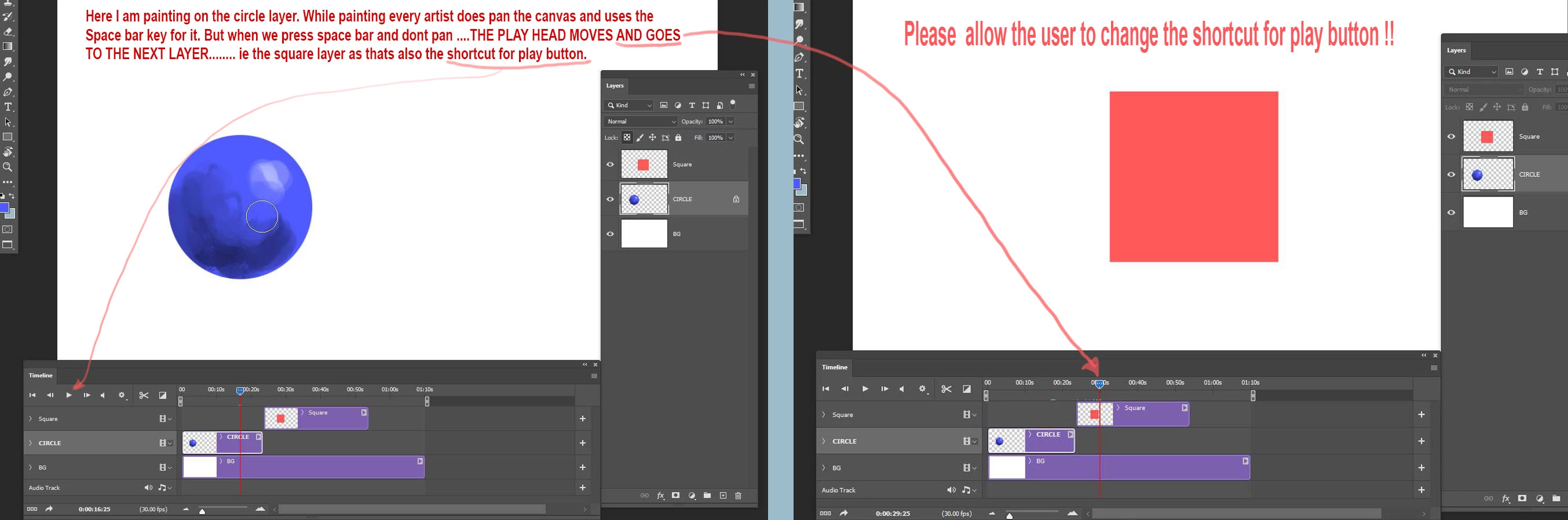
When working with video timeline  I am painting and panning the canvas with the space bar key. But when I press spacebar and not pan it starts to play the timeline and the play head moves to the next layer which is very annoying. This problem was reported a long time ago but the problem is not fixed yet. There whould be a way to disable the shortcut key for the play button in the video timeline. Else the video time line is a feature of no use for animation artists trying to create animations in Photoshop. Just cant work with this. Please fix the problem. Its been really long since this bug got fixed.
30 replies

Participant
December 18, 2021

I wonder why there is no way we could change the animation shortcut for Timeline (Frames)..


This is causing me so much trouble when I am editing the shape of the current frame, because I have to hold Space to move around the canvas and many times it plays the animation causing the timeline to move to a different frame than the one that I am editing.


I am using Latest Photoshop 2022 v23.1.0 on Windows 10.

Participant
October 13, 2021

Hello there,

I tried to make a frame animation, but I noticed really early that there is one problem. When I want to pan around my work, I press the Spacebar, but that also triggers the playbutton in the timeline and my animation starts playing, which is really distracting and annoying. So I have to pause the animation and find the frame I was working on over and over... There is no way to turn this off, so I would really REALLY REALLY appreciate a way to somehow turn this off. This seems to be a problem to a lot of users since 2019, and some of them already reported this issue, but it still exists...


So yeah, TLDR: An option to...

-change the hotkey for the timeline playbutton and/or a checkmark to freeze the animation in the timeline settings.

-change the hotkey for the hand-panning.


Thanks in advance.

-Patrick

PECourtejoie
Community Expert
Community Expert
September 20, 2021

Another thing: what about slightly readjusting one's habits and get benefits?

I tried the trick I just shared, but I also noticed that the spacebar does trigger a play if you just briefly hit it...

BUT, if I make a long press on the spacebar, I do get the hand tool that lets me pan in my image...

Another solution would be to use the H key to trigger the hand tool, giving you also a temporary way to navigate in your image, plus the "birds eyes view" that lets you pan in your image like in the navigator panel...

PECourtejoie
Community Expert
Community Expert
September 20, 2021

Hi, I found this tip by Pete Green: 

"Double-click the Timeline panel tab which will minimize the timeline tab. From there you can use Space to toggle the move tool.
Double-click the timeline panel tab again to bring it back up and the video shortcuts should work again."

Participant
September 19, 2021

If they wont fix it, is there a plug-in that anyone knows of that could assist? This is infuriating. Makes using this to animate nearly impossible.

Monokrohm
Participant
September 13, 2021

I use spacebar quite a bit so having it activate the timeline playback is pretty inconvenient

Participating Frequently
April 27, 2021

Could we have any answer or clarity on this? Makes the whole timeline workflow unworkable.

Participant
November 25, 2020

Please fix asap, simple and necessary.

Participant
November 7, 2019

Please fix this problem as I had been waiting a long time for it be rectified. This is a very powerful feature in Photoshop but unfortunately not usable for this very small issue that many are facing. I hope it will be fixed at the earliest.

williamf68583084
Participant
June 6, 2019

Dear Abby,

Pressing the spacebar while creating frame animations in Photoshop causes the animation to start playing. The spacebar is one of the most frequently used keys in Photoshop for navigation purposes so having it also perform this other function is annoying as balls. Can we please get a way to change that function or disable it altogether? And yes I already know you can go to Edit>Keyboard Shortcuts>Panel Menus to adjust the timeline hotkeys, but this one in particular isn't there.

Thanks,

Sleepless in Seattle.

David Mohr
Community Manager
Community Manager
June 6, 2019
Howdy William,

Okay, well, I won't suggest customizing the keyboard shortbut...but I'll add this as a feature request and thank you for your elloquent user workflow scenario!  8-)

Hoping Seattle gets a little sleepier,
David