


Inspiring
February 20, 2019
Open for Voting

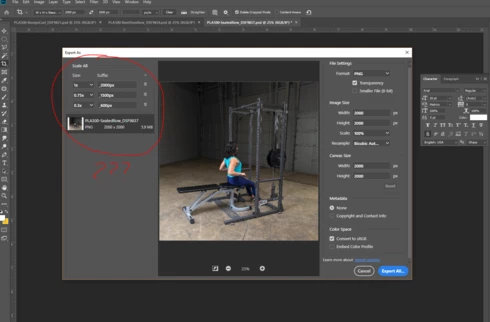
P: Ability to save / load Export As presets

  • February 20, 2019
  • 3 replies
  • 320 views

In the "Export As" menu, it would be a great time saver to be able to save/load preset Scale All sizes. I process a lot of images to 3 different sizes, and I have to enter the three sizes every time I export another image. If I could just save my preset sizes to a dropdown menu that would save me a lot of time. 
3 replies

Participant
November 27, 2021

I use Export As a lot, the feature saves me a lot of time when I need to deliver different sizes to clients, and specially when I have to remove metadata, convert to sRGB, and all at the same time.


The annoying part of this feature is that every time I need to export an image, I have to manually set up everything. Sometimes when I have a lot of images I just send them all once finished to Lightroom and make the exports from there, or you another third party software to make a batch export. But that is not the ideal scenario.


Export As is great, but it lacks of a user preset possibility that let people to make their own presets for export (like in Lightroom) with all the settings changed at one click.

I made a fast mockup on how it could look, with a list of favorites at top, a + symbol to add more presets, and a list of all of your presets from where you can add your favorits to the "one click" buttons to make the selection of your most used (favs) faster.

I hope Adobe take this in consideration.

Inspiring
March 25, 2020
Pleaze for a next version....
Yves Crausaz, Suisse, retraité actif dans le monde de la photo et des arts graphiques.
David Mohr
Community Manager
Community Manager
February 28, 2019
Howdy Brian,

Thanks for your suggestion.  I've logged a Feature Request for this.

Have a good one,
David