



Open for Voting
P: Allow changing default for Color Samples (#1, #2) in the Info Panel
When I use the Color Sampler Tool and place sample points, the Info panel shows point readouts as #1, #2, ….
I need these point readouts in HSB, but Photoshop keeps defaulting them to RGB, so I must manually change RGB → HSB for every new point. This becomes repetitive and wastes time.
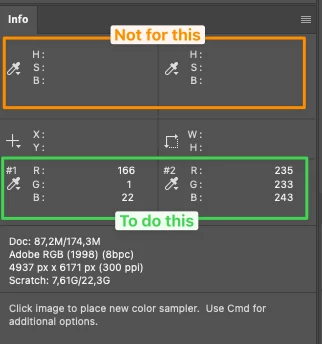
Please add a preference so the Color Sampler point readouts (#1/#2/…) can either:
-
be set to a default mode (e.g., HSB), or
-
remember the last used mode and apply it to new points.
❗Note: this request is only about the placed sampler points (#1/#2/…), not the color readout when simply hovering the cursor.
System info
Photoshop 27.3.1 (arm64), macOS 26.2.0, Apple M2 Max, 32 GB RAM
 AdChoices