



D.A.R
Legend
April 24, 2011
Open for Voting

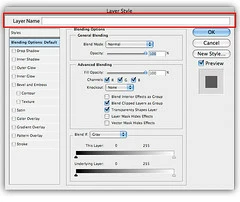
P: Allow renaming of Layers in Layer Styles dialog

  • April 24, 2011
  • 13 replies
  • 587 views

When I double click the Layer name in order to rename it, I often miss the name which of course invokes the Layer Styles Dialog.

This would be acceptable if I could actually rename the Layer in this dialog box. Closing and trying again can get tedious.
13 replies

Drew-B
Participant
June 2, 2017


A lot of the time, when I double click a layer name to rename it, I end up accidentally opening the layer style panel as there's no obvious separation between the clickable areas to either change layer name or open layer styles, so it would be really rather helpful if the layer's name was also within the layer style panel, just to save having to close the panel and double click the layer name again in the hope that this time you've clicked in the right place! Just some UX/UI feedback here really... 
Legend
October 31, 2013
Hi Dave, sorry about that. Looks like an honest mistake by Chris. I can see how it would happen (I've done it myself).

Here's the existing topic on this subject if you want to add your vote comment to topic: http://feedback.photoshop.com/photosh...
Inspiring
October 31, 2013
Hmm, I seem to have gotten the wrong topic when merging. I had selected the existing old topic about reordering layer styles...
zarrdave
Known Participant
October 31, 2013
@ Chris Cox (who merged my idea into this one) - this isn't the same thing so why has this been merged?
MY topic was about RE-ORDERING styles, not re-naming layers. Please un-merge and please read more carefully.
zarrdave
Known Participant
October 31, 2013


In the "Layer style" dialogue box (double click a layer on the layers panel (Windows version - I guess CTRL & click on a Mac maybe? Or right click and chose "Blending options") in Photoshop, along the left of the pop-up box are "styles" which can be applied to that layer.

The styles shown have a specific and fixed layer order. "Bevel & Emboss" at the top through to "Drop shadow" at the bottom.

They cannot currently be re-arranged, but sometimes different effects could be achieved if the priority order could be changed. For example, "outer glow" underneath/ behind "drop shadow" or "inner glow" above "inner shadow" or "color overlay" behind "gradient overlay".

I would like to see a way to CONTROL THE ORDER that styles are applied, either on a layer basis, document wide or both.
Inspiring
October 18, 2012
Add an input box so that you can also rename the layer in the layer style panel when you double click layer. Double clicking on the layer name, to rename the layer, a lot of times opens the layer style panel instead, if you don't click precise.

Inspiring
September 13, 2012
Yes. And then a keyboard shortcut could allow it to be opened and the layer renamed. I can't believe that they removed the ability for a keyboard shortcut to rename layers. That is the first thing I customized with every new version!
Participant
May 10, 2012
This happens all of the time. Include the layer color to the left of the name and we're in business.
Inspiring
April 16, 2012
Still hoping this makes the final cut, especially seeing how difficult it is to activate the name field w/o ending up in Layer Styles.
D.A.R
D.A.RAuthor
Legend
April 25, 2011
yeah, that might have been me in June 2008 🙂 when I posted the image to Flickr.