Known Participant
Jan 19, 2016 7:55 PM UTC
Released

P: alt+right click drag resize opacity lock

Would be great to have an option that will lock opacity when resizing my brush with alt+right click drag, There is one for brush hardness, but never found one for opacity!

Pinned Reply By Chad Rolfs

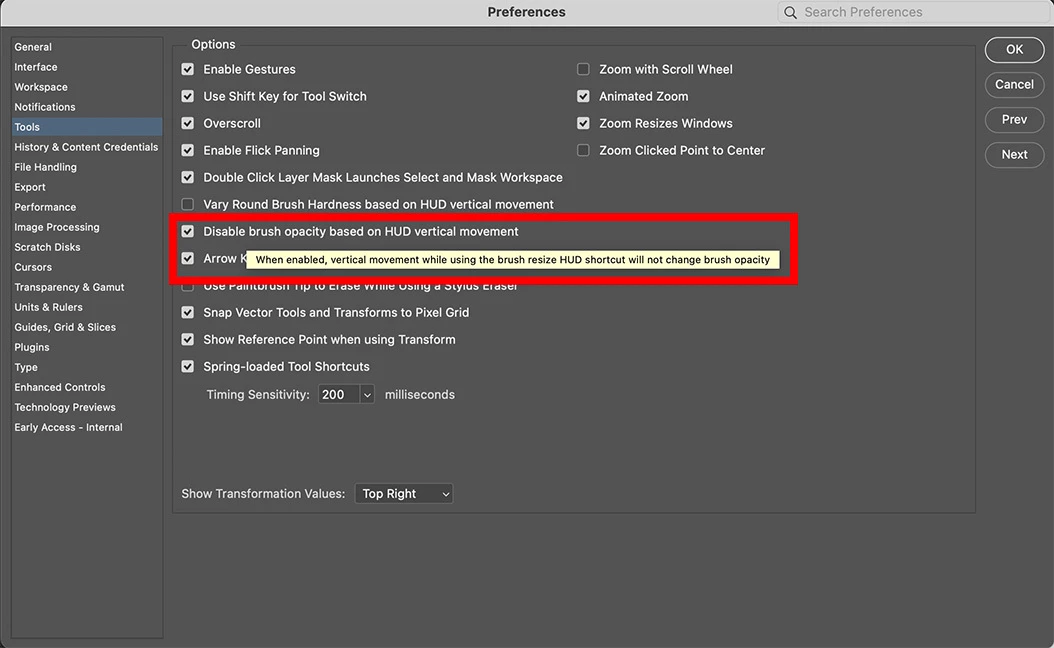
We have added a preference in the most recent Beta release (27.6 20260404.m3493) that allows you to disable vertical HUD adjustments for opacity. This will also be in the next upcoming release. 


95 replies

CShubert
Community Manager
Community Manager
Apr 16, 2026 5:57 PM UTC
Open for Voting→Released
Translate
Chad Rolfs
Adobe Employee
Adobe Employee
Apr 6, 2026 4:20 PM UTC

We have added a preference in the most recent Beta release (27.6 20260404.m3493) that allows you to disable vertical HUD adjustments for opacity. This will also be in the next upcoming release. 


Translate
Participating Frequently
Feb 3, 2026 3:44 AM UTC

我登录就是为了给这个帖子点赞。这个问题居然还存在,真是太荒谬了。我登录就是为了给这个帖子点赞。这个问题居然还存在,真是太荒谬了。

Translate
FreeTime
Known Participant
Sep 2, 2025 7:11 AM UTC

Это сделано для того, чтобы вы покупали новые планшеты! Это намеренное введение в фотошоп, чтобы мы не могли пользоваться корректно старыми планшетами! Ребята, эта проблема решится только через суд.. да и то думаю это будет сложно...  Просто эти ублюдки трясутся за каждый цент, поэтому сейчас есть куча альтернативных программ.. Если кратко эти мрази настолько жадные, что готовы ради нескольких тысяч нервировать 99% пользователей своего софта

Translate
Participant
Aug 29, 2025 6:37 PM UTC

Thank you for this by the way, works like a charm in the meantime. Just annoying to set this up everytime I'm on a new computer...

Translate
Participant
Aug 29, 2025 6:33 PM UTC

It has driven me crazy for years. Such an easy fix for tremendous amounts of pain. It even made me take time to write this, which I never do. It's just baffling it's STILL not in photoshop in the year two thousand and twenty five.

Translate
Participant
Jun 4, 2025 9:08 PM UTC

I just want to let you know i got around this using a free program called Autohotkey and running a script that automatically presses "0" when you release the alt key. This way every time you resize a brush using the drag method it resets the opacity to 100%. I'm using Photoshop 2022 on windows 11 so i'm not sure this works on MacOS

Here's the script, paste it into a .txt file and save it as a .ahk file. Google and download Autohotkey V1. I think you need windows ink enabled in your tablet settings but im not sure, i use a Wacom 4 tablet. Load Photoshop first then double click the script and it should work. When you are done remember to go to the system tray and close autohotkey. 

#IfWinActive ahk_exe Photoshop.exe

; When Alt is pressed, assume brush resize might begin
~Alt::
    resizingBrush := true
return

; When Alt is released, check if we were resizing
~Alt Up::
    if (resizingBrush)
    {
        resizingBrush := false
        Sleep, 50
        SendInput, 0
    }
return

#IfWinActive
Translate
Participant
Feb 21, 2025 7:06 PM UTC

I meant going into edit:preferences: tools: Vary round brush hardness based on HUD vertical.. 

Translate
Participant
Feb 21, 2025 7:00 PM UTC

Thank you! That was driving me nuts and I could NOT find a fix! that cured it

Translate
Participant
Dec 16, 2024 3:40 AM UTC

I want to PREVENT opacity changing when I resize my brush.

Translate