


Inspiring
September 26, 2012
Released

P: Annoyed by missing fonts warning

  • September 26, 2012
  • 28 replies
  • 1292 views

This is about Photoshop 12.1 x64 under Windows 7.

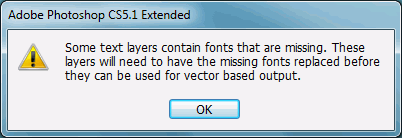
Our designers use MacOS. Our developers use Windows 7. Every time our developers open any single file sent from our designers, Photoshop throws up a modal dialog stating "Some text layers contain fonts that are missing. These layers will need to have the missing fonts replaced before they can be used for vector based output".

This doesn't just appear the first time you open any file like this. This doesn't just appear once per session. This doesn't just appear once per file. This doesn't just appear once when you open several files at once. This appears every time the user opens every file. There is no option to turn it off or never see it again, under Preferences or on the Dialog itself. The dialog does not appear briefly and go away after a set period of time. The notice does not appear in a status bar. This dialog has persisted for months and shows no signs of disappearing from the program by itself.

The following should be noted: Photoshop does not immediately change the file in any way. The file can be edited and re-saved with the same font layer intact, and Photoshop will warn you again when you try to open that file. There is another related, and arguably more useful, dialog that appears when a line with a missing font is selected. The developers will not normally need to change any font layers. In this author's opinion, this dialog serves no real purpose and should be changed in one or more of the many ways listed above or removed from the program entirely.
28 replies

Inspiring
December 10, 2012
I agree this is very annoying.

I would also like to be able to disable this warnings!
Inspiring
November 21, 2012
Chris Cox doesn't seem to be reading you Steve Mattison. His responses are short and inadequate. He has basically already admitted to the problem by not countering the points you're laying down.

I'm a developer and I want to ignore this warning.
Inspiring
September 27, 2012
I mean, it appears that someone is on "a noble quest" to prevent people who ACTUALLY WANT the option (there are TEN THOUSAND of us) from having the option of hiding a NAG screen, even if it's hidden at the bottom of a preferences panel, far out of sight of anyone.

Even if it's in a hidden field-set that only appears when you click 'advanced options'.

Even if you can't set it true unless you also check 'I am sure' and 'I am absolutely very sure' in addition to 'I actually really want to skip that first missing fonts dialog and accept all the ramifications that in the future I may actually experience a missing font without Adobe holding my hand through the entire experience, even though you're gonna pop up another dialog anyway every time I select an individual line that has a missing font in it'...

Do you just not want to type all of that out? Look, I did it for you. Now you can copy-paste it.
Inspiring
September 27, 2012
A warning is not IMPORTANT if there are TWO of them.

Image is not available


This is what you're arguing about.

Standard Practice in "most design firms" is to cater to the client. What the client wants, the client gets. The client is the one footing the bill to pay the paycheck of the design firm.

If the client wants a certain font on their website, the designer downloads it, and puts it into the PSD. It's not the designer having the issue. It's the DEVELOPER, who is NEVER going to have that font beforehand. The developer has not been communicating with the client about fonts used in their logos, and shouldn't have to. It's the developer's job to analyze the programmatic needs of the client's website demands, while integrating whatever sort of design the designer throws at them. That integration does not require editing the text within the logos made from fancy fonts that will be used one single time. It just requires extracting rasterized graphical elements from the template, a process that is oddly not hindered by a few missing fonts.

I thought my company was just buying "Photoshop", I didn't know my company was buying "Photoshop and you're gonna have to download every font you want to use before you even know you're gonna need it even if you're only going to use it once or we'll bother you to the ends of the earth". You should probably rename it that, so people won't be so surprised that it's what they're getting. Here I thought I was the client, and you guys were the design firm, and I was footing the bill to pay your paycheck. I've apparently paid for you to spend the better part of the day reading all of this, thinking up reasons not to give the client what the client wants, and then typing them out. Are you just the guy they pay to say "No"? Is Adobe's official policy to reply to their clients with "I'm sorry that you are annoyed" and then do nothing about it?

And now I see how Adobe has wasted my money. The amount of time to add a single check-box to the preferences panel, and an...
IF(GetVar($ignoreMissingFont)==FALSE){
    AnnoyUser('MissingFont');
}
...certainly would have wasted a lot less of Adobe's hard-earned money than this exchange has.

I wonder what the CEOs would say.
Inspiring
September 27, 2012
I'm sorry. I thought this was the PROBLEM-reporting form.

A modal dialog (save screen) just appeared more than 90% of the way outside the screen. So tell me, just how much "asking the OS about the display size" is Photoshop doing, and then completely ignoring? For reference purposes, I do not have multiple monitors installed.
Inspiring
September 27, 2012
In normal circumstances Photoshop asks the OS about the display size, and brings the dialogs or palettes back onto the visible display area. The only time we've seen that fail is when the OS thinks a display is still connected that isn't really connected (like external displays on laptops), and the OS needs to re-test for connected displays to update it's layout information.

But if you try that hard, non-modal states can also cause serious problems.

And you do seem to be trying really hard to cause yourself more problems.
Inspiring
September 27, 2012
Just because other programs are sloppy and don't inform you about problems doesn't mean that a professional program should also be as sloppy.

And nothing specialized is required here -- just make sure you have the fonts installed that you are using in your documents. That isn't all that difficult, and is standard practice in most design firms.

I'm sorry that you are annoyed by an important warning that you have not taken steps to correct. We'll make a note to improve the wording of the warning and possibly provide more information in it in the future.
Inspiring
September 27, 2012
My car doesn't constantly demand specialized engine oil imported from various countries every time I open the car door. It only tells me about the oil once I start to use the oil.

The "problem" only comes up when you go to edit the font. And there's already a modal dialog for the "problem", and that modal dialog appears when you go to edit the font. I'm not saying that the second modal dialog is a problem, on the contrary, it tells you the font you need. But you know, that just might be my next ticket. You're starting to convince me that Modal Dialogs anywhere are a threat to justice everywhere.

Half a million results for [modal dialog evil] on google. 

You know who doesn't pop up an alert telling me that the PSD is missing a font? GIMP. And Irfanview. I guess those programs are just BETTER than Photoshop. Maybe it's true what they say; "Money can't buy happiness". And "You get what you pay for" is an outright lie.
Inspiring
September 26, 2012
No, many warnings should not have a don't show again, because you really need the warning every time the problem comes up.

Do you only need the "engine oil" light to work the first time you start your car and never again? Or should it come on every time something goes wrong?

And me: I go correct the problem instead of looking at warnings all the time.
Inspiring
September 26, 2012
CASE IN POINT! An hour ago, I moved the Modal Alert Dialog to the bottom right of my screen, for no other reason than to see how far off-screen I could get it. Then I figured "Oh well" and pressed the space button to close it, because you still can, you know.

Now, an hour later, I go to close Photoshop. One of my documents is unsaved. That document comes to the forefront, but Photoshop stops responding. I figure, at first, that it's just processing. I go and do some other stuff for a minute or two, and come back to Photoshop. Still nothing. I try to click on the window. Nothing happens. Photoshop is frozen?

Then I recall the last screen coordinates in which I left a dialog. I check the far bottom right of my screen, and sure enough, that's where top itsy-bitsy corner of the "save changes" dialog has chosen to appear.

THIS IS NOW A STOP ERROR.

If the user normally uses screen resolution 1920x1200, and normally moves their dialog to the bottom or right side of their screen... and then, for any reason, changes their screen resolution to 1024x768 (to maximize compatibility with certain programs that require maximum compatibility, say), any Photoshop dialog or alert that appears for said user, from a 'missing fonts' alert while opening, to a 'save document' dialog while closing, will appear out-of-resolution, off-screen, and the program will have effectively seized up, providing no input to the user. Worse, if the user presses buttons on the keyboard, [tabs, spaces, enters, or whatever], trying to get Photoshop to respond, they may unexpectedly lose data or cause other unexpected results to happen.