


Inspiring
September 26, 2012
Released

P: Annoyed by missing fonts warning

  • September 26, 2012
  • 28 replies
  • 1292 views

This is about Photoshop 12.1 x64 under Windows 7.

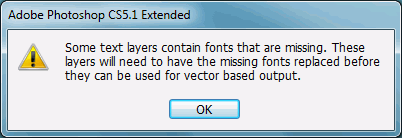
Our designers use MacOS. Our developers use Windows 7. Every time our developers open any single file sent from our designers, Photoshop throws up a modal dialog stating "Some text layers contain fonts that are missing. These layers will need to have the missing fonts replaced before they can be used for vector based output".

This doesn't just appear the first time you open any file like this. This doesn't just appear once per session. This doesn't just appear once per file. This doesn't just appear once when you open several files at once. This appears every time the user opens every file. There is no option to turn it off or never see it again, under Preferences or on the Dialog itself. The dialog does not appear briefly and go away after a set period of time. The notice does not appear in a status bar. This dialog has persisted for months and shows no signs of disappearing from the program by itself.

The following should be noted: Photoshop does not immediately change the file in any way. The file can be edited and re-saved with the same font layer intact, and Photoshop will warn you again when you try to open that file. There is another related, and arguably more useful, dialog that appears when a line with a missing font is selected. The developers will not normally need to change any font layers. In this author's opinion, this dialog serves no real purpose and should be changed in one or more of the many ways listed above or removed from the program entirely.
28 replies

Inspiring
September 26, 2012
In a perfect world, EVERY warning should have a don't show again checkbox. I've been informed. Thanks for telling me. Don't worry about it. I do this every day. Here's a nickel. I know what I'm doing. I'm not an idiot.

Would you like me to pop up a Modal Window on your screen every day? Every time you open, I don't know, a source code file of some sort? "Warning; the source code you're editing could cause your system to crash if you do the wrong thing."

Oh, wait, is this just Adobe getting revenge on Microsoft for that whole UAC thing? That would be hilarious. You know you can turn UAC off, right? A prompting system installed to prevent the user from getting their computer infected with viruses... and you can turn it off. A missing font or two in your Photoshop document, however? Why, that's simply unacceptable. 😉
Inspiring
September 26, 2012
I don't seem to need them at all. I don't need them to open the document successfully, I don't need them to see what the fonts look like, and I don't need them to save the document successfully with the same text-layers intact.

I expect that if I don't have a font, I won't be able to edit the text-layer without changing to a different font, but that's why there's that 'useful alert' that tells me which font I need.
Inspiring
September 26, 2012
It appears to be a modal; a visible element upon the screen that takes the focus from the main Photoshop window, changing that window's "mode" from the normal "mode that accepts input", into a "mode that does not accept input".

"In user interface design, a modal window is a child window that requires users to interact with it before they can return to operating the parent application, thus preventing the workflow on the application main window. Modal windows are often called heavy windows or modal dialogs because the window is often used to display a dialog box." - Wikipedia again

"Any other error display mechanism"? Like, perhaps, displaying a faded red background behind the layer name in the layer's window? There's already an "alert" when you attempt to change the text. There is no reason for another one when you open the document, especially one that doesn't present options.

Were this small "alert" to appear outside of the user's screen resolution for any OS-related reason, one would simply assume the Photoshop application had crashed, for all intents and purposes. Additionally, since the Modal takes focus away from the Photoshop application, the close button would not work, and Photoshop would need to be force-terminated (Possibly causing the user to lose work from other unsaved documents!)

The "warning lights" on Photoshop prevent the user from opening the program with such a document, and prevent every other similar document from being opened. Every time. The warning lights on my car do not prevent myself and every other passenger from opening the door and getting into the car. Should they?

There are no missing resources needed to render the document correctly; the document renders just fine, because PSDs apparently include a rasterized version of the text-layer. Ask the PSD Specification people how that works. I'm not a Photoshop programmer. (Though learning a new programming language and implementing these changes I'm suggesting can't be more difficult than teaching you about modal dialogs, I'm sure.)

1995 called. It wants its OK-button back.

Image is not available

Inspiring
September 26, 2012
It's not a modal dialog, it's an alert -- necessary when informing the user about important problems (like missing resources needed to render and edit the document correctly). Any other error display mechanism would still require a semi-modal state so that the user must confirm or dismiss the error warning before continuing to edit their document.

Yes, the dialog could do better to inform the user about the names of the missing fonts. I think there's already a feature request for that.

There's a reason for the warnings -- just like there's a reason for the warning lights and alarms in your car: to inform you that proceeding could be dangerous and that you really should take corrective action soon.
Inspiring
September 26, 2012
It's a warning about the document, it really shouldn't have a don't show again checkbox.

If you are editing the document on another machine, you really need the fonts that go with that document.
Inspiring
September 26, 2012
But I guess if Adobe wants to badmouth the developers of my company for not having every font on the internet installed, I'll let Wikipedia badmouth Adobe.

[Not that myself or said developers work for or otherwise edit or endorse Wikipedia in any way. But as far as 'public opinion' goes, this is what people have to say on the matter.]

"Modal dialogs are generally regarded as bad design solutions by usability practitioners since they are prone to produce mode errors. Dangerous actions should be undoable wherever possible; a modal alert dialog that appears unexpectedly or which is dismissed automatically (because the user has developed a habit) will not protect from the dangerous action."
- http://en.wikipedia.org/wiki/Dialog_b...

"Users may not recognize that a modal window requires their attention, leading to confusion about the main window being non-responsive, or causing loss of the user's data input intended for the main window."
- http://en.wikipedia.org/wiki/Modal_wi...
Inspiring
September 26, 2012
As emphasized in the above text; The developers will not normally need to change any font layers. The developers simply export PNGs and program websites. The process of exporting a PNG is not affected by a 'missing font'. As emphasized in the above text; Photoshop does not immediately change the file in any way.

Additionally; Some of the designers work off-site. In addition to running a completely different OS with a completely different font-base, the designers often find new fonts online which fancy them. The developers cannot be bothered to go track down some obscure (possibly Apple-only) font that caught the Designer's eye, just to please Adobe. If the developer needs something changed in a non-standard font, it is most often a typo in a company logo or menu-bar, and ask the designers to do it so it looks right. But notifying the user that they don't have a font, and then displaying that font anyway? Should the user be impressed?

The user is not so impressed when opening 12 files at once (and getting 12 modal dialogs in a row). And the user is not so impressed when a second(third,fourth,etc) dialog box is displayed every time any font layer is clicked, for instance, in order to copy said text. The dialog doesn't display any pertinent information. No list of fonts missing. No location about where to get them. Just some vague threat about possibly inflicting future Modal Dialogs upon the user.

All I'm asking for is a check-box, in some future version.


It doesn't even have to be checked by default. It doesn't even have to show up on the dialog. It could be hidden in preferences somewhere.
Inspiring
September 26, 2012
The dialog is an important warning to the user.

And why have you not made sure that all of your designers have the same fonts installed to prevent these problems?