

Known Participant
February 5, 2014
Released

P: Custom brushes organization/sub-menus

  • February 5, 2014
  • 60 replies
  • 1946 views

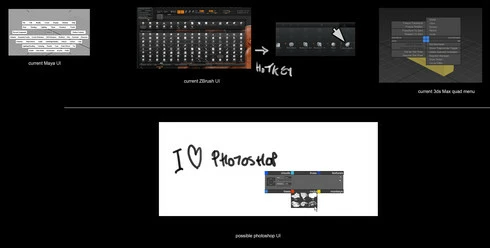
Could we have a custom brushes quad menu to access customizable sub folders.
Please see discussion regarding custom brushes here:
http://forums.adobe.com/message/6084985
60 replies

Inspiring
April 10, 2014
Requesting an update to the preset manager.
PECourtejoie
Community Expert
Community Expert
February 22, 2014
Also, I wanted to point out this other related discussion on the topic: http://feedback.photoshop.com/photosh...
Inspiring
February 16, 2014
Without a doubt, there's a need for a Paint specific UI for Ps. The same is true for other Adobe CC apps such as Ai, Fl, and Ae. A shared UI would greatly enhance the ability for CC subs to jump from app to app.
PECourtejoie
Community Expert
Community Expert
February 16, 2014
Erik, we do indeed speak of brushes here, but you should really post a separate request, and post the link here, as this thread deals more with presets organization, but I do like your idea very much!
davidc1815
Legend
February 16, 2014
I'm in favour of some reorganisation of CC's preset management but please let us not go down the Corel Painter route - the latest X3 brush management and tweaking are awful to use. That system looks chaotic and complicated, and is clumsy to work with. Let's not throw the baby out with the bath water.

A small thing - but it would be nice if the name of the current Photoshop preset could be displayed as you use it - if you have made any changes to your preset brush it no longer appears highlighted in the drop down presets list and it is easy to forget which preset you started with.
Inspiring
February 11, 2014


i'd like a brush manager that

1. lets you test out brushes on a canvas
2. has a list of the library with detailed info (names of brushes, size) and stroke previews like the current brush preset window
3. has a list of all installed libraries, with expandable lists of the brushes in them
4. has drag and drop capability to edit libraries without opening them.
5. lets you create/delete libraries
6. easily lets you create new brush tips and save them into a library all in the same ui

as it is now you have to open a library and then delete all the brushes you dont want from it to add the brush you do want to another library which is really annoying especially when you have big libraries.
vyle artAuthor
Known Participant
February 8, 2014
The title mentions "submenu", because that is the overall concept of the idea, whatever the solution may become.
Using literally a subfolder menu is actually a very "simplistic" approach for a solution, when the solution should be "simple".
jonasd17518611
Known Participant
February 8, 2014
Hi David, I understand your points and I'm familiar with ZBrush's system.

Don't entirely agree on your view about more surface traveling but ok,
the post is called Custom Brushes Sub-menus, so I thought that's what we were specifically talking about, ergo my two cents in simple organizing possibilities.

One-click systems or pies would be great though, let's see what Adobe comes up with.
Inspiring
February 8, 2014
One thing which I guess might be on-topic to mention is that it doesn't seem to be possible to make panel features (with Adobe Configurator) nor actions controlling Brush panel features such as Shape Dynamics On/Off or Angle Control: ...
Or have I missed something?
Those things don't get recorded through actions. Would be very nice to be able to toggle Direction on and off for the current brush (and ideally without relying on the whole Shape Dynamics on/off as that would toggle every other sub-item and not just Angle Control).
vyle artAuthor
Known Participant
February 8, 2014
Jonas, The main issue with the solution you offer is not the logic (it makes a lot of sense, and I like the presentation of it) but it is the amount of clicks necessary in order to reach a specific brush, surface travelled and more importantly the lack of possibility for the maximum expansion possible in the future. Ideally we want a maximum of one to two clicks per selection and even better if just one click+hovering.
A folder system means more clicks, more distance to move the stylus, and depending on how many brushes you have, also having to use the scroll bar to see all of them. If you have the latest of zbrush, you may want to try it to experience what one click selection (plus one key at worse) feels like, and how liberating it is. And even more liberating is just a key assigning brush set or brush pop up. Plus the filtering option Gavriil offers allows for a huge amount of various sets without necessary loading all brushes at once, good for memory usage. Since we are talking about a redesign, the thing should be fully fleshed out and offer a fully thought system that allows for expansion so we do not just push the rock just a little further and complain about it in two years. I agree with the tagging, not sure I'd be up for it as an artist painting at home, but I could see on an entertainment project when I am at work, where it could be very useful especially when sharing assets with groups of artists. If we request something, might as well be the best we can, not just a temporary solution.

Also, top of the line, the pie menu is always a great thing to use as it makes everything second nature just after few hours of work, super intuitive and rapid, and complexity depends on the artist using it and does not limit future expansions.
