

Known Participant
February 5, 2014
Released

P: Custom brushes organization/sub-menus

  • February 5, 2014
  • 60 replies
  • 1946 views

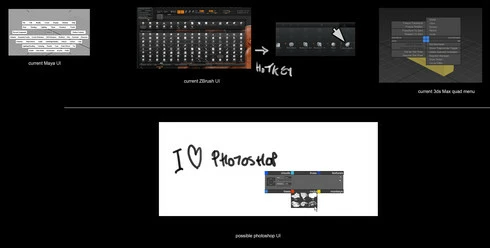
Could we have a custom brushes quad menu to access customizable sub folders.
Please see discussion regarding custom brushes here:
http://forums.adobe.com/message/6084985
60 replies

Inspiring
February 7, 2014
Inspiring
February 7, 2014
I agree with the brush system being revamped but another thing that I hope adobe tweek up is the amount of undos that you can make. I find it really a pain in the arse to be limited to only one undo and constantly going back to the history palet in order to go back a few steps.

What do you guys think about it?

Cheers!

Johny C.
jonasd17518611
Known Participant
February 7, 2014
Hi David, the menus here are meant as an example and are at the smallest size thus looking a bit cluttered. In practice the same Stroke mode window would look something like this
http://bit.ly/1c9Cswc


Image is not available


That is why i suggest resizing and autofold options. It looks quite tidy to me and folders are a simple and long needed addition.

Dont get me wrong I love gavriils ideas and a filtering system would be great, im just trying to be realistic as to how many new windows, panels and functions we can realistically request.

Additionally I have a bit of an issue with the tagging system, though it is great it will force users to go through a long, slow process of accurately tagging every single brush for them to show up in the filters
Trevor.Dennis
Community Expert
Community Expert
February 7, 2014
Reuse the same shortcuts saved to different Workspaces. Or the same basic Workspace named according to the shortcuts saved with it. Try it. It works fine.
Participant
February 7, 2014
These changes need to happen! Adobe, hear us out!! I fully support you guys!!
PECourtejoie
Community Expert
Community Expert
February 7, 2014
More and mode, I think that a Pie-type contextual menu, where you have 8 choices around, that you could select with the mouse, or using a number in the keypad, giving you another sub-menu or a different brush/preset. Going to the menus is further and further away with the screen resolutions soon switching to 4K, and the keyboard shortcuts are almost all taken. Close to the mouse, so we stay focused on the work!
PECourtejoie
Community Expert
Community Expert
February 7, 2014
Chris, could right-click be used as a modifier?
Inspiring
February 7, 2014
Participant
February 7, 2014
Here is some of the images from my blog post; please to see the description of each read the 'longer' explanation there : http://www.hexeract.net/blog/2014/2/6...

They key point is to avoid useless menus and cluster-looking entities, I feel some of the other options provided present too much visual noise.


Image is not available


Image is not available


Image is not available


Image is not available

Inspiring
February 7, 2014
Because all the shortcuts are already in use, and selecting a brush means something in the brush palette (so multi-select, or drag and drop don't really work).
