

Known Participant
February 5, 2014
Released

P: Custom brushes organization/sub-menus

  • February 5, 2014
  • 60 replies
  • 1946 views

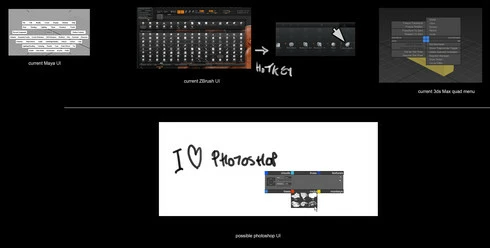
Could we have a custom brushes quad menu to access customizable sub folders.
Please see discussion regarding custom brushes here:
http://forums.adobe.com/message/6084985
60 replies

Inspiring
February 6, 2014
I love all the different interfaces being presented. The one note I'd give is lets push to make the ui as small as possible and as close to your current mouse position as possible, so you don't have to make your mouse a ton to get to the tools you want, even without shortcut keys. Lets see this happen!
jonasd17518611
Known Participant
February 6, 2014
I also fully support a brushes update.

Please look at Gavriil's suggestions as they offer a lot of great new features.

I've also done a mockup of a possible overhaul, it's meant to be as simple and as close as possible to the current way Photoshop works.

See it here: http://bit.ly/1c8fc1t
vyle artAuthor
Known Participant
February 6, 2014
Gavriil>> pretty much perfect.
Participant
February 6, 2014
I fully support a revamped brush preset menu and a new brush system.

I made my own mock-up version; you can see the full set of images here: http://www.hexeract.net/blog/2014/2/6...
Inspiring
February 6, 2014
Glad you like it David. I've been meaning to do a writeup on a better brush picker for awhile now, when I saw your post you had some great ideas on the subject so I combined your ideas with the thoughts I had.

I've added a page on the subject to my personal wishlist on my website for future reference...

http://www.neilblevins.com/cg_tools/c...

Now lets see if we can convince people to vote for this. 🙂
vyle artAuthor
Known Participant
February 6, 2014
Neil, I am SO happy to see you here. Your UI genius is most welcome!
Your proposal answers fully my need. Perfect.

PECourtejoie, Neil totally nailed the issue in his post.
Inspiring
February 6, 2014
The main pain point for me is the amount of time it takes to select a new brush.

I have about 200 brushes I use. There's currently two ways to organize them.

First is flat earth. I have a single brush file that contains all 200 brushes. If I do this, when I right click I get a huge wall of brushes (possibly larger than the entire screen), and now I have to move my mouse quite a distance and do a lot of visual hunting to find the brush I'm after. Try operating a computer file system with no folders for awhile and you'll get the idea. There's a reason we have folders in an OS. And that's why I want to see brush groups.

The second technique is to take similar brushes (clouds, rocks, trees, etc) and put them into separate brush files. This is similar to groups. But the issue is the amount of time it takes to switch to a new brush file to access a different category of brush. You need to either go to replace brushes, which is quite a number of clicks, or you need to move to the location of the brushes palette where you can switch between brush files, both of these break your workflow because you now have to go find a palette somewhere else in the interface rather than having it your tools where you want to paint your brush stroke.

The system I show above allows for quick access to brushes, either through hotkeys or by setting up a simple visual hierarchy that allows you to categorize and then move your mouse less to get the brush you want. That would make selecting your brush much quicker which means you can paint faster.
PECourtejoie
Community Expert
Community Expert
February 6, 2014
It would be very useful if you could describe your pain points.
What is the issue #1? not seeing the contents of presets? fast switching between presets?Seeing the last X brushes?
Inspiring
February 6, 2014
Here's another potential ui mockup that covers most of these features...

Trevor.Dennis
Community Expert
Community Expert
February 6, 2014
Note: several comments and a great deal of support for the idea, on this thread:

http://forums.adobe.com/thread/139783...

One thing mentioned more than once, was the ability to see the contents of a brush set without committing to it with Append. Photographers had a huge give with the Photography Bundle deal last year, so time to be nice to painters and illustrators. 🙂
