



Pedro Cortez Marques
Legend
January 27, 2022
Open for Voting

P: HSB values on Info panel on new Color Samplers by new specs panel option

  • January 27, 2022
  • 5 replies
  • 847 views

I like to color change or color match using the HSB method and color samplers.


By default, every time I create a new color sampler, the info panel color values show me RGB values.

I would like to have an additional specification on the info panel preferences, allowing me to choose the value kind I want to see (avoiding selecting it every time there is a new color sampler).
In my case, I would like to have always HSB values showing up, not RGB.
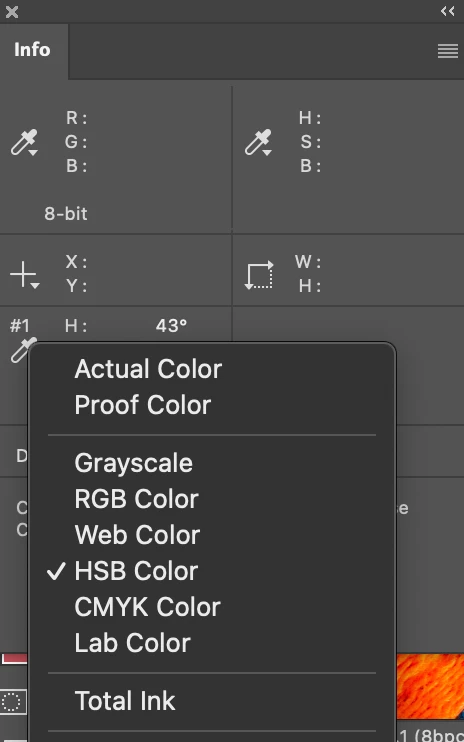
#colorsampler #infopanel #HSB 

5 replies

Participant
January 8, 2024

can not edit my post?


P.S. : 

cons:

have to install autohotkey,

can not move image since the point will not go with the image,

to grab a point, have to switch to a pointed curser, like MOVE tool.

Participant
January 8, 2024

For anybody who might be interested: I wrote an Autohotkey script to do this. 


It ONLY WORKS IN WINDOWS !


Install autohotkey, then any script can be run like an exe file.


The usual scenario:


I run this script, there will be a small window around upper left corner of screen, always on top.


move mouse to any point on screen, use hotkey (win_spacebar), the HSB value of that point will show in that small window. 


do not move the image/document in photoshop. Do my thing about color adjusting, the color changes will show, both original and new value, just like photoshop's color sample tool does.


At any time, I can move mouse to new point and use hotkey to grab color.


I can move the small window. I can close it to clear up screen, then use hotkey to grab a new point and the window will show again.


If anybody interested, I can post the script code.

Participant
January 7, 2024

No feedback. No solution.

Pedro Cortez Marques
Legend
November 24, 2023

No feedback. No solution.

Known Participant
February 17, 2023

Hi Pedro

I'd like the same option 🙂

Did you find a solution in the end?

Cheers


Steve