



Pedro Cortez Marques
Legend
March 19, 2018
Open for Voting

P: New advanced "Make Work Path" from selection

  • March 19, 2018
  • 10 replies
  • 1564 views

When transforming a selection to path in the Paths panel, using Make Work Path, for years that we get the same single argument "number of pixels".

Why so many improvements in photoshop but not on the path panel?

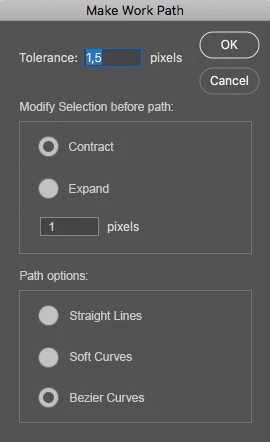
Here is a semi more advanced "Make Work Path" panel could be.
I could diminish the pre-selection 1 px before creating the path and select what kind of path I want.
Some times I want to force only straight line (path points with the same left and right direction values)
Some times I want different math formulas to generate the paths (the other two options)
10 replies

Lance021
Participating Frequently
June 25, 2021

It's not full version.

Pedro Cortez Marques
Legend
June 25, 2021

*CBK86DGL This was posted in the new ideas section. 
This plugin never existed. I posted it as a new idea for Adobe to do it. If you like it, vote for it.

Note: the panel, was an image to help Adobe understand what is my idea.

Inspiring
June 25, 2021

hi bro, i need some help

1. which version of this photoshop needed for this plugin?

2. which folder i need to place this plugin?

Thanks in Advance.

Pedro Cortez Marques
Legend
December 3, 2018
Yes, I understand.
The company that created it was contacted several times to ask for an update or an official link, and they said they will not do it anymore.
Too sad. The results on the paths were better than Adobe's.

Anyway, let's hope that this would become better in the future, and preferably more productivity (fast, accurate controlled) easy going.
Inspiring
December 3, 2018
it is not full version
Kukurykus
Legend
September 9, 2018
To which post / part of that you refer your words?

btw nice to see 34 users voted for this feature 😉
Inspiring
September 9, 2018
it is need requiment and password,it not full 
Inspiring
May 25, 2018
Thank you Pedro, this is awesome i will try it asap 😉
Pedro Cortez Marques
Legend
May 25, 2018
Here is an example already developed in the past on a 32bit plugin:

These guys upgraded the "Make work Path..." adding a second algorythm calculation. They don't upgrade it anymore, unfortunately. I wish we had a 64bit version!

It only works on a Photoshop 32bit version. The file is in here:
http://www.mediafire.com/download/z2...2u/OptPath.8bs
Kukurykus
Legend
March 19, 2018
Yes it's confusing, because there are little icons like that for Making Selction from path. Unfortunately it applies Feather Radius there was used last time (even after restarting Photoshop). I don't say it's bad it remembers value entered previously. But it is not handy to open fly-out menu to Make Selection only to change Feather Radius quantity. In this situation icon that Makes Selection from path is half useless as far as there is no box for the value you can change without opening menu 😞