



Edu Couchez
Inspiring
August 4, 2025
Open for Voting

P: Photoshop 26.10 Selective Color UI Changed

  • August 4, 2025
  • 30 replies
  • 2986 views

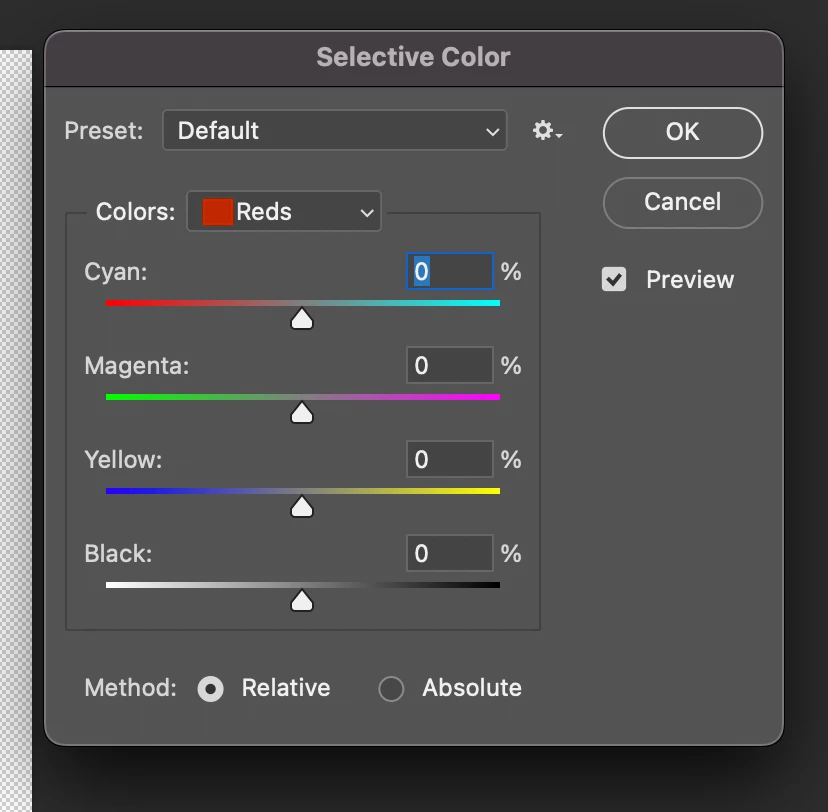
So... one of the best Photoshop tools I've used for decades for color correction has been replaced overnight by a duplicate of "Color Balance." I can't simply no longer correct individual colors as I did intuitively before. Why has a tool that worked perfectly been destroyed? The change has been so disastrous and counterintuitive that I can only think it's a silly programming error!
30 replies

alexanderl16240166
Inspiring
September 26, 2025

Just wanted to voice an agreement that this new UI is distracting and unpleasant. Having a bunch of bright colors on screen when you're working on something color sensitive is very deletorious. There's a reason the default UI background is grey, not red or cyan..

Participant
September 24, 2025

Please bring back old legacy selective color tool, the new one is a trash. Maybe with option in settings like the other new things.

davescm
Community Expert
Community Expert
September 24, 2025

'..the new one is a trash...'

Aside from appearance of the coloured sliders in the panel, the tool works exactly the same as the old tool. So it is only the panel that has changed.

Dave

Participant
September 25, 2025

No its not the same.

1. You can not enlarge  the photo with cmd+ or -(like the last Brightness-contrast). With  spacebar and click changes values

2. The shortcuts cmd 1 for red, cmd 2 for yellow, cmd 3 for green...cmd 9 for black does not exist any more

3. When  you press P for preview it puts letter p in current value (you have to click out of current value)

4. The appearence is trush

It is disgrace

jsr3
Participant
September 18, 2025

This new selective color tool is a disaster. I want to be able to remove colors to effect color changes and I want to be able to do it with all primary, secondary and grayscale colors. This tool does not work the same. The effects of its changes are different. 


D Fosse
Community Expert
Community Expert
September 18, 2025

It works exactly the same way as it always has. No functional change. As I said above, I use Selective Color constantly, it's my favorite color correction tool.


But I agree that the colored sliders have no place here, and I'd be happy to remove them if I could. It makes no sense in the context of how this tool is used.

viktorc92663764
Inspiring
September 9, 2025

This is a bad decision from Adobe. The previous version was better. Adobe had to keep the legacy version of the Selective Colour tab; otherwise, this would be a disrespect to customers.

michaljanata
Inspiring
August 22, 2025

there is much worse change in beta... ubsolutely unusable and destroying workflow... you cant use keyboard anymore to select color you want to edit

Known Participant
August 26, 2025

I agree with the sentiment those colored gradients drive me nuts and there is no option to turn it off.

Maybe I will go even that far as to downgrade.

Known Participant
August 26, 2025

If anyone is wondering 26.8.1 is fine it still has the old version

Participant
August 21, 2025

I agree! Adobe why did you change Selective Color?? Do you actually even use the programs?? 

D Fosse
Community Expert
Community Expert
August 5, 2025

As far as intuitive UI goes, I'd have to say I agree with the OP. These strongly colored sliders don't make much sense in the context of how the tool is used. The idea is to add/subtract color components, not move around primary colors wholesale. It's a subtle tool, that's why I like it.


But the point was that functionality is the same. I suspect we'll get used to it quickly.

Edu Couchez
Inspiring
August 5, 2025

First, I expect that if something works, why change it? Who even asked for a radical redesign of a UI that's been working for decades?


Second, the philosophy behind User Experience on software design is basically common sense and consistency. These "balance" color tones don't represent what's actually happening when you "subtract" or "add" a percentage of color contained in a selected range. If I remove 100% yellow from a yellow patch in a photo, I don't expect it to turn blue as the tool suggests, It's absurd!

davescm
Community Expert
Community Expert
August 5, 2025

'First, I expect that if something works,'
Selective Color still works the same way it did before. The only difference is the coloured UI.

'I don't expect it to turn blue as the tool suggests' 
The bars are merely a representation of what happens to a mid grey tone when you increase or decrease the individual CMYK colour slider. I agree they are of little use when honed in on a particular colour range such as the yellows in your screenshot. 


For me, I just ignore them and use the tool as I always have.


Dave


D Fosse
Community Expert
Community Expert
August 4, 2025

Yes, it surprised me too when I first opened the new UI.


But I can reassure everyone that it works exactly the same way as it always has. Nothing has changed except colored sliders instead of gray sliders (and this is my favorite color correction tool too, I use it constantly).

davescm
Community Expert
Community Expert
August 4, 2025

The tool has not changed but the UI now has coloured sliders instead of grey bars. What exact isssue are you experiencing with it?
Dave