



Edu Couchez
Inspiring
August 4, 2025
Open for Voting

P: Photoshop 26.10 Selective Color UI Changed

  • August 4, 2025
  • 30 replies
  • 2986 views

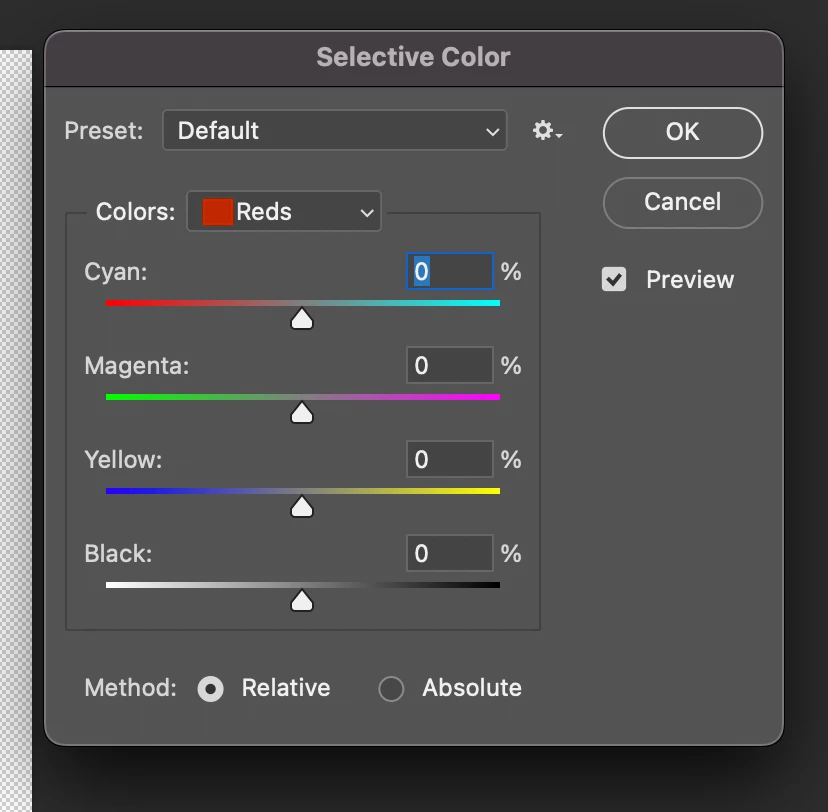
So... one of the best Photoshop tools I've used for decades for color correction has been replaced overnight by a duplicate of "Color Balance." I can't simply no longer correct individual colors as I did intuitively before. Why has a tool that worked perfectly been destroyed? The change has been so disastrous and counterintuitive that I can only think it's a silly programming error!
30 replies

Participant
October 10, 2025

This is simply not true. I used to use the shortcuts on the keyboard (Crtl1, Ctrl2 and so on) and it doesn't work anymore!

Participant
October 10, 2025

I couldn't agree more!

They must have had a trainee that doesn't even understand that this palette was originally invented for correcting CMYK-files.
(I have been using Photoshop ever since version 2.0 - if I'm correct - 1993 or 1994;-)

Participant
October 9, 2025

I've been using Photoshop since 1998 and I HATE this new palette. Please, Please change it back. It's unattractive, confusing and throws a wrench into my workflow. It doesn't even make sense. I am so dissappointed by this change. It was simple and straightforward before. Why add more clutter that hinders the simplicity and ease of use. Just my 2 cents. I H.A.T.E it.

Participant
October 9, 2025

Since they've chenged the interface of the selective color tool, you can't use the shortcuts.

Normally you use Ctrl 1 for red, Crtl 2 for yellow and so on, but since the interface has changed this does not work.
It is a lot of extra work to get to your mouse, go to the second screen and click one of the colored buttons (why???), to select the next color.
So please fix this bug! 
P.S. I am glad the bug with the info pallet (before/after) has been solved, but I really would prefer my older version of Photoshop!

Participant
October 3, 2025

Thank you

Semaphoric
Community Expert
Community Expert
September 29, 2025

Wasn't "Modern Interface" what Microsoft called Vista?

Edu Couchez
Inspiring
September 29, 2025

"modern user interface"... hehehe.

michaljanata
Inspiring
September 29, 2025

hey Adobe, please, bring back old dropdown menu, this new is absolutly terrible and not usable wihout keyboard access


Semaphoric
Community Expert
Community Expert
September 29, 2025

Edit > Preferences > Technology Previews and un-check Enable Modern User Interface.

michaljanata
Inspiring
September 29, 2025

@Semaphoric thank you!

Participant
September 28, 2025

My difficulty with the new selective colour adjustment is that  nothing happens with the sliders. I want to put more black in the neutrals and yet abolutley no change is visible in my selection. Any ideas why?


Known Participant
September 28, 2025

Looks built for primary schoolers. Please bring the old one back.