


freshsisyphus
Participant
December 23, 2014
Open for Voting

P: Support more accurate 16 bit/channel display even when zoomed out below 66.67% magnification

  • December 23, 2014
  • 54 replies
  • 1815 views

It is rather abysmal that photoshop still has this critical bug, given that is has been reported for years now. It is a software for professional imaging yet you cannot work on an image at print resolution and have accurate color displayed on the screen.
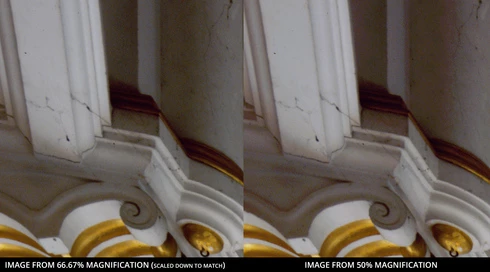


Steps to reproduce:
-For full effect, open an image with dark shadows you would like to lighten
-Again, to dramatize, we are going to add two curve adjusment layers
--Make one curve to set your black and white points and your gray balance
--Make another curve to open up the dark shadows
-You should see that at 66.67 magnification you will get the true colors while at 50% below colors suddenly change, meaning you cannot look at the image as a whole and make color adjustments. This applies to any image that is more than 4/3 your screens total resolution, which, for a 1080p monitor that is beyond the average, would be 3MP. Yes, that is three megapixels as in DSLRs of 14 years ago.

Perhaps you could have an option to 'render proxy at this magnification' which would render a 16bit cache level at a specified magnification at which curves et al could be calculated from there on.

Shame on you for not having addressed this despite pleas from multiple professional fields for so long.

54 replies

Mark.Dahm
Community Manager
Community Manager
September 2, 2022

Photoshop 23.5 shipped with a new option called "Precise Previews for 16-bit files" in the Technology Preview Preference. It's on by default, and preserves 16-bit previews at higher image pyramid levels.

Known Participant
July 11, 2022

2022 and still no better apparently. This is insane

Denyerpro
Known Participant
April 14, 2021

Well 7 years later and still waiting. The number of gripes I have with PS is escalating to the point where transitioning to The Other Editor is becoming a more tenable proposition 😕😕

--
Known Participant
July 21, 2020
Yes i know, i wanted to say that for people that could read that and think that buying graphics cards and displays could solve this situation : it's not.
My message was unclear, indeed !
pinktank
Participating Frequently
July 21, 2020
To be clear: The issue is not related to 10bit displays, it's about the image processing that happens before it is sent to the display, you would see the effect even if your display and graphics card were from 10 years ago.
Known Participant
July 20, 2020
thread written in December 23 2014.
It's hard to expect anything.
Even with 10-bits display and graphic cards, Photoshop doesn't care.
pinktank
Participating Frequently
July 19, 2020
Hey Dean, nope, Adobe has yet to provide a solution. (I'll be surprised the day they do)
Inspiring
July 19, 2020
Hi Guys, I was just wondering if there is any update or a fix to this issue? Im so glad i found this thread as Ive wasted so much time searching for an answer to this. It has also affected the way I work as i have not been pushing my edits to their fullest potential because i didn't want to introduce even more banding and artefact's. Still cant believe how much stress this has caused me, just because i wanted to view my image as a whole! Cheers
Inspiring
May 30, 2020
Proper 16-bit preview would be great. Hope this issue will be solved soon.
Known Participant
November 3, 2019
This still bugs me. Please Adobe! Computational power gets better and better. Please find a way to make use of 16 bit everywhere, not just in 100% crop (66%+) ...