


freshsisyphus
Participant
December 23, 2014
Open for Voting

P: Support more accurate 16 bit/channel display even when zoomed out below 66.67% magnification

  • December 23, 2014
  • 54 replies
  • 1815 views

It is rather abysmal that photoshop still has this critical bug, given that is has been reported for years now. It is a software for professional imaging yet you cannot work on an image at print resolution and have accurate color displayed on the screen.
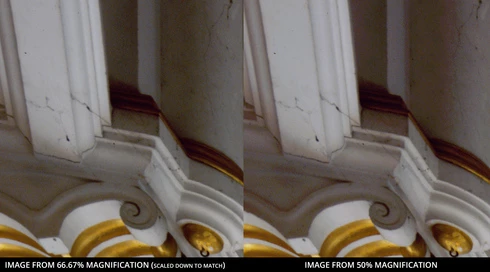


Steps to reproduce:
-For full effect, open an image with dark shadows you would like to lighten
-Again, to dramatize, we are going to add two curve adjusment layers
--Make one curve to set your black and white points and your gray balance
--Make another curve to open up the dark shadows
-You should see that at 66.67 magnification you will get the true colors while at 50% below colors suddenly change, meaning you cannot look at the image as a whole and make color adjustments. This applies to any image that is more than 4/3 your screens total resolution, which, for a 1080p monitor that is beyond the average, would be 3MP. Yes, that is three megapixels as in DSLRs of 14 years ago.

Perhaps you could have an option to 'render proxy at this magnification' which would render a 16bit cache level at a specified magnification at which curves et al could be calculated from there on.

Shame on you for not having addressed this despite pleas from multiple professional fields for so long.

54 replies

Legend
January 18, 2019
David, will send you an email to get the file. Thanks.
Charles Lanteigne
Participating Frequently
January 17, 2019
I did restart Photoshop, no dice.
pinktank
Participating Frequently
January 17, 2019
A suggestion: put a toggle on a panel that can switch to 16bit rendering for all levels without restarting Photoshop so that we can enable it as needed for a task and disable it afterwards, not dissimilar to 'high quality previews' found in some modal tools.
Legend
January 17, 2019
I can send you that file, let me know how to get it to you. Thank you!
pinktank
Participating Frequently
January 17, 2019
You have to restart Photoshop after doing that but it will also slow photoshop down to a crawl for general use.

To Adobe: What would be useful perhaps is a toggle on a panel that can switch to 16bit rendering without restarting photoshop so that we can enable it as needed for a task and disable it afterwards, not dissimilar to 'high quality previews' found in some tools.

On a similar note, what would be great is to have a 16 Bit curve adjustment option, the current one is rather limiting in precision for setting the black point in common color spaces.
Charles Lanteigne
Participating Frequently
January 17, 2019
Changing the Cache Levels to 1 does not fix the issue for me, there's still a shift in color when I zoom in/out. (I also notice no difference in performance.)

To be clear, I use adjustment layers when I see the issue. "Flattening" the image (or placing a composite of the stack at the top) makes the difference go away (regardless of the cache levels), but obviously this is not convenient.
Legend
January 17, 2019
I'd need to get your sample file that reproduces the problem so I can get it in front of engineering.
Legend
January 17, 2019
What about my post above where there is actually a big change when converting a file from 16 to 8 bit? IOW, its not just a cosmetic difference but different actual pixels. I've seen this happen one other time with layers and Difference blend mode.
Legend
January 17, 2019
As Chris pointed out earlier, the current implementation, where pyramid levels above the base (that is, the 50%, 25%, levels) of a 16 bit document are in 8 bit. The thinking at the time was that zoomed out representations are previews (inaccurate for a number of reasons including interpolation, etc) and  speed/performance was more important than accuracy.

It might be something we can revisit as compute power increases and we refactor and improve our drawing code - but it's not 'free' - it takes a lot more compute power.

If you want accurate 16-bit previews at all levels of the zoom pyramid, you can go to Preferences > Performance... and set the "Cache Levels" to 1 (close all docs and reopen them). You can see how 16-bit at all zoom levels affects performance and why this decision was made.

(Christoph pointed this out earlier in the thread but I wanted to capture it in an official answer)
Legend
January 4, 2019
This is the same file- 16 bit on the left, converted to 8 bit on the right. No other changes. This is consistent with what I get zooming in and out on the (much larger) original between 50% and 66.7%. I've seen this before with multiple layers set to Difference blending.

Is this behavior expected? Doesn't seem right to me.