


marcbjango
Known Participant
October 4, 2012
Open for Voting

Photoshop: It would be great if Mask Feathering scaled with the document

  • October 4, 2012
  • 14 replies
  • 986 views
It's common for website and software designers to scale documents. Most Photoshop features handle document scaling well. Layer Styles applied to Shape layers can (optionally) scale when the document is scaled.

However, Mask Feathering on Shape layers can not.

To be clear, here's the feature I'm talking about:
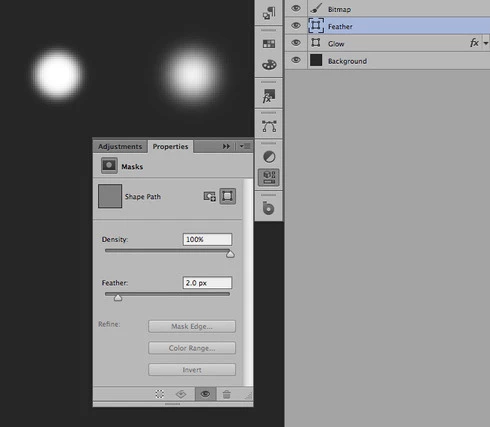


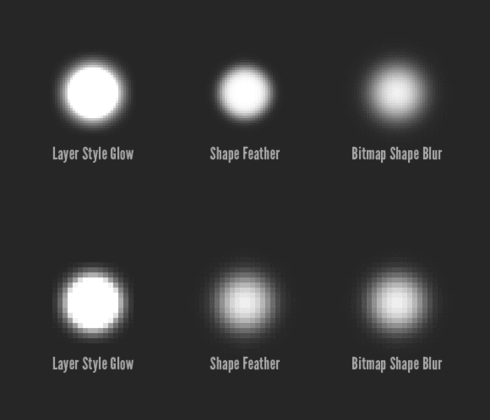
To demonstrate, I've created three elements: A Shape layer with a Glow Layer Style, a Shape layer with Mask Feathering applied, and a bitmap layer that's been blurred.

After scaling the document by 200%, the Layer Style scales, the bitmap layer scales (using bitmap scaling, of course), and the Shape with the Mask Feather has the same amount of feathering applied... it doesn't get scaled with the document.


I scale documents quite a bit, so manually editing all the Mask Feathering by hand isn't really an option. It's for this reason that I'm not using an otherwise awesome feature. I'd *love* Mask Feathering to scale with the document.

14 replies

Ivan Zajats
Inspiring
September 27, 2021

STILL no improvement?! I'm using CC2017, but anyway... the problem was mentioned almost 10 years ago!

Peter Villevoye
Community Expert
Community Expert
April 17, 2016
Well, I can even add another very serious consequence of this half-baked mask feather behavior: it also hinders using automated Export features. The feather value remains the same amount of pixels, so the effect is not visually scaled to the various output sizes...
Known Participant
December 30, 2013
It's pretty astonishing that this hasn't been fixed yet, or even as much as acknowledged... Adobe?
marcbjango
Known Participant
October 6, 2012
David Jensen's created some great scripts to help scale mask feathering:

Scale Mask Feather by 200%.jsx
Scale Mask Feather by 50%.jsx
Scale Mask Feather.jsx

They've been added to this project:
https://github.com/bjango/Bjango-Actions

While I hope Photoshop itself is changed for the better, these scripts will definitely help.
Franck Payen
Inspiring
October 4, 2012
Sounds like a "Just Do It it feels so simple but oh, ok, i see why you haven't made it yet" 🙂 (which is far less easy to shorten than JDI)
marcbjango
Known Participant
October 4, 2012
Yeah, the ultimate would be for every single property to scale with the document. I'd settle for just Mask Feathering.
marcbjango
Known Participant
October 4, 2012
Yeah. “This is great! I'll use it all the time!” closely followed by “Damn. I guess I still can't use this.”
Inspiring
October 4, 2012
I was pretty ecstatic when CS6 let me actually move feather-masked vector objects without re-manipulating the mask attributes, but I will have to agree it makes it fairly useless on most documents I intend to scale. Which is most of them.
Inspiring
October 4, 2012
This is actually @6698759. It's cached an outdated username. Grrr.
Inspiring
October 4, 2012
I would argue that this is an essential feature, and that it is a natural extension of the existing paradigm within Photoshop.

Because layer styles optionally scale with document resizing, one would expect all dynamic visual effects to scale in the same manner, especially those applied to vector masked layers. The entire raison d'être for vector masks is to provide a means to resize graphics without losing accuracy of the original shape. It is nonsensical that layer styles should scale but not the mask options.

Smart filters should also optionally scale along with the layer styles and vector mask options, for consistency. There are times when a feathered mask cannot achieve the desired effect that a smart blur can achieve.

At the most basic, all dynamic visual effects should optionally scale.