




Open for Voting
Photoshop: Layer Comps Enhancements Ideas
I a big fan of Layer Comps which was introduced in Photoshop CS.
Since then, features was added and I think they need to be supported in Layer Comps.
Here my ideas to enhance Layer Comps :
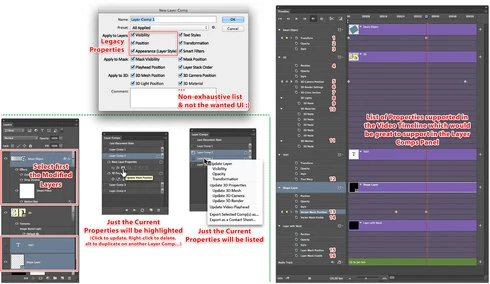
- Simplify the way to update specific Options of a Layer Comps (Visibility, Position and Style) like in the composer extension (http://www.jasonforal.com/composer/)
- Adding icônes on the Layer Comp line (perhaps like layer Fx in the Layers panel...) which allow user to quickly update the Properties he want.
- Right click on a multi-selection of Layer Comps, to update the wanted common Properties.
- In the Video Timeline, Photoshop support also by default Visibility, Position and Style, but it support also more properties (Text Warp, Mask Position,3D Camera Position...). So that would be great to also support these Properties in the Layer Comps panel.
- We could support more options, like Smart Filter, position of Timeline Playhead, the Layer Stack order, the Crop Area position and size...
- Perhaps also adding a thumbnail at left of the Layer Comp name like in the Layers panel to have a quick preview of the composition and an Alt+Click on it to have a larger Pop Up Preview (idea not illustrated in my mockup). That would help to quickly identify the right variante...
- Exporting a multi-selection of Layer Comps as external files (JPEG, PNG, PDF...) and as a Contact Sheet (options to choose the size, the header, the caption which could come from the Layer Comps Comments field).
Here a quick mockup (draft ideas) of some possible implementations of my ideas and the list of the Video Timeline Properties:
Is that make sense for you?
Any complementary ideas?
Since then, features was added and I think they need to be supported in Layer Comps.
Here my ideas to enhance Layer Comps :
- Simplify the way to update specific Options of a Layer Comps (Visibility, Position and Style) like in the composer extension (http://www.jasonforal.com/composer/)
- Adding icônes on the Layer Comp line (perhaps like layer Fx in the Layers panel...) which allow user to quickly update the Properties he want.
- Right click on a multi-selection of Layer Comps, to update the wanted common Properties.
- In the Video Timeline, Photoshop support also by default Visibility, Position and Style, but it support also more properties (Text Warp, Mask Position,3D Camera Position...). So that would be great to also support these Properties in the Layer Comps panel.
- We could support more options, like Smart Filter, position of Timeline Playhead, the Layer Stack order, the Crop Area position and size...
- Perhaps also adding a thumbnail at left of the Layer Comp name like in the Layers panel to have a quick preview of the composition and an Alt+Click on it to have a larger Pop Up Preview (idea not illustrated in my mockup). That would help to quickly identify the right variante...
- Exporting a multi-selection of Layer Comps as external files (JPEG, PNG, PDF...) and as a Contact Sheet (options to choose the size, the header, the caption which could come from the Layer Comps Comments field).
Here a quick mockup (draft ideas) of some possible implementations of my ideas and the list of the Video Timeline Properties:
Is that make sense for you?
Any complementary ideas?
 AdChoices