


Inspiring
January 28, 2013
Open for Voting

Photoshop: Preference to set default Document Size unit type in Image Size dialog in CS6

  • January 28, 2013
  • 10 replies
  • 1296 views
Getting sick of constantly changing the unit type from inches to centimetres in the Image Size dialog window. Every time I open Image Size dialog, it's reverted back to inches (if my rulers are set to pixels).
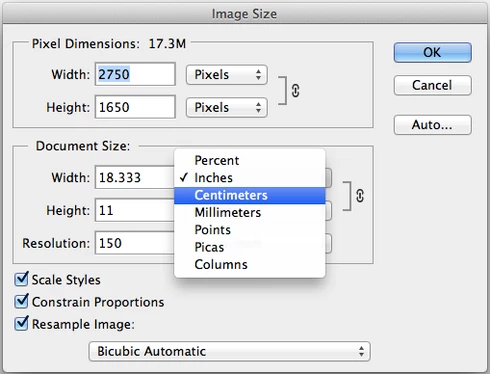


P.S. Also getting sick of photoshop.com and adobe.com not saving the cookie/session — I have to log in every time after I close a browser window or even a tab (happens in all browsers).

If you guys require proper web coders, just let me know — I'll recommend a couple dozen for you.

10 replies

Carson Jones
Known Participant
March 19, 2021

Why hasn't the Image Size panel been assigned an option to set the unit default.  I'd like it to be Pixels all of the time.  Currently it always resets to Inches.  Adjusting Ruler units in Preferences does nothing to help this situation.

Inspiring
November 6, 2018
When you open a new image, the default size is inches. Who works in inches and not pixels? Furthermore, there's no way to open a Photoshop "default" size image (or that option is somewhere not easily found).
Inspiring
June 7, 2018
2018 same problem
Participant
February 8, 2016
The rulers have been screwed up in the last 3 versions at least! I like mine in inches, but it keeps reverting to pixels no matter what I do. Adobe support has not been helpful at all. They keep saying an update will fix it, but I keep everything up-to-the-minute and this has been a persistent problem!!!
Inspiring
October 20, 2014
I have exactly the same problem as Chris.
Inspiring
June 8, 2014
I have this same problem -- I have set my ruler unit preferences to pixels, but whenever I create a new image file, the dimensions are shown in inches. I am running Photoshop CC version 14.1.2 x64 on a Windows 7 laptop.

Is there a fix for this?
Legend
January 28, 2013
Gotcha. Although, I'm not seeing the behavior where a previous version of Photoshop would remember the Document Size units per document.
Inspiring
January 28, 2013
Yes. As I said, it happens when Rulers are set to pixels. Whether in the Preferences or by right-clicking on the rulers.

Document Size units correspond to Ruler units. And because Document Size can't be in pixels, it reverts to inches.

Would be nice to have a separate preference for default Document Size unit type for such case. Also, previous versions of Photoshop remembered what you choose for Document Size unit type in Image Size dialog per working document.
Inspiring
January 28, 2013
Yes. As I said, it happens when Rulers are set to pixels. Whether in the Preferences or by right-clicking on the rulers.

Document Size units correspond to Ruler units. And because Document Size can't be in pixels, it reverts to inches.

Would be nice to have a separate preference for default Document Size unit type.
Legend
January 28, 2013
Have you tried setting Units to Centimeters in your Preferences for "Units and Rulers"?