



_scott__
Legend
November 28, 2011
Open for Voting

Photoshop: Remove unused layer styles

  • November 28, 2011
  • 26 replies
  • 3702 views
Feature Request....

Option to remove unused Layer Styles.
Control-click/Right-click the fx icon for a Layer and get...

| Copy Layer Style |
| Paste Layer Style |
| Clear Unused Styles | (NEW)
| Clear Layer Styles |
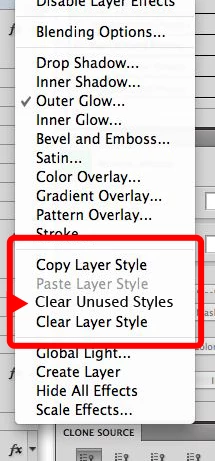


I spend so much time manually click-dragging empty layer style options to the trash.

Thanks!

26 replies

Participant
July 29, 2015
I receive this error when try to run the script.

Can someone help?

I understand nothing form scripts but this one was very useful for me. Unfortunately it stopped working with the latest version of Photoshop.

Inspiring
August 5, 2013


After working on a document I end up with hundreds of hidden layer effects that were experiments. Just like there's an option to delete all hidden layers, there should be an option to delete all hidden layer effects.
Inspiring
July 13, 2012
My suggestion would be to have a global ‘Clear Layer Styles’ option beneath the existing ’Delete Hidden Layers’ entry in the Layers palette fly out menu.

In fact there's a whole host of clean up options that would be very useful: Delete Empty Groups, Delete Empty Layer Masks, Delete Empty Vector Masks, Delete Empty Layers, Delete hidden maks, etc.

On top of this an overall ‘Clean up file’ option could execute all of these commands, reducing a file to its current viewing state.
Participant
May 6, 2012
Hi to all of you :)

just coming back from a weekend away - so I haven't been able to test the latest changes on the script. Will do it tomorrow.

Paul I am sure it'll work - thanks a lot for your help there!! I will also have a look the 2nd script you've mentioned.

Edit: Btw if someone's keen to install the panel mentioned above, give me a shout.
_scott__
_scott__Author
Legend
May 4, 2012
Yes. I made the change before trying it. Works wonderfully, Paul. Thanks again.
Paul Riggott
Inspiring
May 4, 2012
I hope you have made the above change Scott and glad it works for you.

Simon if you do a lot with Layercomps I have another script that removes layers that are not used in any layercomp, it just cleans the psd. It's here if it's any use to you...
http://www.scriptsrus.talktalk.net/Cl...
Maybe you could add it to your configurator panel.
_scott__
_scott__Author
Legend
May 4, 2012
Paul,

This is excellent. Exactly what I needed. Thank you!
Paul Riggott
Inspiring
May 4, 2012
Hi Simon, sorry about that, change the line in the makeActiveByIndex( idx ) function...

From :-
desc.putBoolean( charIDToTypeID( "MkVs" ), true );

To :-
desc.putBoolean( charIDToTypeID( "MkVs" ), false );

That should fix the problem.
Participant
May 4, 2012
I have just tried the script Paul has posted earlier. That works well and is all I need.
The only thing which would top it would be an integrated function/button in the layer menu (right click on a layer) similar to what Scott has suggested.

I guess I will build a panel using the Configurator now and integrate the script myself.

Edit: I have built a Configurator panel now which links to the .jsx script in my "../Presets/Scripts" folder (works fine). Can anyone tell me how I could use the script from Paul in Configurator without linking to an external file. Whenever I copy this source code into a script "button" nothing happens... Thanks a ton!

Edit II: After a bit of testing I come to following result: The script works perfect, with one little "imperfection". As far as I understand, it goes through all the layers (no matter whether the layers are hidden or not) checks all the different layer styles and if some of them are unticked, it removes them. But what it also does is it switches hidden layers on to check them and leaves them visible. Which is a problem if you work with layer comps - some of my layers are hidden for a reason and if the script suddenly switches them back on it creates a situation which takes lots of time to fix again. @ Paul - can the script be modified so that this can be avoided (leave the layer visibilty as it was before?)
I would do it myself but I don't understand how to script 😞
_scott__
_scott__Author
Legend
May 3, 2012
By the way.. wonderful job on CS6.