


Typhonart
Inspiring
Dec 22, 2025 3:55 PM UTC
Open for Voting

References outside canvas

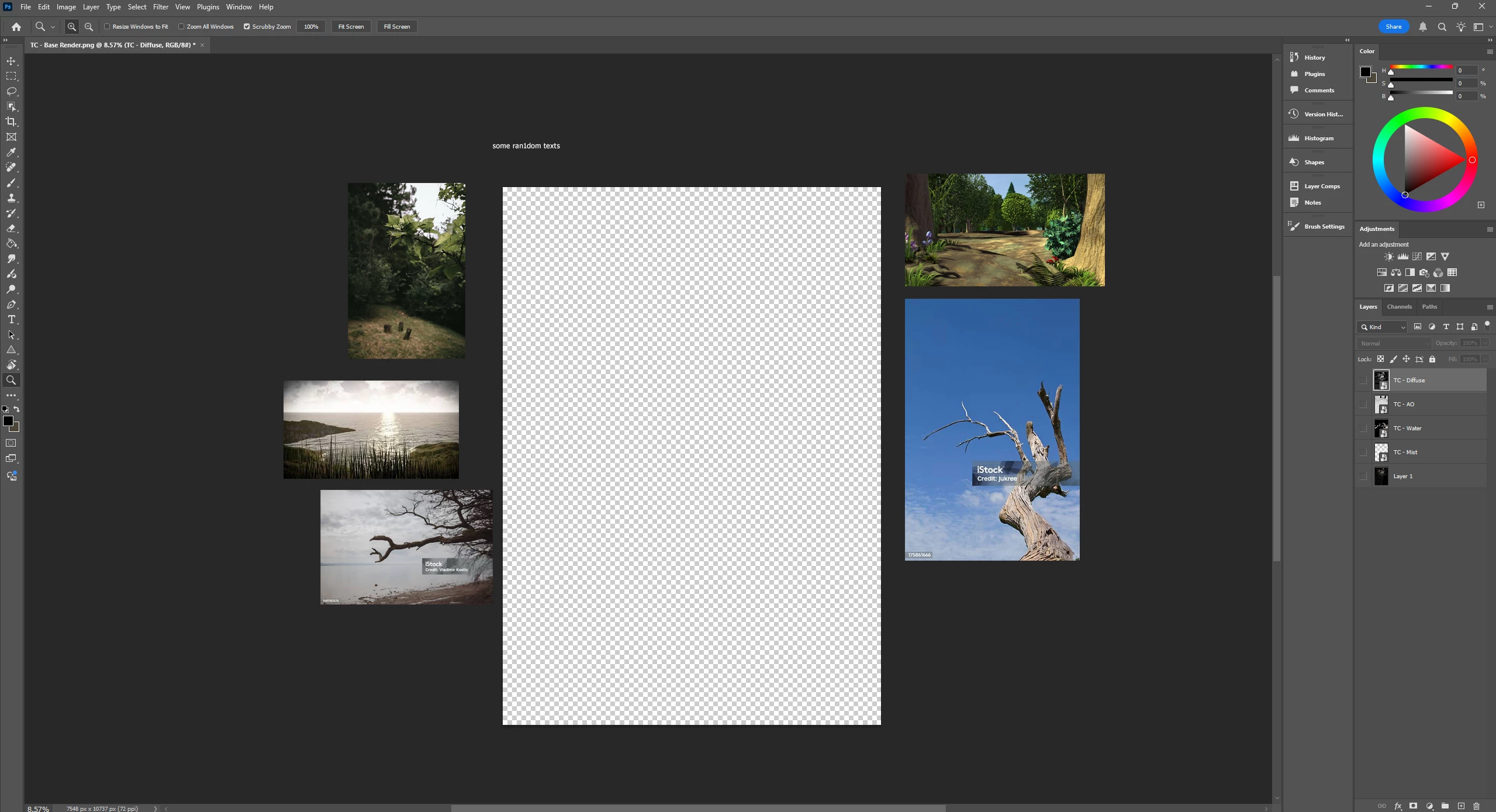
Ayooo, would it be possible to implement something in the lines of PureRef, but working outside the main canvas, without utilizing any artboards? Just press a button to enter the background area, copy and paste images and text to it, lock it and keep it there? Seems like a very simple thing to implement, and would be a huge quality of life improvement for anyone dealing with digital painting, ie entire design in gaming/movie industry in the world :d

Just to visualise the idea:
871154i87785651AA95D919.png


6 replies

Pete.Green
Adobe Employee
Oct 20, 2026 7:50 PM UTC

​@Typhonart Curious if you’ve tried this with an Artboard document? With an Artboard document, you can pull objects, layers, type outside of the canvas. 


Here’s an example new artboard using the images you’ve included in your screenshot outside the canvas. 


Does this solve the need you're describing?

If not, what would make it better for you?


Regards,

Pete

Translate
Typhonart
TyphonartAuthor
Inspiring
Oct 20, 2026 8:07 PM UTC

Yeah tried it several times, the issue is it either clips images, or requires me to resize everything to move references freely. Was thinking something working more like Pure Ref, but without the need of external programs. Also artboards mess up a lot of screen recording programs that focus purely on the canvas only :d

Probably some option to tick the availability of the refs in the bg, lock for itm and ability to zoom into them without zooming into the canvas. Kinda like a “separate” individual background canvas if it makes sense. 

But if it’s not in plans, I guess artboards have to suffice :d

Translate
jane-e
Community Expert
Community Expert
Jan 1, 2026 1:36 PM UTC

Hi @Stephen Marsh 


I agree that a pasteboard will probably never make its way into Photoshop, but the concept works better than the video I saw on the PureRef page.


I remember the early days of Photoshop. If you dragged a layer with an object slightly off the canvas, you could immediately retrieve it. But if you did other things, then the hidden part of the image would be chopped off and gone. That was in the days of one undo sometimes.


We've come a long way!


Jane


Translate
Stephen Marsh
Community Expert
Community Expert
Jan 1, 2026 12:51 PM UTC
quote

My preference would be for a Pasteboard, similar to InDesign and Illustrator.


By @jane-e 


Agreed Jane, as you know, the issue is that Photoshop is a pixel and canvas based program, not vector or page based. The challenge, just as with artboards, is that there is only a single canvas.


One could create an action or script that would create a group that would contain all existing groups/layers (not artboards) with a group layer mask for the current canvas size, which then creates an enlarged canvas with a new group for the "pasteboard" area.


Translate
Stephen Marsh
Community Expert
Community Expert
Jan 1, 2026 12:45 PM UTC
quote

Seems like a very simple thing to implement


By @Typhonart


I doubt that, especially if one is concerned with backward compatibility with formats that can maintain layers.

Translate
jane-e
Community Expert
Community Expert
Jan 1, 2026 1:16 AM UTC

@Typhonart 


Have you used PureRef? The video at their site looks like it stores images outside of the Photoshop application and does not hide parts of an image that extend inside Photoshop but outside of the canvas.


My preference would be for a Pasteboard, similar to InDesign and Illustrator.


Jane


Translate