



graphics_4075
Inspiring
July 15, 2026
Open for Voting

Remove Generative AI from Camera Raw

  • July 15, 2026
  • 2 replies
  • 50 views

I have tried to just suck it up that Photoshop is flooded with AI features now, but the addition of Generative AI features in Camera Raw, and more specifically that they have taken a hierarchical priority in the panels,  is infuriating and borderline insulting from a consumer standpoint. Adobe is diluting the individual purposes of each of their apps by pushing duplicate AI features across every interface they can find. 


ACR is for editing RAW photos. Photoshop is for manipulating them. Why can you not keep it this way? These features are also in Photoshop, which I often use after editing in ACR. They are literally being shoved in our faces in every corner of every Adobe application.


I use these features in Photoshop. I do not want them in ACR, because they are used for completely different things. I now have to alter my workflow and take extra time to AVOID using them because they are intentionally put in the way. 


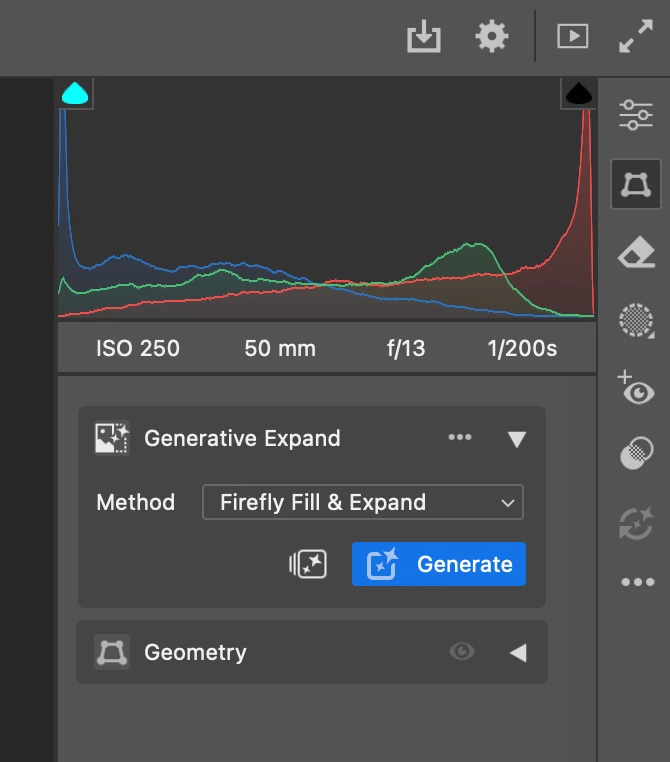
If you want to crop your photo you now have to click twice instead of once. This is literally the geometry panel, yet generative expand has been bumped to the top. Pretty easy to accidentally use credits through muscle memory if you ask me.


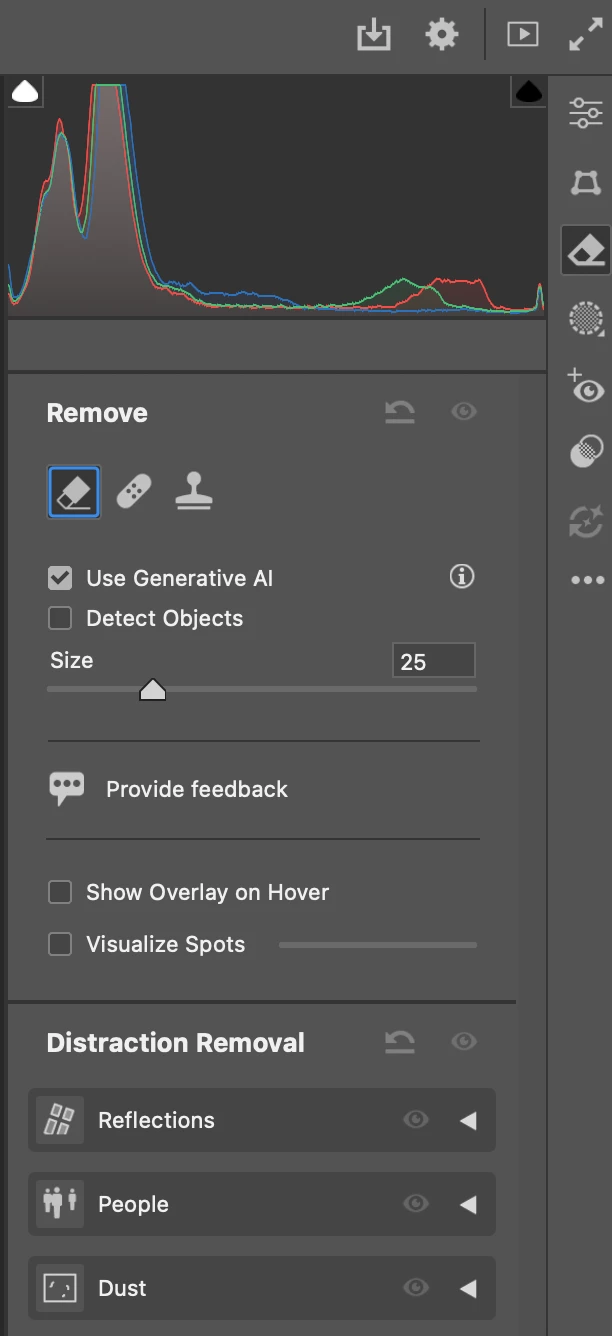
If you want to use the remove tool (a feature I have only ever used in Photoshop, not ACR...), generative AI is on by default.


    2 replies

    D Fosse
    Community Expert
    Community Expert
    July 21, 2026

    This feature request (which I’ve voted for) should be merged into the main feature request here, where it should get more traction:

    https://community.adobe.com/feature-requests-713/adobe-should-make-opt-out-to-all-of-gen-ai-feature-for-users-655758


    That request now has 171 votes, we need more! I would urge anyone who rejects AI to add their vote here. We probably have to live with it being there; all we ask is a simple way to disable it with one master switch. And that includes ACR.

    M. Ufuk Korkusuz
    Participating Frequently
    July 18, 2026

    I don’t think the problem is that these features exist. A lot of people will probably find them useful. The problem is that Camera Raw has always had a very workflow-oriented interface, and moving long-established tools down the panel hierarchy changes that workflow for existing users.

    Instead of making AI features more prominent for everyone, I’d rather see Adobe make the interface more flexible. Let users decide which panels appear first, allow frequently used panels to be pinned, or even offer a “Classic” layout alongside the current one. That way, people who rely on Generative Expand can access it quickly, while photographers who primarily use Camera Raw for RAW development don’t have to relearn years of muscle memory. It feels like a better balance than forcing a single layout on every type of user.

    Typography • Type Design • Illustrator Scripting • Open Source
    graphics_4075
    Inspiring
    July 21, 2026

    I use more definitive language like “remove” rather than “change” because unfortunately there is a reoccurring theme among updates throughout the entire CC library that show Adobe is prioritizing AI and its prominence rather than flexibility and choice among users.


    I’ve seen many AI tools introduced lately that do not work as intended, yet rather than roll them back or fix them with urgency, they introduce more tools. I’ve seen enough to believe that there is obviously a more commanding push internally to increase AI tools than there is to satisfy customers through QoL & feature updates; if the understanding is that those two things are related, Adobe could not be more wrong. 


    All that being said, I don’t see much likelihood of Adobe listening to it’s AI-resistant user base so I agree that this is less of “give me what I want” and more of a “please give me the capability to make a choice.” 

    Cheers