

Participating Frequently
January 16, 2023
Open for Voting

Remove minimum size restriction for resizing Panels.

  • January 16, 2023
  • 5 replies
  • 378 views

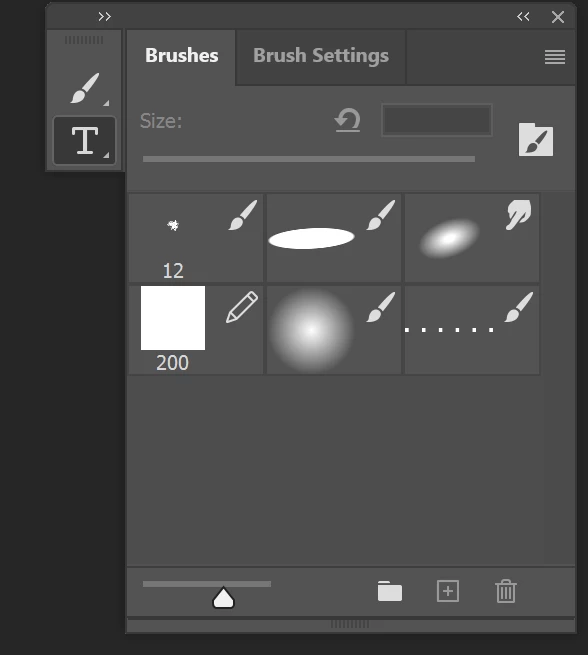
For productivity I limit myself to one monitor and would like to resize my Brushes panel smaller than it will let me. Here's an example of the dead space I am left with:

5 replies

Participating Frequently
January 17, 2023

Hey, I'm glad you learned some basic hotkeys and feel comfortable being condescending in public... but since you have no understanding of my professional workflow, I'd appreciate it if you took time to understand why UI customization is important for some people even if you don't personally need those options.

Participating Frequently
January 17, 2023

Thank you, but I understand hotkeys, I have used Photoshop for over 10 years. I am asking for the option to resize windows smaller, not an adjustment to my workflow.

jane-e
Community Expert
Community Expert
January 17, 2023

@charlesm49296164 


Here's one thing you can try:

  • Press the Tab key to hide the panels that are docked. (Tab will bring them back.)
  • Hover over the right edge of the application with your mouse until the panels reappear. This can be tricky in the beginning while you are learning the sweet spot, but is fast once you get used to it.
  • Click to choose the brush you want and move your mouse back into the document area. The panels are hidden again and you have gained all that space on your small monitor.
    https://helpx.adobe.com/photoshop/using/workspace-basics.html


Jane


ElizabethOOOG
Known Participant
January 16, 2023

Use the brackets shortcut to resize your brush. There's others you can find. You just have to experiment. You don't have to keep the pallet open.

Okay
ElizabethOOOG
Known Participant
January 16, 2023

Close it. B. Learn how to navigate palettes. Right click works. 

Okay