


Known Participant
September 18, 2025
Open for Voting

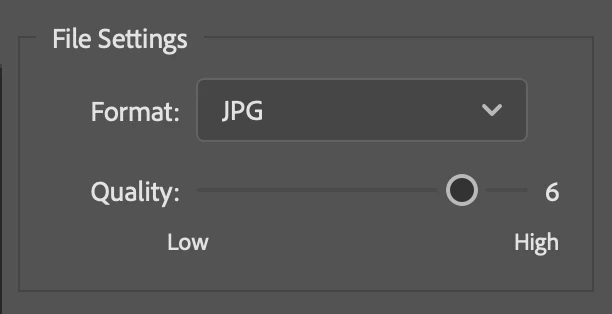
REQ: Option to set Export As… JPG quality default to something other than 6

  • September 18, 2025
  • 10 replies
  • 282 views

Issue: When using Export As… the quality is always set to 6.

For my exports I always need quality 7 because other apps are going to compress it more optimally.

An option to set a new default value would be appreciated.

I know there is a Quick Export quality setting in Preferences but I need more control, just not needing to slide the slider to 7 everytime. 

Thanks for considering.
 

10 replies

D Fosse
Community Expert
Community Expert
October 14, 2025

Two things, actually:

  • Not actionable, so no way to set a standard pixel size without using Image Size first
  • No way to embed color profile. You export untagged


These two things render Quick Export totally useless to me. Actually, either one of those would.


Thankfully, Save For Web is still there and my SFW actions still work.

Known Participant
October 14, 2025

@Stephen Marsh Setting custom sizes on a picture by picture basis for example. With quick export you export the size of the image as it is. With the material that I receive it's often easy to big. 

Stephen Marsh
Community Expert
Community Expert
October 14, 2025

@jan_peeters 


What are you doing in the Export As window that can't be covered by the Quick Export defaults?

Participant
October 14, 2025

and +


Known Participant
October 14, 2025

@??????_?????????1988 Thanks for your help attempt, appreciated. But this is only for Quick Export and the legacy export checkbox is not available anymore as a setting on macOS latest PhSh versions. I would lov e to have this for the regular export function.

Participant
October 14, 2025

Edit-preferences-export

Known Participant
September 18, 2025

Thanks for the info. But bizar.

Ged_Traynor
Community Expert
Community Expert
September 18, 2025

@jan_peeters "Why can you not edit a message here, like on most decent forums?" you need to have achieved a certain rank before you can edit your own post

https://community.adobe.com/t5/using-the-community-discussions/how-to-edit-posts/m-p/12771413#M58079

Known Participant
September 18, 2025

Sorry for the typo's. Why can you not edit a message here, like on most decent forums?

Known Participant
September 18, 2025

Thanks for the suggestion. The thing is the other automated compression tool compresses the format how in it's original file format. Since png always stays bigger with jpg's this is not a good solution.


D Fosse
Community Expert
Community Expert
September 18, 2025
quote

because other apps are going to compress it more optimally.

By @jan_peeters


In that case I would consider exporting to a non-destructive format like PNG, so you're starting with the full image data.


There is no such thing as maximum quality with jpeg. The jpeg algorithm is always destructive, even at the highest setting.


I know, not answering your question (I don't know if you can set a default here).